How to Create SIEM Correlation Rules
In modern cybersecurity frameworks, SIEM (Security Information and Event Management) systems serve an essential function. They gather log and event data from many sources across an organization’s network, enabling real-time analysis and long-term retention of this important information to maintain security standards. Correlation rules are a central element of SIEM effectiveness, built to identify particular patterns or anomalies that could point to a security problem.
Understanding SIEM Correlation Rules
SIEM correlation rules are organized criteria or logic sets that assist with detecting, alerting on, and even mitigating potential security threats in real time. Through the definition of particular conditions or event sequences, these rules let the SIEM separate background noise and focus attention on real issues that need action.
A correlation rule’s structure generally contains fields like name, severity, description, solution, category, tactic, reference, frequency, and operators, among others. Such fields assist in defining the rule, setting how it works, and classifying the alert to improve incident management.
Crafting Correlation Rules
Unified Security Stack is a platform that lets you create and manage SIEM correlation rules without difficulty. Let’s examine the process with Unified Security Stack as an example:
- Identify the Threat ScenarioBefore you begin creating a rule, make sure you clearly understand the threat scenario you intend to address. That means recognizing indicators of compromise (IoC) and the log data that would be needed to detect such activity.
- Access Rule Configuration Section:
- Go to the correlation rules configuration area in Unified Security Stack.
- Select Add Rule to start creating a new rule.
- Fill in the Basic Information:
- Name: Choose a title that captures what the rule aims to achieve.
- Severity: Select the severity level (Low, Medium, High) according to the possible impact.
- Description: Give a brief description that outlines the rule.
- (And so forth, based on the field references provided)
- Define the Logic:
- Use the operators (==, ::, !=, <>, and others) to build the rule’s logic.
- Define the fields and values to be examined, along with the conditions that should cause an alert.
- Configure the Cache or Search Parameters:
- Decide whether cache or search should be used, depending on the rule’s analysis period and complexity.
- Fill in the necessary sub-fields like
minCount,timeLapse, andsaveDefine how the rule should function and what information should be kept for additional analysis or the next cycle iteration.
- Save and Test the Rule:
- Save the rule, then run tests to confirm it works as intended, adjusting it as needed for optimization.
- Documentation and Reference:
- Document the rule and the threat scenario it targets, and include references for more information.
- Linking to established security frameworks or advisories (for example, MITRE ATT&CK) is recommended.
Examples
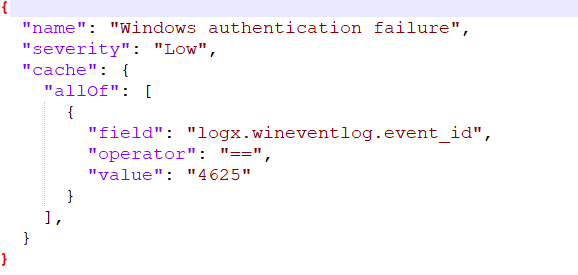
The following are examples of SIEM correlation rules built in Unified Security Stack to monitor Windows authentication failures, which may indicate brute force attacks. These examples show how both cache and search methods are used in rule configuration, demonstrating Unified Security Stack’s flexibility and power in creating effective SIEM correlation rules.
- Rule Using Cache Method:
- Rule Using Search Method:
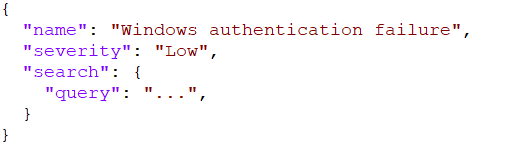
These examples clarify how SIEM correlation rules are structured and run in Unified Security Stack, showing the process of customizing rules for specific threat scenarios.
In conclusion, gaining mastery of SIEM correlation rules is essential for improving an organization’s security posture. With platforms such as Unified Security Stack, security professionals can build strong rules that are vital for real-time threat detection and response, thereby strengthening the organization’s defenses against many cyber threats.
Next Steps
For a complete guide, please consult the Unified Security Stack documentation.