Best Log Management Tools for 2026 Security
Enterprises are already spending an average of nearly US$2.5 million annually on logging solutions, and those tools consume 45% of observability budgets while teams juggle an average of seven different tools to manage logs and telemetry (enterprise logging spend and tool sprawl). That's the reason log management tools have shifted from back-office tools into security architecture choices. When a pipeline is costly, fragmented, or thin on evidence, investigations bog down and audits become harder, not easier.
The market mirrors that shift. More than 122,903 companies now use log management tools, with Datadog estimated at 89,359 customers and a 72.71% share of the category, followed by Splunk at 9,947 customers and 8.09% (6sense log management category data). Put another way, this is no longer a narrow admin niche; it forms part of the core control plane for modern security and compliance.
Table of Contents
- Why Log Management Has Become a Strategic Security Priority
- How a Log Management Pipeline Actually Works
- Choosing the Right Architecture for Your Environment
- Meeting Compliance Requirements with Log Management
- Understanding the True Cost of Log Management at Scale
- Deployment Best Practices and Common Pitfalls to Avoid
- How Unified Platforms Reduce Complexity and Accelerate Response
Why Log Management Has Become a Strategic Security Priority
Log growth is pushing security teams toward a direct trade-off. Retain more evidence for investigations and audits, or reduce retention and accept gaps you may not be able to defend later. Dynatrace reports that log and telemetry volume increased 93% on average over the previous 12 months, and 1 in 5 organizations saw growth above 150% (Dynatrace 2026 log management research). At that rate, storing logs no longer reads as a routine IT cost and starts to affect security architecture.
Security teams are paying for visibility twice
Initially, they pay to ingest and index data. Then they pay again in analyst hours when the platform cannot link activity across systems. New Relic's 2022 State of Logs report found a 35% year-over-year increase in logging data, while 56% of customers used infrastructure monitoring together with logs and about 14% used logs with APM monitoring (New Relic State of Logs summary in Strategic Market Research context). This pattern shows why log tools now belong within observability rather than next to it.
Market forecasts indicate the same trend. A major projection puts global log management at USD 2.9 billion in 2024 and USD 5.85 billion by 2030, at a 12.4% CAGR, while another puts the market at USD 4.35 billion in 2026 and USD 8.99 billion by 2031 with a 15.64% CAGR (market forecast summary, Mordor Intelligence market report). These figures matter because they indicate buyers see logs as a long-term control surface, not a disposable utility.
Practical rule: if your team cannot say which log data it stores, which it drops, and how far back it can query, the platform is not genuinely under control.
Adoption is broad, but operational maturity still varies
6sense shows the United States accounts for 80,938 customers, or 74.23% of observed usage, while the United Kingdom has 5,676 customers and Canada 5,286 (6sense log management category data). This concentration mirrors what security architects encounter in practice. Established enterprise markets treat log management as ordinary operating discipline, particularly in software-heavy industries.
Adoption is not the difficult part. The difficulty lies in building a pipeline that keeps pace with cloud services, endpoints, containers, and audit requirements without turning into a cost drain. If you want a broader view of how architectural decisions affect that balance, Ryware's guide to scalable observability strategies is helpful because it presents the same scaling challenge from an infrastructure point of view.
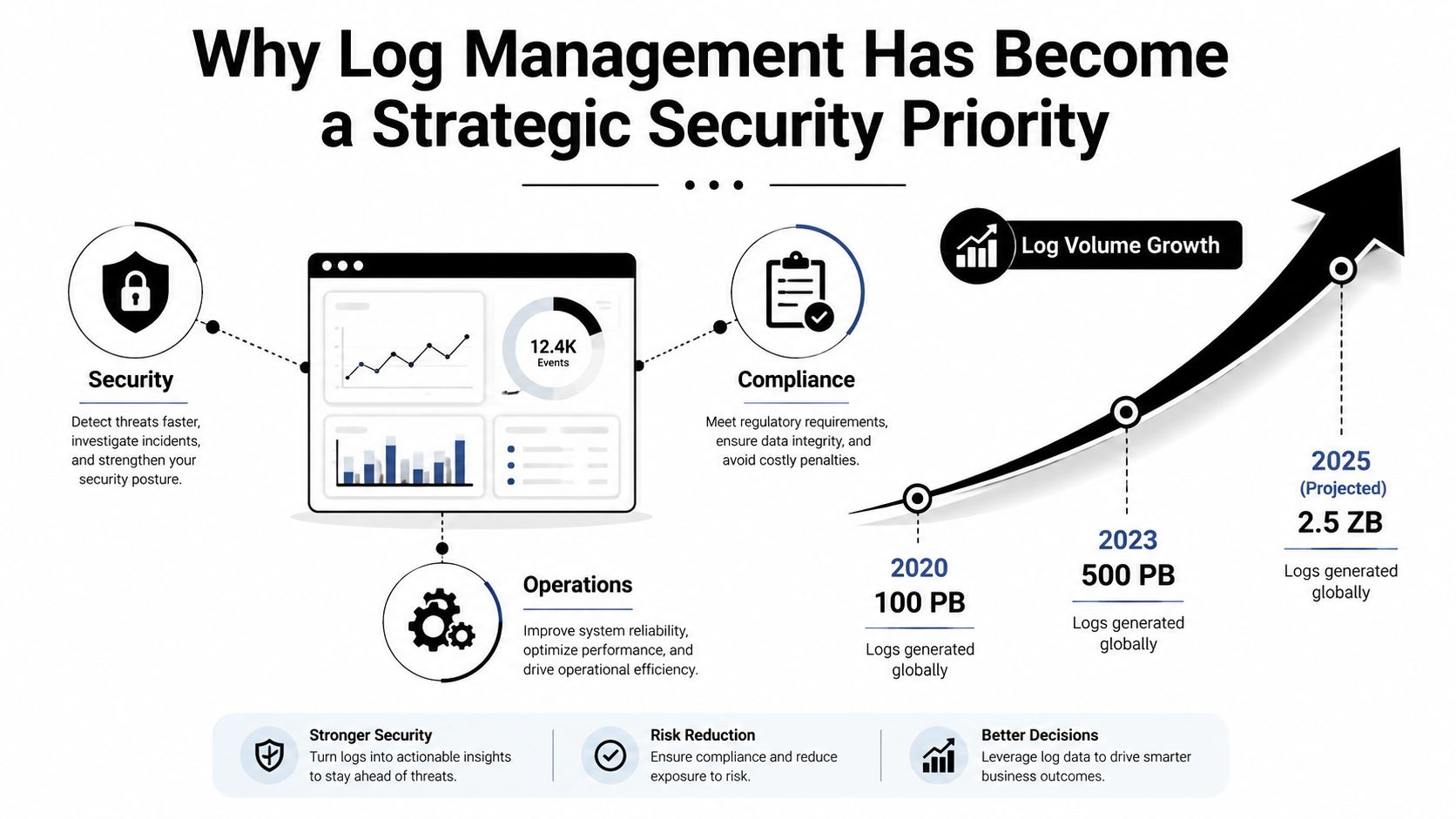
A decision about tooling today can influence mean time to respond, audit quality, and retention costs for years. In regulated settings, the real question is whether the architecture can maintain evidence chains, limit storage growth, and prevent investigators from pursuing missing context when an audit or incident occurs.
How a Log Management Pipeline Actually Works
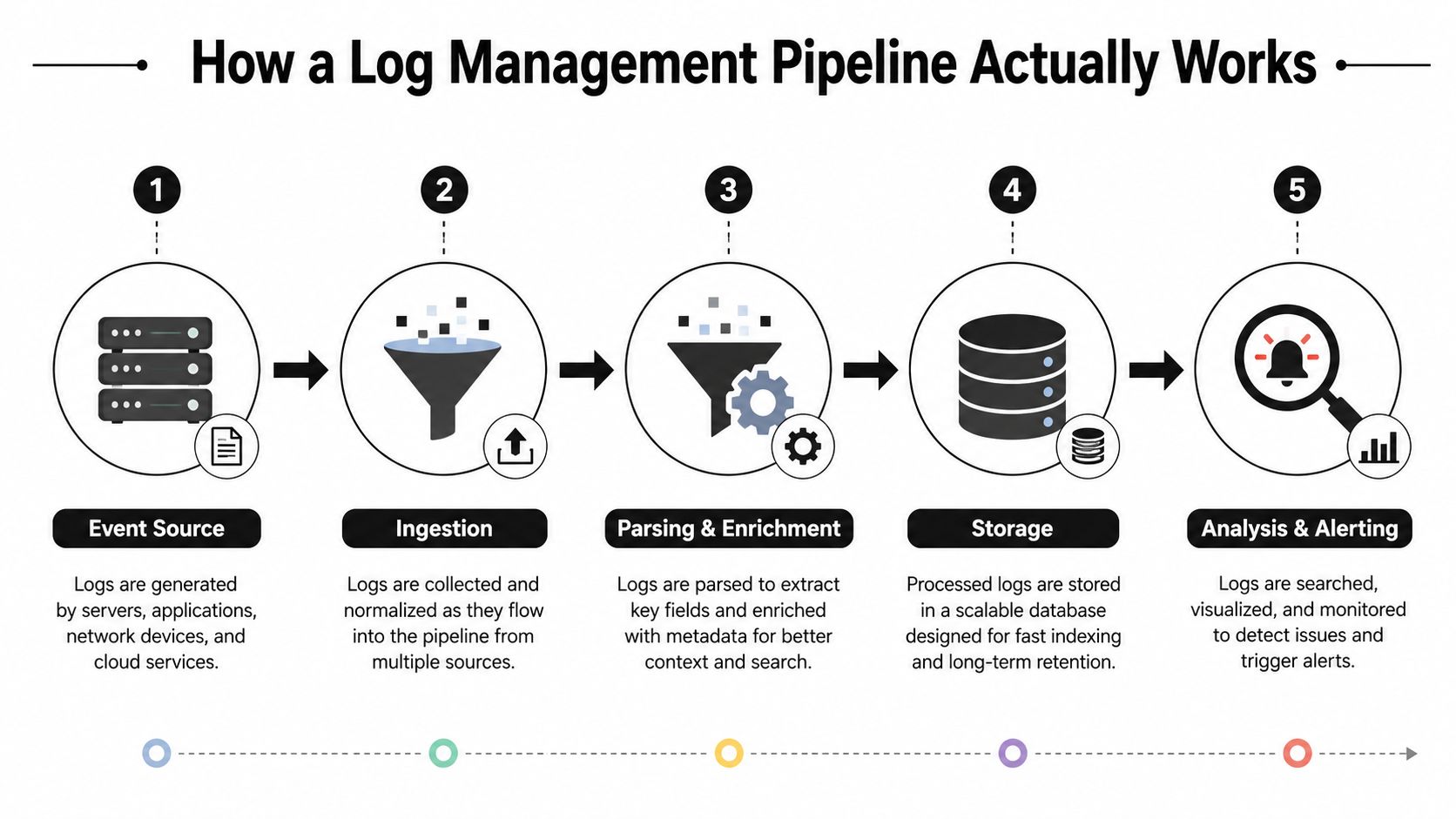
A log pipeline has a single purpose: convert raw event noise into a searchable record that an analyst can rely on. That seems straightforward until you attempt it across syslog, agents, APIs, containers, and cloud services, each producing different formats and field names (Exabeam log management overview). The architecture matters because any weak point eventually appears as a missed alert or an investigation that takes too long.
From raw event to usable field
Consider a failed login attempt. It may come in as syslog from a server, through an agent on an endpoint, or via API from a cloud service. The first task is ingestion, the second is parsing, and the third is normalization, which essentially translates different dialects into a shared language so the rest of the platform can compare them with confidence.
That normalization phase is simple to underestimate. If one system calls the user field account, another uses principal, and a third uses nested JSON, your search queries and correlation rules gradually drift. A mature pipeline cuts down that schema drift before data is indexed, so investigations do not rely on tribal knowledge.
Why indexing and correlation are not the same thing
Indexing makes the event quickly searchable. Correlation asks whether that event matters in context, perhaps the same username failed from three geographies, or the failure coincides with an unusual process launch. Modern evaluations focus on whether a platform can support full-text and structured search across real retention windows and still correlate logs with metrics or traces without forcing the analyst to switch tools (Middleware log management tools evaluation).
Practical rule: if your team must move between dashboards to link a log event to a trace or metric, the pipeline is making the investigation more difficult than necessary.
A practical MSP-oriented reference for this part of the stack is GoSafe's guide to data logging for MSPs, which is valuable, since managed providers encounter onboarding and source diversity challenges sooner than most internal teams do. If you're evaluating network telemetry within the same workflow, Unified Security Stack's guide to VPC flow logs serves as a relevant companion because flow data often ends up in the same search path as security logs.
A strong pipeline does more than hold additional data. It shortens the interval from event to decision, which is the objective of the entire effort.
Choosing the Right Architecture for Your Environment
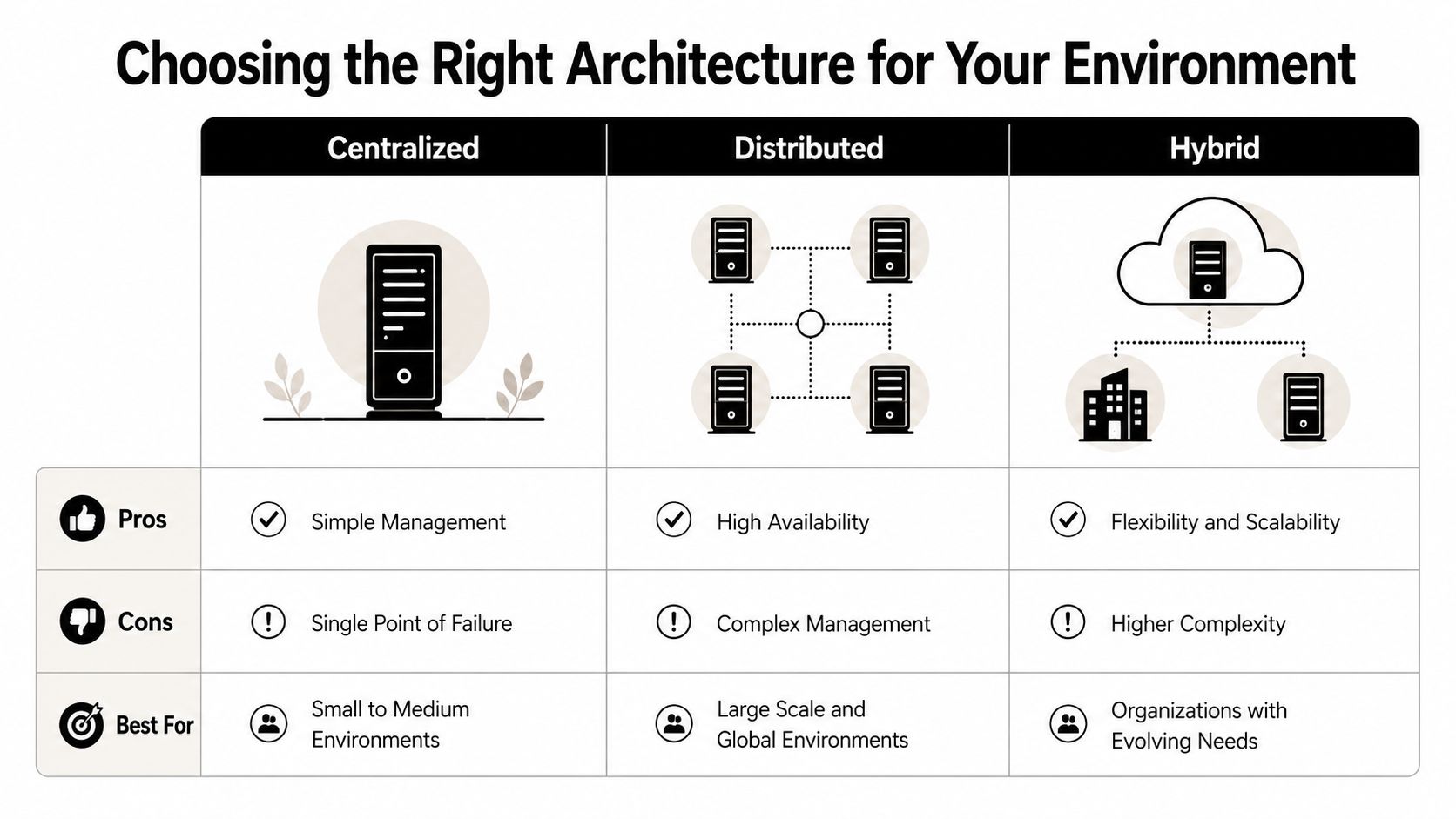
A log architecture may appear neat in a demo yet break down in production. Retention strain, cross-cloud routing, and compliance limits quickly reveal its weaknesses. Centralized, distributed, and hybrid models each address a distinct operational need, and the best option hinges on where your systems operate, how much data you keep, and how strictly you must govern the route evidence follows through the pipeline.
Centralized works until the environment stops being simple
A centralized stack provides a single search surface, a single set of retention policies, and a single administrative model. This suits smaller environments, or teams that primarily work in one cloud. It also simplifies audit review, since investigators need not pursue records across multiple stores.
The drawback emerges as ingestion increases. Storage, indexing, and search begin contending for the same resources, and scaling the platform can grow costly. In regulated settings, a centralized design may also concentrate too much evidence in one location, which creates access control worries when the role model is too broad.
Distributed helps with volume, but coordination gets harder
Distributed architectures move collection, and at times indexing, nearer to the source. This is more effective when teams span several regions, require data residency controls, or produce heavy telemetry from cloud workloads and infrastructure layers. It also lessens the load on any one search plane.
The expense is coordination. Additional collectors, forwarding paths, and local configurations increase the likelihood that a parsing rule, certificate, or forwarder will fall out of sync. Retention also grows harder to manage, since local storage decisions can produce inconsistent evidence chains unless policy and review workflows remain rigorous. For teams weighing deployment models, the centralized log management pattern remains a helpful reference point, as it clarifies the trade-offs involving access, storage, and control when viewed against one operating model.
Hybrid is typically the most effective enterprise answer
Hybrid provides a centralized view while retaining certain data locally for performance, residency, or security purposes. That is the pattern I have observed working best in regulated healthcare, finance, and MSP environments, since it can take in varied source types without requiring every team to adopt the same storage model. It also allows high-value evidence to remain near the systems that create it while still contributing to a shared analytics layer.
The caveat is discipline. When correlation rules, retention policies, and role boundaries are misaligned, hybrid turns into two distinct issues rather than one unified system. Here, the framework from Kagool for SAP is a helpful reminder, because compliance architectures break down when evidence handling and control ownership are divided across too many layers.
Practical rule: select the architecture that keeps search and retention cost-effective at your projected log volume, not the one that appears neatest in a diagram.
One architecture seldom remains optimal as the environment expands. Volume shifts, audit scope widens, and retention costs climb faster than teams anticipate. This is why regulated deployments continue to favor hybrid patterns, particularly when they must retain evidence without making each search and review costly to run.
Meeting Compliance Requirements with Log Management
Compliance teams do not audit logs in the abstract. They audit evidence: who accessed what, when it was reviewed, what decision was made, and whether the record is intact enough to trust. That is why the strongest log management setups combine event capture with workflow evidence, not merely a search box.
Matching log controls to framework expectations
A practical compliance stack usually starts with retention, access auditing, integrity, and review evidence. HIPAA, PCI DSS, SOC 2, ISO 27001, CMMC, GDPR, and GLBA each emphasize those themes in their own way, even where language varies. The tool must retain the log, safeguard who may view it, and ensure review actions are traceable.
| Framework | Retention Requirement | Key Log Controls | Audit Evidence Needed |
|---|---|---|---|
| HIPAA | Keep records long enough to support investigation and review | Access logging, integrity controls, incident traceability | Who reviewed the event, what action was taken, when it closed |
| PCI DSS | Preserve evidence for cardholder-data environment oversight | Authentication logs, admin activity, change tracking | Investigation trail and closure record |
| SOC 2 | Maintain evidence for security and operational controls | Access logs, alert history, review records | Reviewer identity and decision history |
| ISO 27001 | Support control verification and incident handling | Audit trails, retention policies, tamper resistance | Control evidence and remediation proof |
| CMMC | Show security process discipline and response tracking | Event logging, access auditing, workflow records | Chain of review and corrective action |
| GDPR | Support accountability and breach handling | Access records, incident evidence, retention governance | Decision trail and closure evidence |
| GLBA | Support safeguarding and review processes | Sensitive-access logging, monitoring, escalation records | Proof of monitoring and remediation |
The shortfall most tool roundups overlook is that logs by themselves do not demonstrate compliance. Process Street specifically points out that regulated teams also require evidence of who reviewed an event, what decision was reached, what corrective action was approved, and when the issue was closed (Process Street log management guidance). That is the element auditors focus on after they get beyond raw event data.
Workflow matters as much as search
A tool that indexes the event yet cannot track the investigation is only partially useful in regulated environments. That is why modern platforms more often combine log analysis with incident workflows, and why compliance mapping matters when you're comparing options. Kagool's framework from Kagool for SAP serves as a helpful reference point here, since it treats security and compliance as an operating model rather than a spreadsheet exercise.
If the platform cannot show who examined the log, what they determined, and whether the action was approved, you're still gathering evidence by hand. That produces the same difficulty with every audit cycle.
Understanding the True Cost of Log Management at Scale
Buying log tools by feature checklist rarely works. What really determines whether a platform makes it past its second budget review is cost governance, particularly when retention periods stretch out and ingestion becomes messy. The initial invoice is seldom the decisive one. Storage expansion, index swelling, query demand, archive recovery, and analyst hours usually influence the budget more than the advertised subscription price.
OpenObserve notes that under 10 GB/day nearly any tool can work, while above 100 GB/day the main question becomes cost per GB (OpenObserve log management tools guidance). This shift is significant because rising volume alters what buyers should prioritize. A platform that seems inexpensive in a limited pilot may turn costly when search, retention, and export needs face real production conditions.
The hidden bill is retention, not just ingestion
A system may appear inexpensive until you retain actual logs for actual durations. Storage, indexing, rehydration, archive retrieval, and analyst effort accumulate in different ways based on whether the tool is SaaS, self-hosted, or hybrid. Groups that compare only ingestion pricing typically overlook the bigger cost of keeping evidence searchable when an incident or audit arrives months afterward.
Retention also shapes compliance gaps. When the platform cannot keep enough history to rebuild an investigation trail, the security team must assemble evidence from backups, ticketing systems, and manual exports. That effort is slow, and it undermines the record auditors anticipate.
Cost model should follow use case
SaaS usually fits teams that prioritize speed and prefer not to manage storage or index infrastructure. Self-hosted is a better choice when data residency or control outweighs convenience. Hybrid frequently succeeds as a middle path, particularly when regulated logs require longer retention than operational logs.
Cribl's guidance is useful because it pushes buyers to evaluate security/compliance, deployment environment, cost model, scalability, and integration requirements together, rather than treating the cheapest feature list as the entire decision. That is the proper lens for three- to five-year planning, since a flawed architecture typically breaks under retention pressure before it breaks on raw ingestion.
Practical rule: if your team is removing large volumes of logs to remain under budget, the architecture is already failing the investigation and compliance use cases.
Aggregation strategy also alters the economics. A log aggregation tools A design that filters, routes, and normalizes data prior to long-term storage can keep searchable evidence affordable as volume increases. The question is not which tool offers the most checkboxes; it is which one still provides defensible retention, usable search, and audit evidence without making you discard logs you might need later.
Deployment Best Practices and Common Pitfalls to Avoid
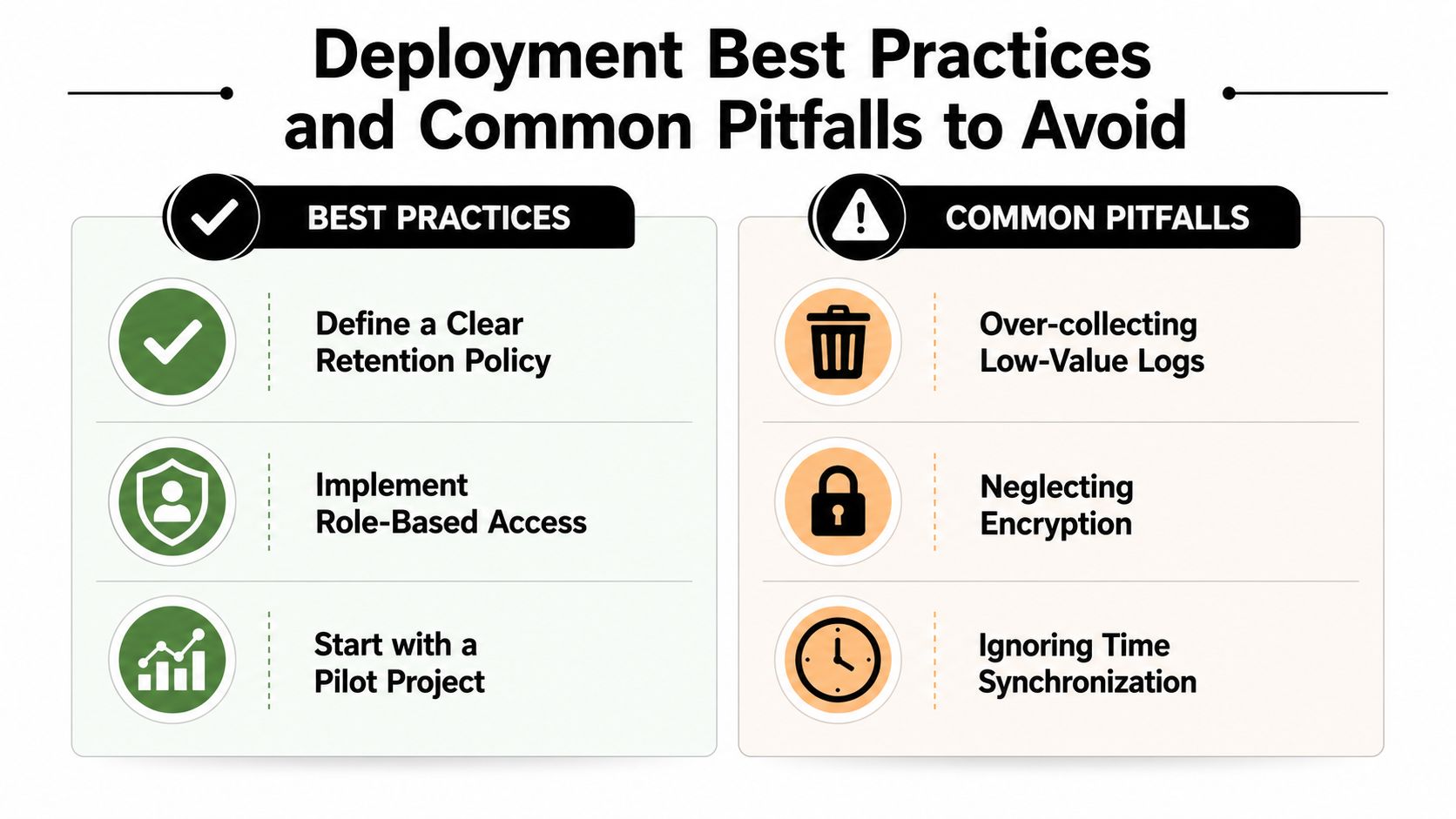
Over-collection is typically the first mistake. Teams enable every source, every debug stream, and every verbose audit setting, then find that the platform spends its existence ingesting low-value noise. Under-documenting the pipeline is the second mistake, which makes onboarding difficult after the original engineer leaves.
Start with the sources that answer real questions
Choose a limited set of log sources that directly serve detection, investigation, and compliance. Authentication, privilege changes, critical application events, cloud control plane actions, and security tooling generally rank near the top. All other sources should justify their inclusion.
Tune for signal, not volume
Overly loose correlation rules cause alert fatigue. Excessively strict rules overlook the low-and-slow patterns attackers employ. Search performance must also be tested against realistic data volumes, since a query that seems instant in a demo may become unusable once 30-day windows and active retention reach production scale, which is precisely the kind of condition modern evaluations highlight (Middleware log management tools evaluation).
Keep the operational basics tight
- Define retention by data class: Place security, compliance, and operational logs under distinct retention policies so only the expensive data pays for long-term storage.
- Lock down access: Use role-based access control so analysts, auditors, and admins don't all view the same data by default.
- Validate source health: Verify that each log source continues to send data, since silent failures are worse than noisy ones.
- Document parsing rules: When a source alters field names or format, document it right away so the next analyst doesn't need to reverse-engineer the fix.
A clean deployment isn't the one with the greatest number of integrations. It's the one where the team can explain why a source is collected, who is able to see it, and how fast it can be searched when something fails.
How Unified Platforms Reduce Complexity and Accelerate Response
Siloed tools slow analysts down. When a security team goes from a log platform to a SIEM, then to an XDR console, then to a compliance tracker, the investigation loses momentum and context. Unified Security Stack is a concrete example of a unified stack that brings together log management, SIEM, SOAR, and XDR so correlation and response reside in one workflow.
This matters because the platform can collect from cloud services, network devices, and endpoints through agents, syslog, NetFlow, and APIs, then correlate events prior to indexing. The practical result is less manual stitching, fewer false leads, and a clearer route from detection to action. Its compliance workflows also align evidence with frameworks such as CMMC, HIPAA, SOC 2, ISO 27001, PCI, GDPR, and GLBA, which eliminates much of the spreadsheet work in audit preparation.
Open-source licensing also alters the economics. Growth doesn't have to cause per-seat or per-gigabyte pain, and that is a genuine advantage when log volume continues to rise. For teams seeking one operational surface rather than a patchwork of tools, that combination is difficult to overlook.
If you are comparing log management tools for a regulated environment, Unified Security Stack provides centralized log collection, correlation, response playbooks, and compliance mapping in a single stack. Visit Unified Security Stack to assess its compatibility with SIEM, SOAR, and log management needs in hybrid environments, then determine whether its architecture aligns with your retention and audit workload.