Network Device Monitoring: A Complete 2026 Guide
Many teams are currently facing the same situation. Users describe the VPN as unreliable, finance reports timeouts in a cloud application, a firewall emits alerts intermittently, and no one can determine if the issue is congestion, a bad interface configuration, a failing device, or something malicious moving through the network.
That is why network device monitoring cannot remain confined to the NOC as a basic uptime task. In a modern environment, it is partly operations, partly security telemetry, and partly audit evidence. If your switches, routers, firewalls, wireless controllers, hypervisors, cloud network edges, and vendor access paths are not visible in a single monitoring program, you are working with gaps you will eventually feel during an outage, an investigation, or an audit.
Table of Contents
- Why Network Visibility Is No Longer Optional
- Understanding the Language of Network Devices
- Architecting for Scalability and Insight
- From Raw Data to Actionable Intelligence
- Unifying Network Data for Security Operations
- Solving Real-World Business and Security Challenges
- Tuning Your System for Peak Performance
Why Network Visibility Is No Longer Optional
Complaints that the network is slow remain among the most costly vague issues in IT.
This delay occurs because the observable symptom is physically distinct from the root cause. Users report sluggish application performance. Service desk personnel verify endpoint status. Network engineers test gateway connectivity. Cloud teams audit specific instances. Security analysts review firewall records. Significant time elapses before a team pinpoints issues like an unstable interface, a saturated uplink, or unusual data transfer via a third-party remote session.
That is the old model failing publicly. It assumed monitoring meant checking if a device was online. That is no longer sufficient.
A major historical change in network monitoring was the move from basic status checks to real-time, multi-layer visibility across hybrid and cloud-connected environments, where systems correlate telemetry, metrics, logs, traces, and flow data to support visibility and automation, according to Splunk's overview of modern network monitoringThat shift matters because it turned monitoring from passive observation into active operational control.
The problem isn't just downtime
A router can stay online and still be the source of a serious incident. A firewall can allow traffic while recording policy violations. A switch can appear healthy at a glance while a single interface drops packets without notice. A vendor VPN can stay available while being misused after hours.
This is why mature network device monitoring serves three purposes at once:
- Operations visibility: It enables teams to pinpoint congestion, latency, packet loss, and unstable links before users raise them.
- Security detection: It provides the SOC with context about traffic patterns, device state changes, and suspicious communication paths.
- Compliance evidence: It retains logs, alerts, and historical behavior that demonstrate controls were functioning when auditors ask.
Practical rule: If your monitoring merely indicates whether a device is up, you do not have a monitoring program. You have a pulse check.
What good monitoring changes
Effective network device monitoring reduces the gap between symptom and root cause. It allows teams to view the device, the interface, the traffic pattern, the event trail, and the probable blast radius within one investigation flow.
It also reshapes the discussion with leadership. Rather than saying something seems wrong on the network, you can explain that traffic moved through a backup path, interface errors increased on a specific switch, and downstream application latency followed. That is operationally useful and audit-friendly.
For security teams, the value is even wider. Network devices are among the richest telemetry sources in the environment. They produce health data, flow records, and logs that can reveal misuse of legitimate access, policy drift, or lateral movement patterns that endpoint tools alone cannot explain.
Understanding the Language of Network Devices
Most failed monitoring deployments do not fail because the tools are weak. They fail because teams expect a single protocol to answer every question.
It will not. Every telemetry source observes a distinct failure mode. If you treat them as interchangeable, your dashboards appear complete even as investigations remain slow.
Why one protocol never tells the whole story
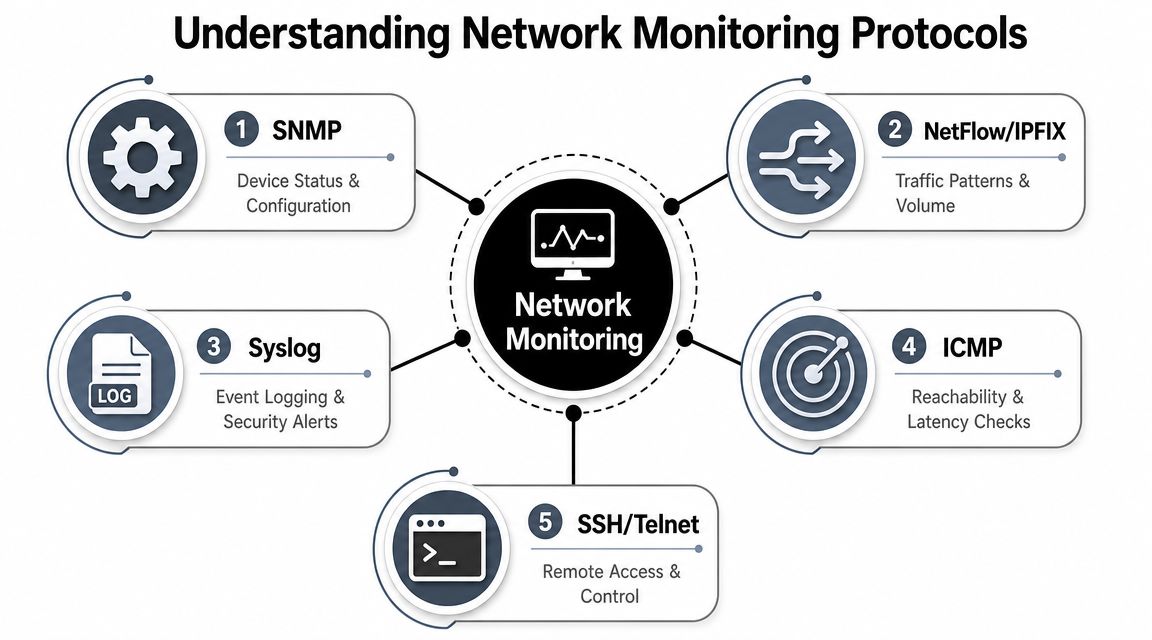
A technically robust stack combines SNMP polling, ICMP reachability checks, NetFlow or sFlow traffic analysis, and syslog or SNMP trap ingestion because each one covers a different problem space, as summarized by Selector's guidance on monitoring software protocols.
Think of them this way:
- SNMP polling acts as the scheduled health check. It requests counters, interface status, and resource data from the device.
- ICMP serves as the quick knock on the door. It confirms that something responds and helps reveal basic reachability or latency issues.
- Flow telemetry serves as traffic-camera evidence. It shows who communicated with whom, over which protocol, and where bandwidth was used.
- Syslog and traps represent the device reaching out first. They report state changes, errors, and events as they occur.
That pairing becomes even more important when your footprint reaches beyond the data center. For groups also monitoring cloud-native services externally, synthetic reachability and service checks work alongside device telemetry, since user experience may decline even while infrastructure counters remain acceptable.
What each protocol is actually good at
This is the plain-language explanation I rely on when building a program.
| Protocol | Best use | What it misses if used alone |
|---|---|---|
| SNMP | Device health, interface counters, status polling | Short-lived spikes, conversation context, rich event detail |
| ICMP | Availability checks, basic latency insight | Why the path is slow, who is consuming bandwidth |
| NetFlow or sFlow | Traffic patterns, bandwidth consumers, unusual communication paths | Device health details and many configuration events |
| Syslog or traps | Real-time alerts, config changes, errors, policy events | Trend context and normalized performance baselines |
A practical administrative layer surrounds this as well. Before your monitoring platform can observe something correctly, it must know that it exists. Inventory and discovery are essential here. An asset management foundation helps connect device telemetry with ownership, location, and business purpose, which matters during incident response and compliance reviews.
SNMP shows that the router is busy. Flow shows why. Syslog shows what changed just before it became busy.
What fails is relying too heavily on one source. Teams commonly begin with ping and SNMP because those are familiar. They later find they still cannot account for link saturation, security anomalies, or vendor misuse. Others take in huge volumes of syslog yet never establish a baseline for interface health, leaving them with event detail but no operational context.
The correct approach is layered, not trendy. Choose the source that best answers your current question, then correlate it with the rest.
Architecting for Scalability and Insight
A monitoring stack becomes fragile when it expands by accident. One collector winds up polling everything. Another tool manages flow. A separate syslog server holds device events. Dashboards sit somewhere else. Alerts trigger from every layer without common logic.
That architecture functions perfectly until the moment you need it.
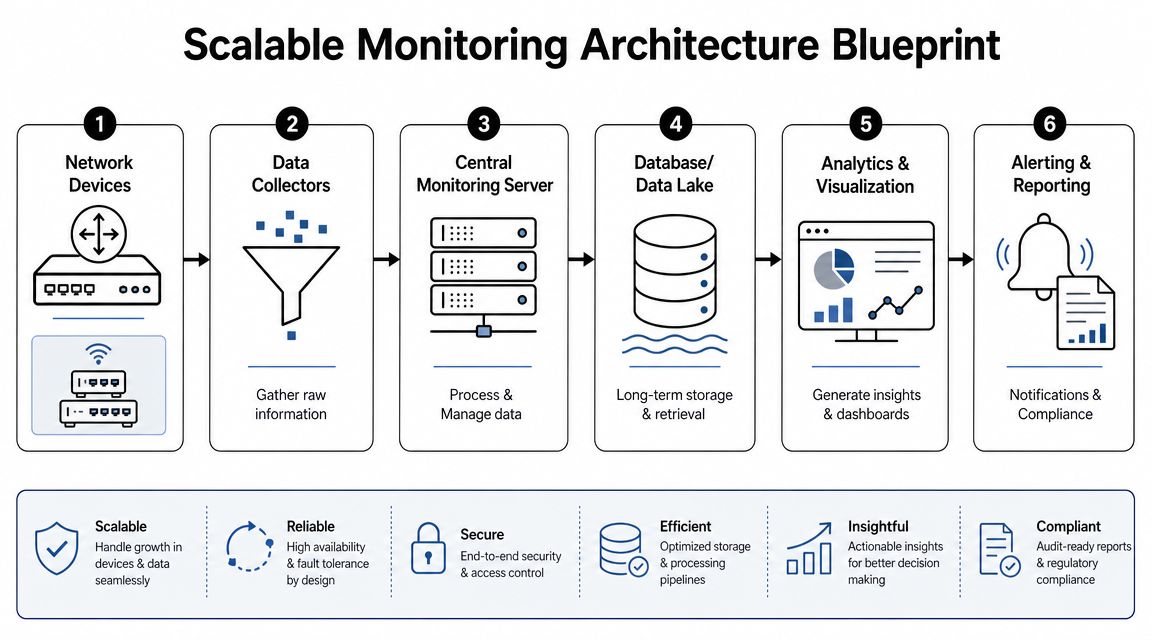
The core components that matter
A production-ready design usually has four moving parts:
- Collectors or pollers close to the devices and network segments they monitor.
- Ingestion pipelines to capture syslog, traps, and flow records.
- A central analysis layer where data is normalized, correlated, searched, and converted into alerts.
- Storage built for retention and retrieval so teams can look into incidents and respond to audit questions afterward.
The importance of that central layer is frequently missed. When device health, flow, and logs remain siloed, analysts must rebuild the narrative by hand. In a hybrid environment, the platform must also enable distributed ingestion patterns. A multi-tenant cloud architecture model is frequently a helpful reference when you require regional collectors, tenant separation, and centralized analytics without creating separate monitoring islands.
Centralized versus distributed collection
This marks the first significant design trade-off.
A centralized model is easier to manage. A single place to configure credentials, thresholds, dashboards, and retention. It performs well when latency between the collector and monitored devices is predictable and the network is stable.
A distributed model offers greater resilience in hybrid environments. You position collectors close to branch sites, cloud regions, or regulated network segments, then transmit normalized telemetry to a central location. This reduces blind spots when WAN links are unstable and lessens the operational burden of polling remote networks through firewalls and segmented paths.
Coordination is the trade-off. Distributed collection brings deployment overhead, certificate management, version control, and more failure domains. Still, for hybrid networks in practice, the effort generally pays off.
Place collection near the signal, not near the team.
What separates a lab setup from a production program
The distinction is not the dashboard. It is the discipline around discovery, topology, and baselines.
Guidance for operational effectiveness emphasizes automatic discovery, topology mapping, and continuous baselining so newly connected, rogue, or misconfigured devices are detected early and correlated with downstream impact, especially in environments where devices, cloud services, and endpoints change frequently, as outlined by DPS Telecom's monitoring feature guidance.
That translates into a few practical design choices:
- Automatic discovery: New devices should not rely on someone remembering to add them manually.
- Dynamic topology mapping: Static diagrams become outdated. Dependency views must reflect real paths and shared infrastructure.
- Baseline-first alerting: Polling that lacks historical context yields noisy alerts and shallow investigations.
- Segmentation-aware deployment: Sensitive zones, cloud edges, and vendor VLANs each require a separate collection strategy.
Monitoring will not scale if it is treated as a fixed project. Devices relocate, cloud paths shift, and ownership changes. The architecture must anticipate churn while preserving usable data.
From Raw Data to Actionable Intelligence
Having more data is not the same as having visibility.
I have watched teams take in every trap, every flow record, and every syslog message, yet still miss the incident because their dashboards answered no operational question. More telemetry is not the fix. The fix is selecting the right metrics and reading them in context.

The metrics that deserve dashboard space
An effective network device monitoring dashboard typically organizes data into three categories.
Availability addresses whether the device or path can be reached and is stable enough to trust. ICMP status, interface state changes, and polling loss belong here.
Performance indicates whether service quality is deteriorating. This covers latency, packet loss, jitter, interface errors, and signs of congestion.
Resource utilization reveals whether the device can handle demand. CPU, memory, interface bandwidth, queue pressure, and comparable counters fit here.
A practical dashboard should also separate executive indicators from analyst viewsLeaders seek service impact, notable incidents, and sustained trends. Engineers require interface, device, event, and flow-level detail that explains the failure.
Why static thresholds fail mature teams
Static thresholding is simple to deploy and difficult to live with.
A rule that alerts when CPU exceeds a fixed line can generate notifications, yet it frequently overlooks what is important. Certain devices run hot during backups, failovers, or routing changes and then return to normal. Others should never hit that level during business hours. That one threshold produces noise in one situation and blind spots in the other.
Baselining is the stronger approach. Rather than asking whether a metric passed a generic line, ask whether current behavior is abnormal for that device, path, and time pattern. That is how you reduce false positives without silencing genuine issues.
Use this contrast when designing alerts:
- Static rule thinking: Alert if CPU goes above a fixed value.
- Baseline thinking: CPU, flow volume, and interface errors rose together outside the normal pattern for the device, so investigate.
- Correlation thinking: That abnormal pattern occurred on a path serving a regulated workload and coincided with a config event, so escalate.
A mature alert shows an operator why this matters now, not merely that a number changed.
Compliance is affected by this as well. Audit teams do not only want proof that alerts exist. They want evidence that your controls yield records that can be reviewed and acted upon. If you are tightening retention and evidence practices, this Practical guide for CISOs is helpful because audit trails only provide value when they keep context, timing, and accountability.
For security-centric environments, a dedicated log management pipeline is what converts these events into evidence that can be searched. That is where device logs stop being operational debris and begin to become incident records, control evidence, and baselining input.
Alerting on every metric with equal weight does not work. Not every spike should trigger a page. Signal comes from prioritizing metrics that predict user impact, service risk, or suspicious behavior.
Unifying Network Data for Security Operations
On its own, network monitoring is valuable. Within security operations, it becomes decisive.
An allowed connection may appear in a firewall log. A switch may report increasing errors. A successful remote session may be logged by a VPN gateway. On their own, these events can seem ordinary. When linked to identity, endpoint, and past activity, they can reveal compromise.
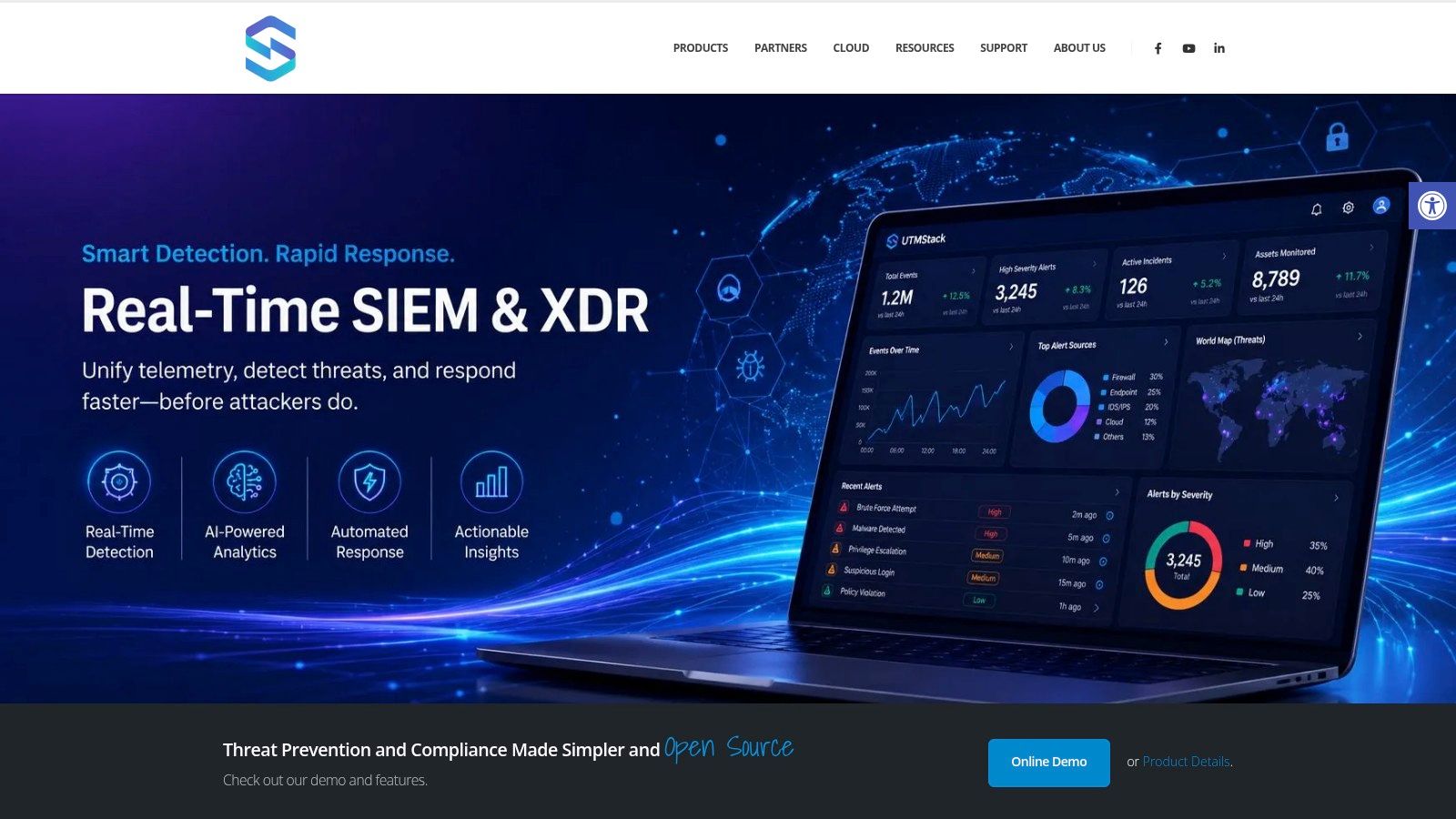
The following shows how this works in practice.
Why isolated monitoring misses real attacks
The operational team usually asks, “Is the device healthy?”
The SOC poses other questions. Who was signed in when the connection began? Is that destination typical for the segment? Did the host start an abnormal process as well? Did the transfer occur at an odd hour? Was the firewall policy altered just before the event?
Separate tools do not answer those questions well. They make analysts switch manually among dashboards and time ranges. Attackers hide precisely in that delay.
A unified SIEM/XDR demonstrates its value. Solutions such as Unified Security Stack collect telemetry from network devices, endpoints, and cloud services via sources such as Syslog and NetFlow, then correlate events prior to indexing so analysts can examine one incident narrative rather than ten separate artifacts.
A practical correlation workflow
Consider a typical situation.
An outside engineer logs in remotely to assist a business system. The VPN event by itself appears valid. Soon after, the firewall allows outbound traffic to a destination that the device segment does not normally reach. At roughly the same time, the endpoint associated with that session starts a process the workstation seldom executes.
None of these events is decisive in isolation. Together, they form a pattern:
- Identity context states the user possessed valid access.
- Network telemetry signals the session generated an atypical destination or protocol pattern.
- Endpoint data points to execution behavior that does not match the baseline of the asset.
- Historical comparison shows the activity occurred outside the normal working pattern of the vendor.
That is a security incident worthy of triage.
A brief product walkthrough helps at this point, since correlation becomes easier to grasp when viewed in a live console.
This is also where monitoring data proves its compliance worth. If incidents are examined within a common platform, you retain timeline, analyst action, evidence links, and response steps in a single location. That aids internal investigations and external audits much more than dispersed screenshots from different tools.
When network telemetry does not reach your detection platform at all, the SOC investigates with incomplete recall.
The real-world takeaway is straightforward. Device monitoring ought to supply security operations on an ongoing basis, not just when outages occur. Flow, logs, traps, and health signals each add context that helps analysts distinguish routine administrative activity from abuse of legitimate access.
Solving Real-World Business and Security Challenges
The strongest measure of a monitoring program is whether it resolves difficult problems, not whether it generates appealing graphs.
Compliance evidence that auditors can actually use
In audits, teams frequently rush to show that controls were in place over time. They can normally locate screenshots. What they find hard to demonstrate is continuity: which devices received monitoring, when alerts triggered, who examined them, and whether exceptions were reviewed.
A stronger model treats network telemetry as evidence from the start. Device logs, flow records, topology changes, and alert histories support control narratives for segmentation, availability monitoring, incident detection, and administrative oversight. In regulated settings, that shifts the audit discussion from trusting our process to presenting a clear trail.
Consistency is essential. When retention varies, time synchronization is unreliable, or ownership metadata is absent, the evidence quickly loses value.
Monitoring fragile devices without breaking them
Research in healthcare highlights a problem that many enterprise teams continue to underrate. Passive network monitoring is preferred for connected medical devices because active scanning can disrupt critical services, and useful metrics include unidentified devices, legacy operating systems, and devices that transmit sensitive data, according to research published in the medical informatics literature.
This lesson extends far beyond healthcare.
OT controllers, building systems, industrial gear, lab equipment, and embedded appliances often respond poorly to aggressive polling or intrusive scans. In such environments, the question is not merely how to monitor. It is how to observe without altering device behavior.
A practical pattern looks like this:
- Use passive discovery: Gain insight from mirrored traffic, flow exports, and observed communications rather than probing first.
- Baseline communication paths: Determine the endpoints a device typically communicates with, the times it does so, and the protocols involved.
- Flag risky characteristics: Look out for unrecognized devices, obsolete platforms, exposed services, and movement of sensitive data.
Watching vendor access like a security architect
Third-party access is among the most under-monitored areas in many environments. Teams monitor whether the VPN is available, but they do not always examine what the vendor does after connecting.
This is an error. Vendor monitoring should be managed as a security control, not a convenience feature.
A strong approach includes:
- Vendor-specific data flow maps: Keep normal support traffic separate from all other traffic.
- Segmented access paths: Put vendor systems into dedicated VLANs or virtual segments so their behavior can be observed more easily.
- Correlation of flow and identity: Tie remote access records to actual network behavior so “authorized” doesn't automatically mean “safe.”
- Off-hours anomaly review: Substantial transfers, unexpected destinations, and uncommon protocols warrant immediate scrutiny.
Mature network device monitoring goes beyond availability, becoming a control mechanism for proving segmentation, protecting fragile assets, and observing third parties that already possess legitimate paths into your environment.
Tuning Your System for Peak Performance
Most post-deployment monitoring problems fall into three categories. Missing data, misleading data, or excessive data.
When SNMP keeps timing out
Symptom: In the monitoring platform, devices seem to go unavailable at times, even though administrators can still access them by other means.
Likely cause: Polling routes are unreliable, credentials are inconsistent, access control rules block queries, or the polling interval is too aggressive for that segment.
Fix: Begin by verifying reachability from the actual collector, not from your laptop. Then standardize credentials by device class, confirm permitted management paths across segmentation boundaries, and reduce polling on fragile or distant links. If a device is operationally sensitive, depend more on event-driven logs and passive telemetry than on aggressive polling.
When flow data never arrives
Symptom: Interfaces indicate load, yet you cannot determine who used bandwidth or which conversations shifted.
Likely cause: Flow export is not enabled on the correct interfaces, records are directed to the wrong collector, or firewalls block export traffic between the device and the analysis tier.
Fix: Check export on ingress and egress as appropriate, confirm the collector is listening in the expected place, and trace the route between exporter and collector across segmentation controls. Do not assume the device is at fault. Missing flow data often indicates a path or policy issue.
When alert storms bury the signal
Symptom: A single unstable device produces cascading alarms across interfaces, dependencies, and downstream services.
Likely cause: Fixed thresholds, absent deduplication, weak dependency logic, and no behavioral baseline.
Fix: Combine related symptoms into one incident view. Suppress child alerts when a parent device failure is already active. Establish a baseline for normal vendor and remote-access behavior so anomalies such as unusual destinations or large after-hours transfers stand out through SIEM correlation, as advised in guidance on vendor network monitoring. This same reasoning reduces operational noise beyond healthcare as well.
Effective network device monitoring is never complete. Teams continuously adjust credentials, thresholds, discovery scopes, retention, and correlations because the environment keeps changing. The result is that your monitoring stack stops acting like a noisy collection of tools and starts acting as an evidence system for operations, security, and compliance.
If you need a platform that can ingest network device logs, Syslog, and flow telemetry, correlate them with endpoint and cloud events, and preserve that data for detection and audit workflows, Unified Security Stack merits evaluation as part of a modern monitoring and security architecture.