VPC Flow Logs: A Practical Guide for Security & Compliance
Many teams discover their need for VPC Flow Logs only once an incident has already taken a bad turn.
A workload begins acting strangely. An analyst notices outbound connections that look suspicious. Then comes the fundamental question in cloud incident response: what else did this instance communicate with, at what time, and was that traffic permitted or denied? Without a network record already feeding your monitoring stack, you must piece events together from incomplete clues. Security groups, application logs, endpoint alerts, and cloud control-plane events are useful, yet they cannot substitute for a direct record of network conversations.
This is where VPC Flow Logs become important. They provide an enduring, agentless account of Layer 3 and Layer 4 traffic throughout your cloud network. Practically speaking, that supports stronger incident response, easier troubleshooting, compliance evidence that holds up better, and a means to identify traffic patterns that harm both security posture and cloud costs.
Table of Contents
- Why Your Cloud Needs Network Visibility
- What Are VPC Flow Logs Explained
- Decoding the VPC Flow Log Schema
- Enabling and Managing Flow Logs
- Flow Logs Across AWS Azure and GCP
- Using Flow Logs for Threat Detection in a SIEM
- Best Practices and Avoiding Common Pitfalls
Why Your Cloud Needs Network Visibility
What makes cloud incidents difficult is rarely the initial alert. It is the uncertainty that comes afterward.
When a server is flagged for suspicious behavior, the team may be unable to determine quickly whether it connected to storage services, a different subnet, or an external address. That blind spot delays triage. It introduces risk as well, since responders begin relying on assumptions rather than evidence.
VPC Flow Logs address that exact issue. They supply network ground truth for IP traffic that was accepted and rejected, making them valuable for threat hunting, root cause analysis, and confirming that controls performed as intended.
What teams miss without them
Without flow data, three common workflows become much harder:
- Incident response: Analysts may see a host alert while lacking the broader network context around it.
- Security policy tuning: Engineers can identify a failed connection, yet they cannot determine whether the issue is isolated or widespread.
- Audit readiness: Compliance teams require proof that network access controls worked, not merely configuration screenshots.
That final point carries more weight than many teams anticipate. In regulated settings, network evidence frequently must hold up retrospectively, not only during an active incident. If you are constructing a wider cloud security monitoring practice, flow logs rank among the earliest telemetry sources that merit standardization.
Practical rule: When an analyst cannot say who communicated with whom, when it happened, and whether it was permitted within minutes, the cloud visibility stack has gaps.
The operational payoff
Flow logs offer value beyond security alone. Operations teams rely on them to examine chatty endpoints, unexpected traffic routes, and connectivity issues that application logs do not clearly reveal.
The main advantage is that this data sits beneath the application layer yet above the complexity of packet capture. You do not have to install agents on each instance just to know whether communication occurred. What you need is a dependable network record and a fast way to search it.
That is the central takeaway of VPC Flow Logs. They transform cloud networking from speculation into evidence.
What Are VPC Flow Logs Explained
Many cloud incidents begin in the same manner. An alert triggers on a workload, the team reviews security groups and route tables, and the most important question remains unresolved: did this system connect to anything suspicious?
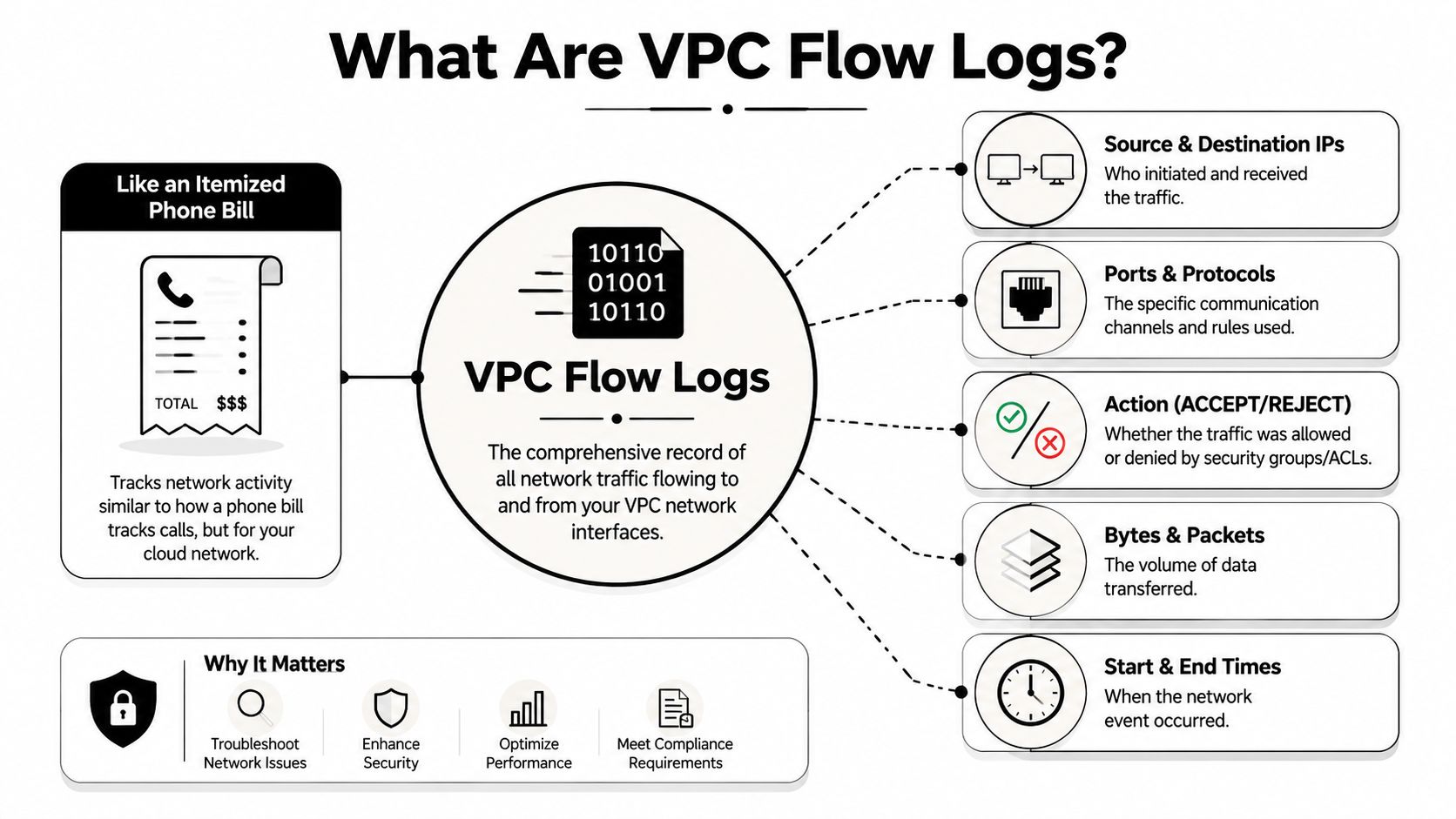
VPC Flow Logs use network metadata to answer that question. They capture who communicated with whom, through which port and protocol, within what time window, how much traffic transferred, and whether AWS accepted or rejected the connection. For security teams, this converts an unclear host alert into an investigable event. For operations teams, it distinguishes a failing application from a blocked path. For compliance teams, it produces a searchable record of network access that can be kept and reviewed later.
What they capture
AWS VPC Flow Logs serve as an agentless telemetry source for Layer 3 and Layer 4. They collect metadata including source and destination IP addresses, source and destination ports, protocol, byte counts, packet counts, timestamps, and the final action, for example ACCEPT or REJECT.
That architecture is important in production. Teams obtain network evidence without placing agents on every instance, and collection occurs outside the application stack. In practice, this makes flow logs among the simplest telemetry sources to standardize across accounts and VPCs. It also makes them well suited to centralized analysis in a SIEM like Unified Security Stack, where analysts can correlate network activity with IAM events, endpoint alerts, DNS logs, and cloud control plane changes.
AWS likewise aggregates these records across a capture window instead of logging each packet as an individual event. This lowers collection overhead, though it alters how analysts should work with the data. Flow logs are effective for detecting patterns, denied connections, scanning activity, unexpected east-west traffic, and anomalies in data transfer. They are not as effective for packet-level forensics.
What they do not capture
Flow logs contain metadata alone. They omit packet payloads, HTTP headers, SQL statements, API bodies, TLS certificates exchanged within session content, and the command executed on the host.
They also fail to cover all traffic paths in AWS. Certain traffic types are excluded, so teams that regard flow logs as complete network ground truth create blind spots. This matters during investigations. If an analyst expects one dataset to show every DNS request, every internal service exchange, or every platform-managed connection, missing records can lead them to the wrong conclusion.
The operational guideline is straightforward. Rely on flow logs to verify that communication took place and how it was treated. Turn to packet capture, application logs, DNS logs, WAF telemetry, and endpoint data when you must understand what occurred within the session.
Flow logs tell you if a connection happened, where it traveled, and if it was permitted. They do not reveal the application transaction within that connection.
Why that boundary matters
Security results get better when teams match each task to the appropriate data source.
Use VPC Flow Logs to:
- Confirm communication paths: Determine the source, destination, port, protocol, and allow or deny outcome for a connection under suspicion.
- Spot control failures: Find repeated
REJECTevents, unexpected permitted outbound traffic, or traffic that avoids expected inspection paths. - Investigate exposure: Check whether an internet-facing asset received connections that it should never have accepted.
- Build historical context: Rebuild connection patterns for the timeframe surrounding an alert, outage, or audit request.
- Feed SIEM detections: Within Unified Security Stack, correlate flow activity with threat intelligence, asset context, and other cloud logs to expose scanning, lateral movement, and data transfer anomalies.
Do not treat them as a replacement for full packet inspection or application-layer monitoring. A denied SSH attempt, a successful database connection, and an outbound call to a suspicious IP can all show up in flow logs. The query sent through that database session or the command run after login will not.
That trade-off is precisely what makes flow logs so valuable. They offer broad coverage, cost less to collect than packet capture, and are simple to centralize, yet they become operationally useful only when the team understands their boundaries and analyzes them in context.
Decoding the VPC Flow Log Schema
A flow log record appears straightforward until an analyst must quickly answer a difficult question: Was this failed connection attempt benign noise, a scan, or the first indication of lateral movement? The schema dictates how fast that answer takes shape.
AWS started with a more limited core record and later introduced fields that make investigations significantly more precise. As documented in Astuto's field-by-field analysis, newer versions introduced fields such as pkt-dst-aws-service, flow-direction, and traffic-path. Such additions matter because they convert a basic network record into one a SIEM can classify, correlate, and alert on with considerably less guesswork.
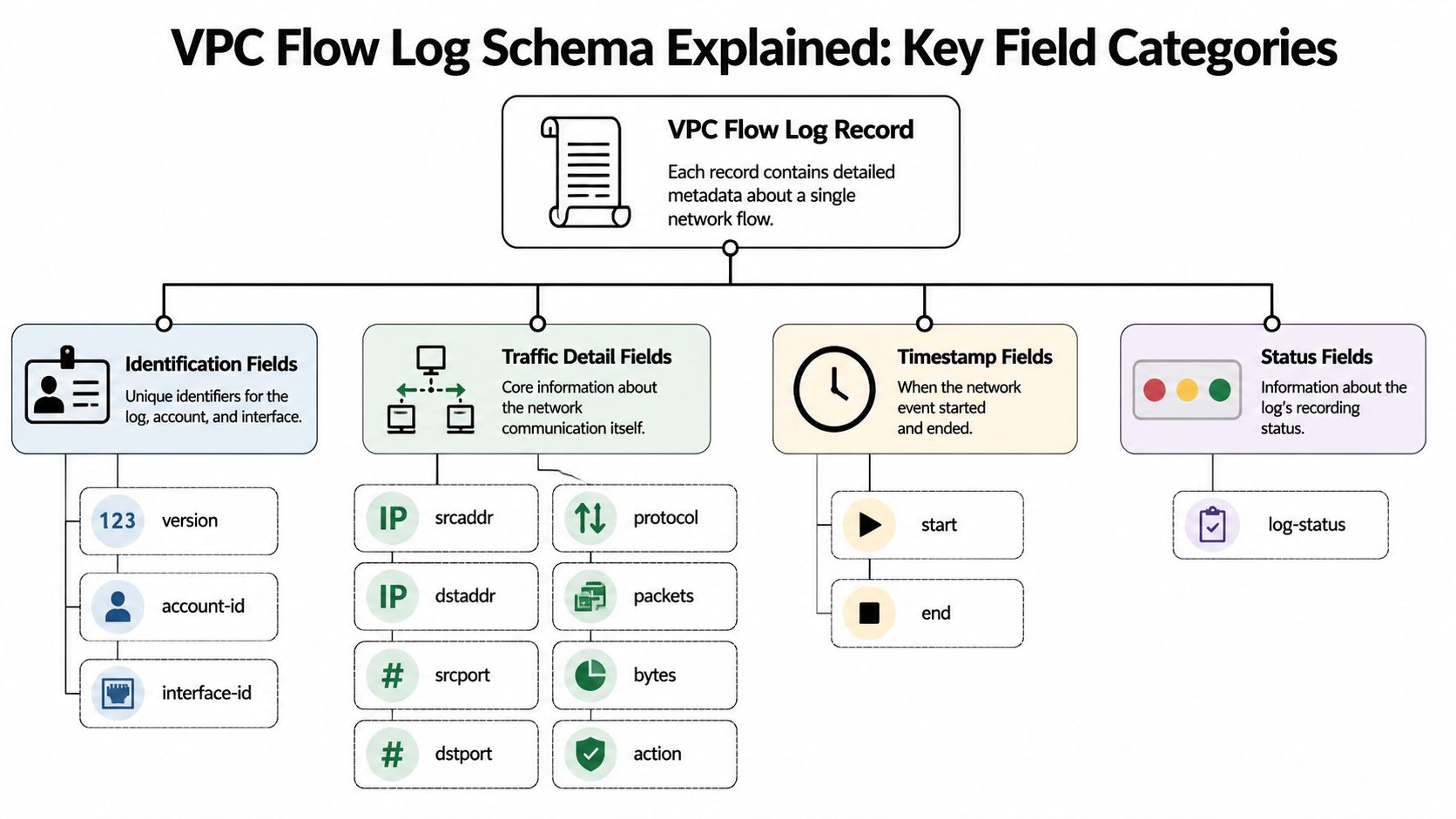
Identity fields
Identity fields address the initial investigation question: which asset played a role?
The fields analysts use first are usually:
account-idto confirm ownership in multi-account estatesinterface-idto tie the record to a specific ENIsrcaddranddstaddrto identify the endpoints
These fields enable a team to move from an IOC to scope. In Unified Security Stack, this typically involves pivoting from a flagged IP or ENI to all related connections, then enriching the outcome with asset tags, cloud account context, and prior alerts. Without that mapping step, flow logs remain isolated records rather than investigation evidence.
Traffic fields
Traffic fields address the following question: what occurred on the wire?
The daily workhorses are:
srcportanddstportfor service contextprotocolfor transport identificationpacketsandbytesfor session size and shapeactionfor the allow or deny decision
Practical security value is evident in scenarios like these: Repeated REJECT records from a single source to numerous destination ports often support a scan hypothesis. Permitted outbound connections with unusually high bytes values can warrant an exfiltration review. A surge in denied RDP or SSH traffic against a management subnet indicates exposure or inadequate filtering. The fields are simple, but the result is not. They help analysts determine whether to escalate, suppress, or correlate with endpoint and identity telemetry.
Metadata fields
Newer metadata fields frequently determine whether an answer comes quickly or an investigation drags on.
flow-direction distinguishes inbound from outbound traffic, a distinction that becomes critical right away when assessing suspicious egress activity. traffic-path aids in clarifying if traffic remained within anticipated routes or took an action that warrants examination. pkt-dst-aws-service provides valuable context around cloud-native operations. When a workload transmits data to an AWS service, the team can distinguish normal S3 usage from an unusual transfer pattern requiring closer inspection.
Concentrate on the fields that quickly address security questions.
This is also where many teams introduce blind spots. When your SIEM parser retains only the older default fields, newer context never makes it into detections. Unified Security Stack should normalize these fields during ingest rather than leave them hidden in raw text; otherwise, analysts will overlook the difference between internal east-west traffic, internet egress, and service-bound connections.
A practical way to parse the record
A useful triage model is to read each flow record in three passes:
| Question | Useful fields | Why it matters |
|---|---|---|
| Who talked | srcaddr, dstaddr, interface-id, account-id |
Establishes ownership and the communication pair |
| What happened | srcport, dstport, protocol, action |
Shows service path and the allow or deny result |
| How much and when | packets, bytes, start, end |
Adds timing, duration, and transfer context |
This structure fits well within a SIEM since it aligns neatly with detections and dashboards. Analysts can create one view for denied connection patterns, another for abnormal outbound volume, and a third for service-specific traffic like flows destined for S3 or DynamoDB. The schema becomes useful only when the fields are parsed with a security question in mind.
Enabling and Managing Flow Logs
The initial design decision is not technical. It is operational. Where should visibility start for you?
AWS allows you to turn on flow logs at the VPC, subnet, or Elastic Network Interface level. The appropriate scope depends on whether your goal is broad baseline visibility, monitoring a sensitive segment, or investigating a particular workload.
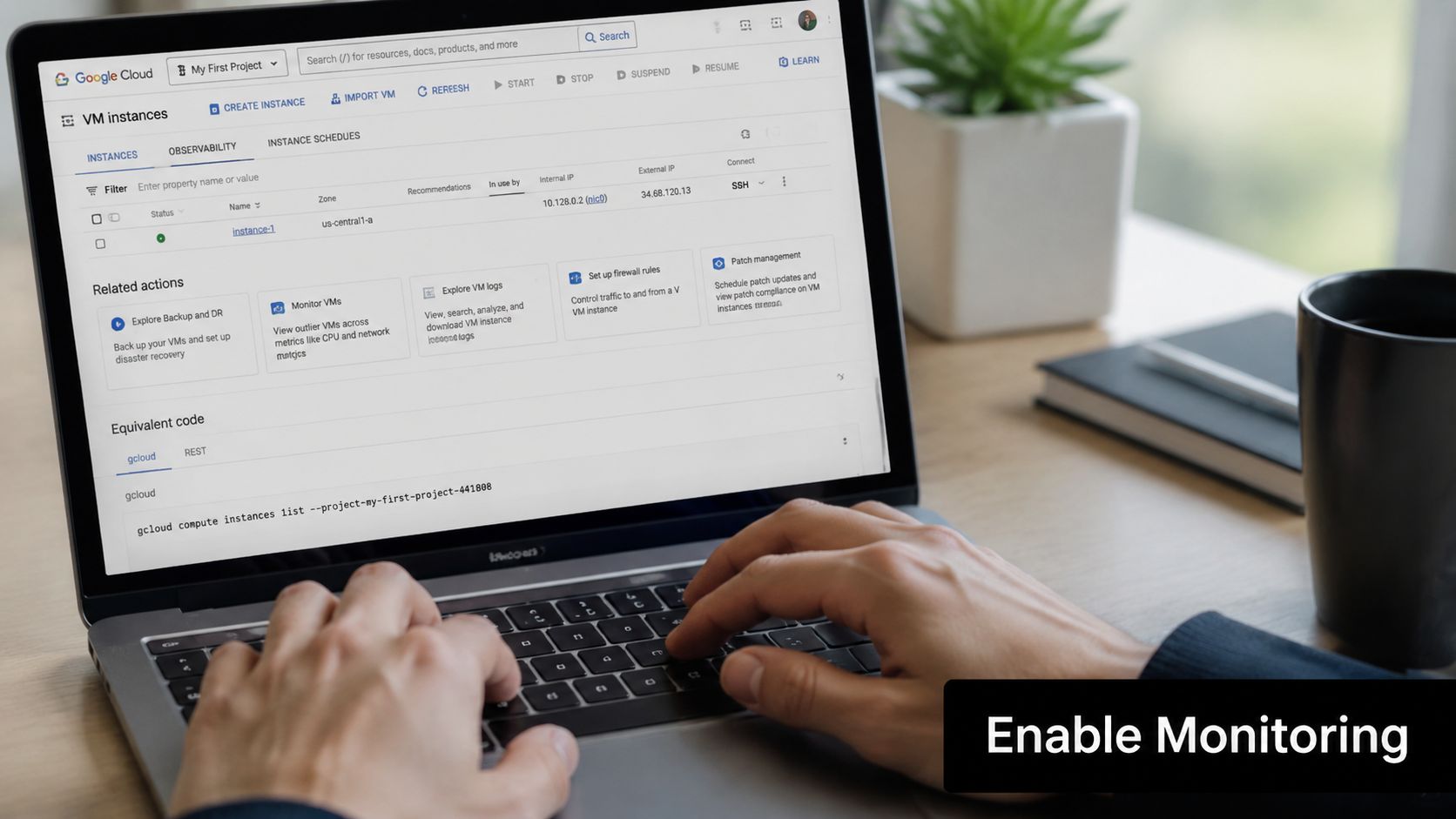
Choosing the right scope
A practical model looks like this:
- VPC level: Ideal when you require foundational visibility quickly across an environment.
- Subnet level: Helpful for separating sensitive application tiers, management zones, or regulated segments.
- ENI level: Ideal for focused troubleshooting or high-value assets that warrant closer observation.
Many teams begin too narrowly and later regret the blind spots. Starting broadly is generally easier for investigations, then narrowing or filtering according to what you use.
Choosing the destination
AWS classifies VPC Flow Logs as vended logs, and cost is driven by the volume captured plus the storage destination you choose, such as CloudWatch, S3, or Firehose, according to the Vantage handbook entry on VPC Flow Logs pricing.
This pricing model turns destination selection into part of your architecture, not merely a logging preference.
| Destination | Best use | Trade-off |
|---|---|---|
| CloudWatch Logs | Fast search and native AWS workflows | Can become expensive for large sustained volumes |
| Amazon S3 | Long-term retention and archival analysis | Less immediate for active detection unless paired with downstream analytics |
| Data Firehose | Streaming into analytics and SIEM pipelines | Requires more pipeline design and operational ownership |
What works in practice
For many teams, the division is simple. Choose CloudWatch when operators need fast native access. Choose S3 when retention and cost control are more important. Choose Firehose when the main objective is streaming telemetry into a central detection platform.
The same Vantage reference observes that organizations also use this data to spot high-latency traffic between regions or zones and relocate workloads to cut unnecessary transfer costs. That is one of the more overlooked advantages of flow logs. They are not merely a security artifact. They can reveal costly architecture habits.
A short walkthrough helps if you're standardizing this across teams:
Management habits that prevent pain
After enabling them, handle flow logs as you would any other production telemetry source.
- Verify permissions early: Failures in log delivery are operational failures, not minor misconfigurations.
- Set retention deliberately: Compliance, investigation, and cost objectives seldom align on a single retention period.
- Review log volume regularly: Flow data can grow rapidly in busy environments, particularly when teams enable broad collection and then forget about it.
Good flow logging is not just enabled. It is scoped, routed, retained, and checked.
Flow Logs Across AWS Azure and GCP
Multi-cloud teams cannot treat flow logs as an AWS-only concern. They need a consistent view across providers, yet every platform bundles network telemetry in its own way.
AWS builds flow logs around the VPC, subnet, and ENI. Azure teams frequently use NSG-focused logging, which usually highlights rule decisions. GCP offers VPC-level network telemetry too, but it feels operationally distinct. For security architects and MSSPs, the difficulty is not simply collection. It is normalization.
Cloud Flow Log Comparison
| Feature | AWS VPC Flow Logs | Azure NSG Flow Logs | GCP VPC Flow Logs |
|---|---|---|---|
| Primary scope | VPC, subnet, ENI | NSG-focused network visibility | VPC network visibility |
| Typical security question | Who talked to whom, and was traffic allowed | Which NSG rule allowed or denied the connection | What traffic patterns exist across the virtual network |
| Format style | Commonly space-delimited, customizable | Commonly structured records | Commonly structured records |
| Operational strength | Broad AWS network context | Policy-centric visibility | Strong fit for GCP network observability |
| Common normalization need | Map ENIs, ports, actions, and timing | Map rule outcomes and network context | Map flow metadata into shared fields |
| SIEM challenge | Parsing custom schemas consistently | Preserving NSG rule context | Aligning provider fields to common detection logic |
What matters more than provider differences
The question worth asking is not which provider has the ideal flow logs. It is whether your team can respond to the same security questions across any cloud:
- Can analysts trace east-west and outbound traffic consistently
- Can engineers distinguish rejected traffic from missing traffic
- Can auditors see evidence of network control behavior across environments
In a hybrid environment, the challenge is not gathering network telemetry. It is getting AWS, Azure, and GCP to present one coherent narrative.
A practical normalization model
When centralizing cloud flow logs, normalize around a few stable concepts:
- Endpoint identity for example source, destination, interface, subscription, or account.
- Transport context including ports, protocol, and action.
- Timing and volume for instance, start, end, packets, and bytes.
- Provider-specific enrichment for example AWS service destination context or Azure rule metadata.
With those mappings in place, detections travel well. Without them, each cloud develops its own rules, dashboard logic, and blind spots.
Using Flow Logs for Threat Detection in a SIEM
VPC Flow Logs gain far more value when they move out of raw storage and into a SIEM pipeline capable of parsing, normalizing, correlating, and alerting.
By themselves, they already enable critical investigations. They help teams refine security group rules, spot a noisy endpoint creating unexpected load, and measure data exfiltration volume during an incident. They also perform best when connected to SIEM systems for real-time monitoring and alerting, as covered in Query's discussion of flow log applicability and limitations.
What raw logs won't do well
A raw flow record cannot confirm whether a destination is normal for that workload. It does not know whether the source host raised an endpoint alert an hour before. It does not know whether repeated rejections from the same source are routine noise or reconnaissance.
This is why centralization is important. A centralized log management approach provides analysts with a single location to merge flow telemetry with identity events, endpoint alerts, firewall records, and cloud control-plane activity.
Detection patterns that work
The strongest flow-log detections are straightforward, easy to justify, and linked to real operations.
- Port scanning: One source produces repeated
REJECTresults spanning several destination ports or multiple hosts within a short window. - Possible exfiltration: A workload that usually communicates internally begins sending abnormally large outbound byte volumes to an unfamiliar destination.
- Suspicious beaconing: A host opens repeated small connections at regular intervals to a destination your team does not recognize.
- Security group tuning candidates: Repeated rejected flows between systems that should communicate signal broken policy or configuration drift.
Here's a practical way to think about query logic:
| Detection goal | Core fields | Analyst interpretation |
|---|---|---|
| Scan activity | srcaddr, dstport, action |
Many rejects from one source across many targets or ports |
| Exfiltration review | srcaddr, dstaddr, bytes, flow-direction |
Outbound transfer pattern that doesn't match workload behavior |
| Lateral movement triage | srcaddr, dstaddr, dstport, action |
New east-west communications between unrelated systems |
| Policy validation | interface-id, action, dstport |
Repeated denies show where rules are too broad or too tight |
Parsing rules matter more than dashboards
Many SIEM projects stumble at ingestion. The team sends logs but fails to normalize important fields consistently, making detection rules fragile.
For AWS flow data, parse and preserve at least:
- Network identity: source, destination, interface, account
- Transport details: ports, protocol, action
- Session context: bytes, packets, timestamps
- Cloud enrichment: service destination and traffic direction when available
Then correlate those records with:
- Threat intelligence hits
- Asset criticality
- Cloud ownership tags
- Endpoint or identity alerts from the same time window
Analyst habit: View flow logs as relationship data. Their worth increases when you link them to asset, identity, and alert context.
That correlation work is what transforms a mass of network metadata into a real investigation queue.
Best Practices and Avoiding Common Pitfalls
Teams run into trouble with VPC Flow Logs when they mistake them for proof of visibility rather than one network telemetry source among many. That error surfaces later during an incident, when the SOC needs to answer an application-layer question but has only IPs, ports, accepts, rejects, byte counts, and timestamps.
AWS flow logs help by revealing which parties communicated, on which port, and if traffic was permitted or blocked. They omit packet payloads. As a result, they can back detections for scanning, lateral movement, denied egress, and abnormal transfer volume, but on their own they cannot verify SQL injection, stolen session tokens, or malicious API parameters.
The blind spots that matter in practice are usually operational, not theoretical:
- Assuming flow logs are full-fidelity network evidence. They provide metadata. Rely on them to reduce scope, confirm how policy behaves, and move to stronger sources for analysis at the content level.
- Equating enabled with complete. Logging setup, cloud service behavior, and architecture decisions can all limit what you capture.
- Forwarding logs to a SIEM without checking parsers. If
action,srcaddr,dstaddr,bytes, or direction fields show up inconsistently, correlation rules fail without anyone noticing. - Retaining all records indefinitely with no plan. Storage expenses climb quickly, and analysts still have trouble when retained data is noisy and lacks prioritization.
AWS also documents limits that affect coverage in specific designs, including cases involving VPC Block Public Access on its VPC Flow Logs limitations page. The practical takeaway is straightforward. Confirm what your environment logs and what it does not before you base detections or compliance attestations on it.
A solid operating model is simpler than many teams allow it to become.
- Collect with intent. Choose fields, retention periods, and destinations according to specific use cases like threat hunting, segmentation validation, PCI evidence, or egress monitoring.
- Test for absence. Create known traffic, blocked traffic, east-west traffic, and internet-bound traffic, then verify that each case shows up as intended.
- Tune for cost and value. Subnets with high volume, services that talk a lot, and long retention windows can generate costly noise. Filter and tier retention according to investigative value.
- Correlate in the SIEM. Flow logs grow much more valuable once enriched with asset tags, identity context, threat intelligence, and endpoint alerts. A dedicated network traffic analysis workflow enables analysts to progress from raw metadata to decisions.
- Document the gaps. Compliance teams and incident responders must understand where flow logs are authoritative, where they play a supporting role, and where visibility belongs to another control.
One caution bears repeating. A crowded dashboard can conceal a poor logging design.
Unified Security Stack helps unify flow telemetry with endpoint, cloud, and compliance data so detections, investigations, and evidence collection take place in one location rather than across disconnected tools.