Windows Event Log Analysis: A Practical Guide
When you are facing a deluge of Windows telemetry at 2 AM, the typical issue is not that the logs lack value. It is that no one has converted them into a workflow. Raw Security, System, PowerShell, and Defender events can reveal exactly what occurred, provided collection, parsing, triage, and reporting are treated as a single control rather than four separate chores.
That's why Windows Event Log Analysis still occupies the center of incident response and compliance work. Microsoft's own guidance classifies several event IDs as high or medium-to-high criticality, including 4625, 4719, and 1102 in its monitoring appendix, which is a pretty clear signal that audit telemetry is meant to support repeated detection, not occasional curiosity (Microsoft event monitoring guidance). For teams required to demonstrate control under HIPAA, PCI, CMMC, or ISO programs, that same telemetry turns into the evidence trail that prevents audits from becoming archaeology.
Teams that succeed with this challenge do not view logs as a heap. They view them as a pipeline. That pipeline begins with proper acquisition, proceeds through normalization and correlation, and concludes with response actions and compliance reporting. Open-source SIEM and SOAR platforms such as Unified Security Stack make that workflow attainable without licensing friction, which is important when you require enterprise-grade visibility but cannot justify yet another costly stack solely to read Windows events.
Table of Contents
- Why Windows Event Log Analysis Matters Now More Than Ever
- Collecting Event Logs from Endpoints and Servers
- Parsing and Normalizing Windows Events for SIEM Ingestion
- Triage Strategies for High-Signal Windows Events
- Building Detection Rules and Correlation Logic
- Automating Response and Compliance Reporting Workflows
Why Windows Event Log Analysis Matters Now More Than Ever
A SOC analyst facing an overwhelmed Security log does not require additional raw data. They require a method to isolate the small number of meaningful events from ordinary noise and convert them into decisions the business can support. That is the central value of windows event log analysis. It converts authentication activity, privilege changes, account lifecycle events, and tampering attempts into a structured trail that withstands scrutiny during an investigation.
The logs already tell you what matters
Microsoft's monitoring guidance is helpful because it does not regard every event as equivalent. It places 4625 in the failed logon lane, 4719 in the audit policy change lane, and 1102 in the log-clearing lane, which lines up directly with brute force, stealth, and anti-forensic behavior in enterprise environments (Microsoft event monitoring guidance). In daily blue-team operations, analysts also repeatedly return to a brief list of high-signal IDs such as 4624, 4625, 4672, 4720, and 4726 because they correspond clearly to authentication success, authentication failure, privilege assignment, and account lifecycle changes.
That mapping is important because Windows has long consolidated these signals into a structured audit trail that can be sent to SIEM platforms for correlation. The result is not merely troubleshooting output. It is a record of the who, what, when, and how of access activity spanning endpoints and domains. In a platform like Unified Security Stack centralized log management, that structure provides analysts with a practical route from raw events to alerting and reporting without incurring licensing costs that exclude smaller teams. When a log source is designed around repeatable detection signals, the analyst's role moves from manual hunting to evidence-driven triage.
Practical rule: if an event alters identity, privilege, policy, or log integrity, it should sit near the top of your watchlist.
Why compliance teams care too
Compliance efforts and incident response intersect more than people acknowledge. The same telemetry that reveals a failed logon storm can also demonstrate whether a control was monitored consistently enough to satisfy an auditor. That is why log analysis continues to appear in regulated environments, particularly where retention and review are mandated.
The Donely security policy serves as a good example of the type of operational document that gains from clear logging assumptions, since policy language becomes more useful when the underlying telemetry is reliable. If you are strengthening your own internal controls, the policy structure there offers a practical reference for how security requirements are converted into written process.
A platform such as Unified Security Stack fits naturally in this context because it unifies log management, correlation, and reporting in a single place. That matters when the objective is not only to detect an issue but to preserve the evidence chain through to a report the auditor can review without further cleanup.

Collecting Event Logs from Endpoints and Servers
A solid incident review begins before the first query. If collection is careless, the rest of the workflow becomes a more efficient way to lose evidence. The practical order is acquire, hash, verify immutability, parse read-only, then build a timeline from the highest-signal event categories across Security, System, Sysmon, and PowerShell logs.
Start with the file system, not assumptions
Windows event logs live under the system32config area and appear in Event Viewer as Application, Security, Setup, System, and Forwarded Events (Windows Event Log overview). In practice, investigators generally begin with .evtx files in the modern Windows log store rather than regarding Event Viewer as the source of truth. The viewer serves as a convenience layer. The file constitutes the evidence.
The safest local acquisition pattern is to copy the .evtx files while leaving the source as is, hash them during collection, and keep the originals unaltered. When using live response, record the system's time zone and UTC offset before analysis starts, because timestamps become hard to interpret across hosts unless you normalize them early (forensic guidance on time context). Also record the machine's power state. Whether a host was powered on or off when evidence was captured affects how the events around it are interpreted.
Remote collection is convenient, but it is not the same as forensics
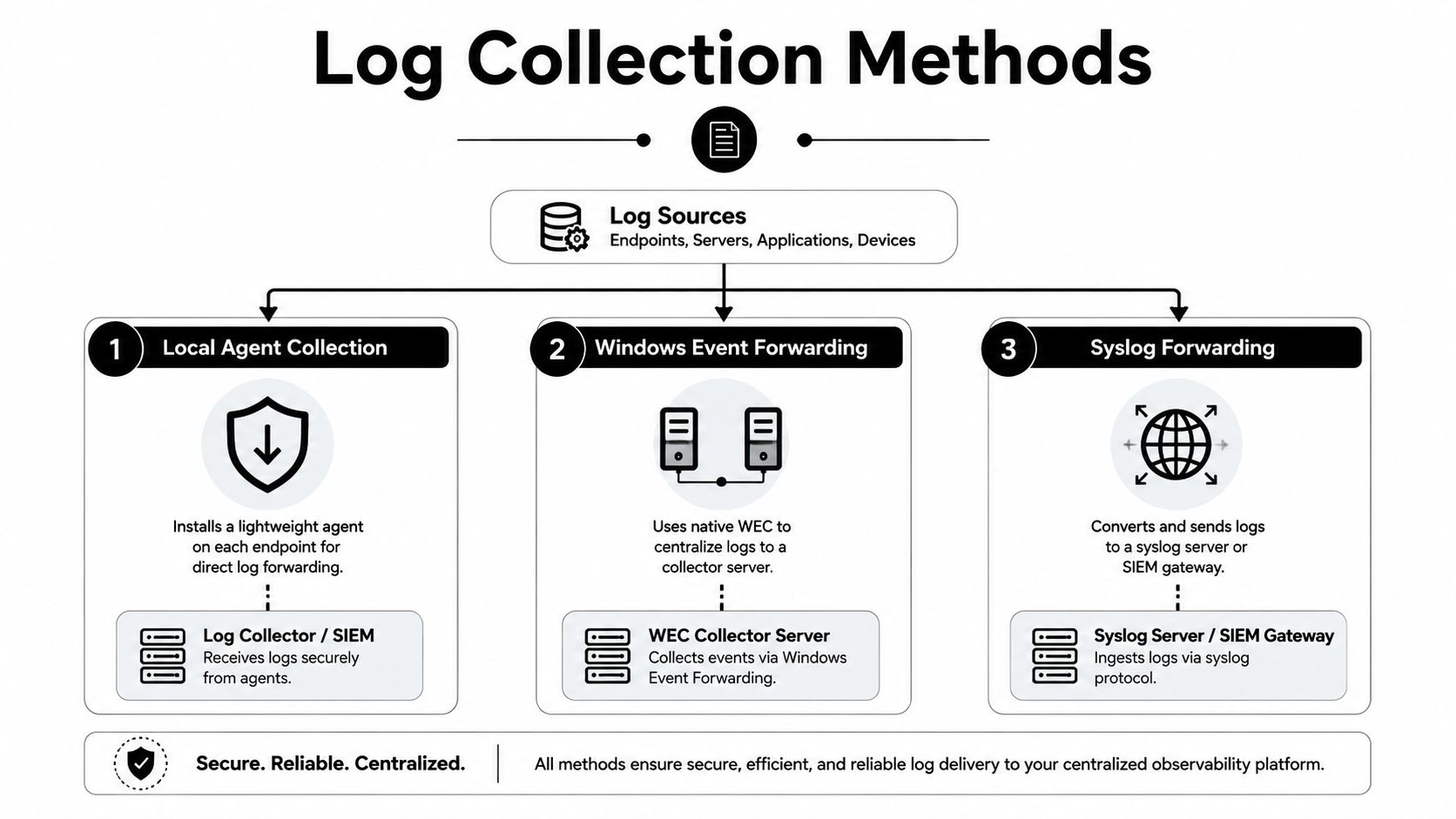
Remote gathering via Windows-native forwarding or an agent enables operational visibility. By default, this differs from forensic collection. During an incident, what matters is whether logs were kept in a way that resists tampering and rollover. Sending data to a central repository becomes important when endpoint logs might already be truncated or erased.
A local
.evtxfile provides a snapshot. A centralized copy provides continuity.
When your environment relies on agent-based collection, Unified Security Stack can ingest Windows Event Logs straight from endpoints via agents, offering an operational route to central visibility without manually copying files. For teams seeking a practical starting point for centralized collection architecture, the centralized log management overview is a useful reference.
The most effective collection configuration is typically a combination of native forwarding and endpoint agents. Native forwarding keeps telemetry moving from domain-joined systems. Agents provide direct ingestion, routing control, and more adaptable pipeline handling when needed. What fails is waiting until after the alert to determine how the logs should have been retained.
Open-source SIEM platforms shift the cost dynamics here. With Unified Security Stack, teams can create an enterprise-grade Windows event log workflow without licensing fees making collection design a budgeting exercise. That helps keep endpoint telemetry, central storage, and review workflows aligned from the outset.
Another pitfall appears repeatedly in incident rooms. Opening, converting, or handling logs in a manner that changes metadata can taint evidence. When that occurs, your timeline is no longer clean enough for a firm forensic assertion. In a regulated setting, it can turn a valuable artifact into a fragile one.
Parsing and Normalizing Windows Events for SIEM Ingestion
Raw Windows events become useful only when all analysts can read them in the same manner. Parsing and normalization perform that task. A SIEM that cannot reliably interpret event ID, timestamp, source, user, severity, and the message body amounts to little more than a storage bucket paired with a query bar.
Structure is the whole game
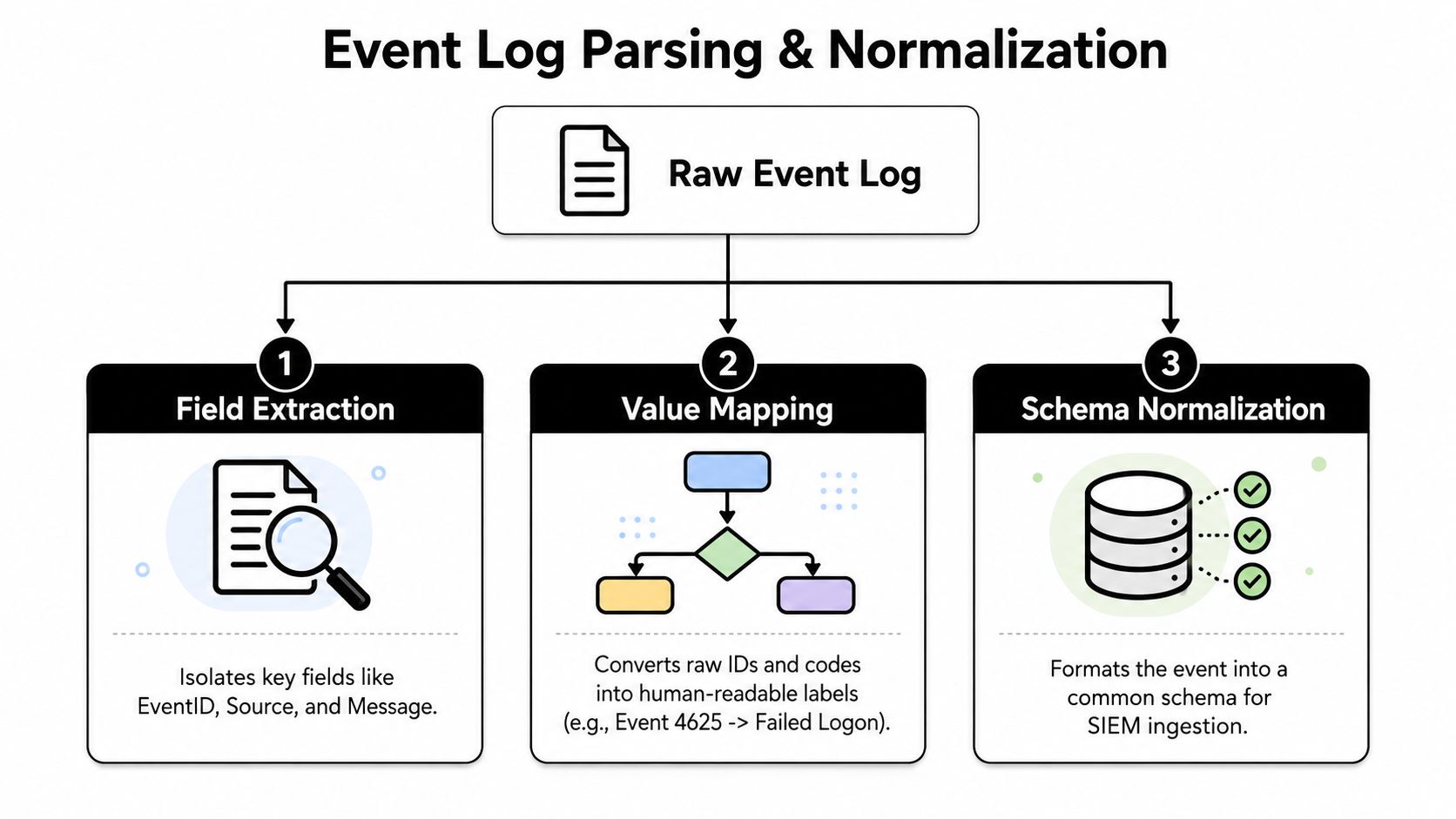
Windows events come with structure already. Every record contains fields including event ID, timestamp, source, user, severity, and a message payload, which is why these records enable correlation rather than simple viewing. Parsing converts those fields into searchable data. Normalization maps them to shared labels across disparate sources so the SIEM can compare one event stream against another.
That value becomes clear quickly when moving between platform generations. Microsoft maintains mappings between current and older event IDs, helping analysts work across versions without losing meaning. 1102 still conveys the same integrity signal, the audit log was cleared, even as the platform changes.
Multi-channel telemetry is where threat hunting gets real
Windows logging today reaches beyond the traditional Security, System, and Application set. Analysts frequently pair those with PowerShell Operational, DNS, and Defender logs, which strengthens threat hunting because script activity, command-and-control indicators, and malware remediation traces all converge in a single investigative workflow. That wider view detects fileless activity and living-off-the-land abuse when Security events by themselves appear benign.
A SIEM that normalizes should retain the meaning of each event while also fitting the data into a shared schema. Platforms such as Unified Security Stack assist here, since Windows logs can be ingested, normalized, and queried without forcing the analyst to manually reshape every source. The log management tools page is a sensible starting point if you want to see how that fits into a wider log pipeline.
The process is simple.
- Field extraction extracts the event details you require.
- Value mapping renders IDs and codes as readable labels.
- Schema normalization renders the result usable across searches, detections, and reports.
Normalization is not merely cosmetic. It is what enables correlation without guesswork.
The compromise is fidelity against speed of use. Strip away too much detail and investigative value is lost. Retain all raw data and the SIEM grows harder to query and slower to work with during an active incident. The proper balance is a shared schema that retains the event context analysts require at 2 AM.
Triage Strategies for High-Signal Windows Events
The majority of alerts are not emergencies, and that difference matters when you face a live queue at 2 AM. Analysts who remain effective know which events warrant immediate attention and which are simply background churn. That judgment starts with a small group of IDs and a repeatable triage process.
Start with the event classes that actually change risk
Certain categories of events move an investigation ahead faster than others. Failed logons, new services, scheduled tasks, log clears, account changes, and privilege escalation events generally deserve the first look because they align with real attacker behavior. Microsoft's monitoring guidance and broader forensic literature indicate the same pattern: authentication, privilege, and integrity events are where the signal lives.
The useful habit is to treat 4624, 4625, 4672, 4720, and 4726 as anchoring points, then branch outward. 4624 tells you a logon happened, 4625 tells you it failed, 4672 indicates that special privileges were assigned, while the account lifecycle events show whether the identity itself changed. If a log clear appears near those events, the incident warrants more scrutiny than a single authentication miss.
Use pivots, not just alerts
The Logon ID serves as one of the best pivot points in Windows analysis because it lets you connect authentication, process execution, and privilege-use events into one chain of activity. Analysts use that chain to ask a better question than whether something failed. They ask what sequence of actions happened under this identity, and what changed around it.
Thresholding is useful in a noisy environment. A pattern such as more than 5 failed logons in 10 minutes does not amount to a universal breach rule, but it is a helpful behavioral marker when paired with context and whitelisting. A single failed logon is usually noise. A cluster of them targeting one account or one host begins to resemble a password spray, a brute force attempt, or a badly scripted access failure.
Use this triage order in practice:
- Account activity first: inspect logons, failures, privilege assignment, and account changes.
- Integrity second: watch for audit policy changes and log-clearing behavior.
- Persistence next: review newly created services and scheduled tasks.
- Context last: match the event chain against routine admin activity you already trust.
Whitelisting trusted administrative routines is important, yet only if it is narrow and documented. Wide exclusions conceal the very behavior you want to detect. If you cannot justify why something is permitted, it likely should not be exempted.
A practical triage workflow must also connect to the rest of the stack. In open-source SIEM deployments, the goal is not merely to view the event, but to move from raw Windows telemetry to repeatable handling and compliance output without license friction. The detection engineering workflow should ease that handoff, so analysts can retain high-signal events, route them into cases, and keep reporting ready for audit and management review.
Building Detection Rules and Correlation Logic
A rule that triggers too late merely documents what has already occurred. Effective ones catch a sequence early enough to leave the attacker exposed, and they do so in a manner a weary analyst can rely on at 2 AM.
Preconfigure the telemetry before you need it
Strong detections rely on the telemetry you have already chosen to retain. Enable the full Advanced Audit Policy, enable command-line auditing, deploy Sysmon with a curated configuration, and increase the Security log maximum size so valuable history does not vanish during a wrap cycle. When those settings are absent during an incident, the earliest signs of compromise are frequently lost before the review begins.
Windows activity seldom comes as one clean event. A failed logon may be followed by a privilege change, then a process launch, then a log clear. If you alert only on the final step, you overlook the chain that explains how the host was used.
Build rules around attacker behavior, not event spam
Correlation is most effective when it reflects how attacks unfold. Service-based persistence should link service installation or modification to the surrounding authentication trail. Tampering should connect audit policy changes to later log clearing. Living-off-the-land abuse should tie process creation to the account context and the parent process tree.
Logon ID serves as the bridge that holds those events together. Thresholds and whitelists remain important, but they should reinforce the sequence, not take its place. A rule that describes attacker behavior is simpler to tune than one that merely watches for volume spikes.
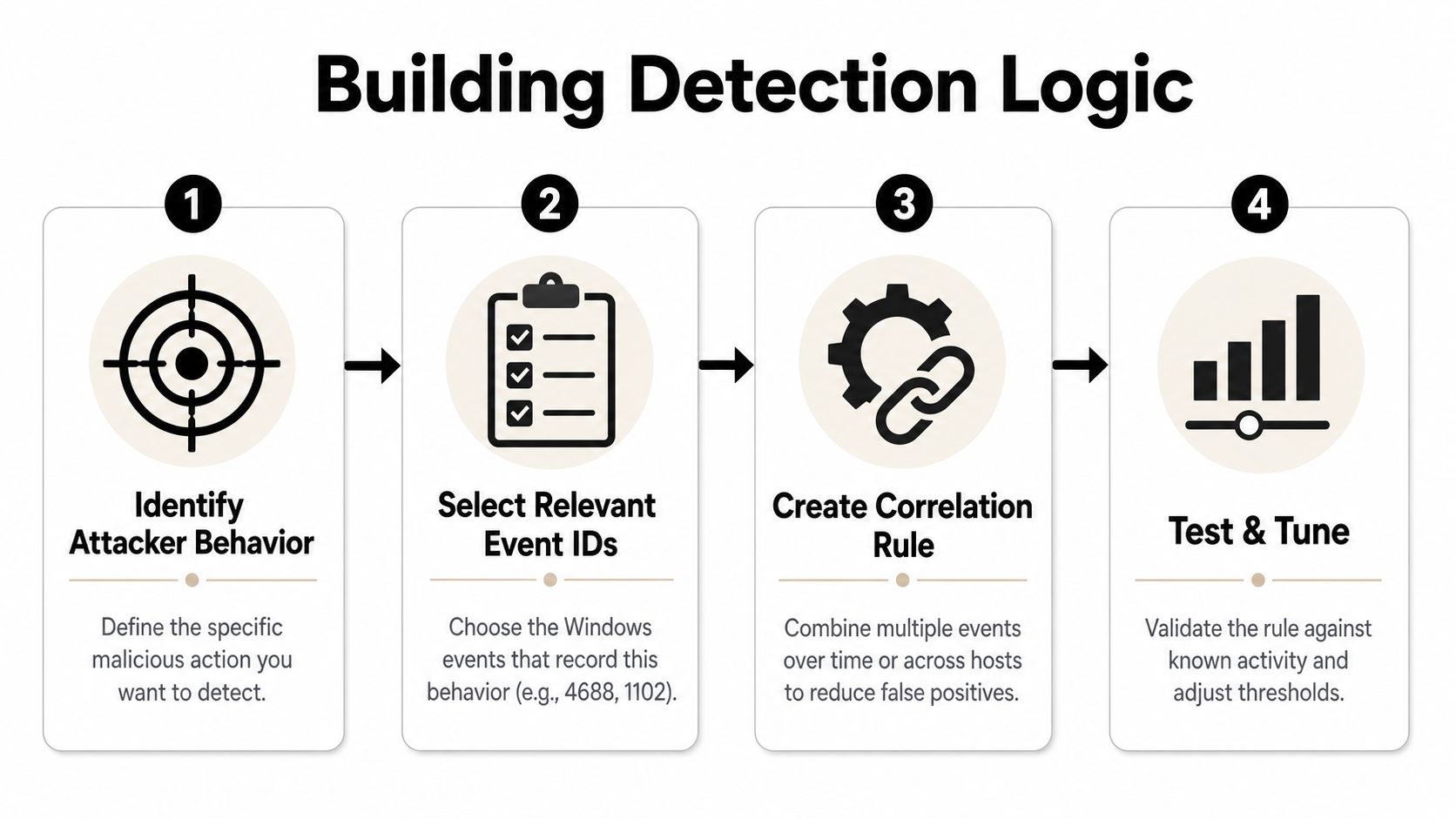
A practical rule-building loop looks like this:
- Identify attacker behavior you care about.
- Select relevant event IDs and document that activity.
- Create a correlation rule that merges events over time or across hosts.
- Test and tune relative to established admin and user activity.
The purpose of an open-source SIEM stack is not merely to show raw events. It is to shift from Windows telemetry to repeatable detections, then into cases and reports without licensing friction interfering. Unified Security Stack's detection engineering resource suits that workflow, so analysts can retain high-signal events, route them into handling, and keep evidence ready for audit and management review.
A single noisy alert is inconsequential. A linked chain serves as evidence.
The difficult part is balance. Overly broad rules produce alert fatigue, and the team starts tuning out the system. Overly narrow rules catch only the obvious cases. Effective detection engineering remains in the middle, where known-good activity is documented and suspicious sequences still stand out.
For teams that need to connect detections with governance work, the Technioz enterprise compliance resource serves as a helpful reference point.
Automating Response and Compliance Reporting Workflows
The final goal is not improved log review. It is a system that responds and reports without added manual effort. When Windows events move through detection, response, and reporting as a single process, the SOC no longer wastes time reconstructing the same narrative for each stakeholder.
Response should follow the signal immediately
When a correlated detection triggers, the response should already be defined. This may involve isolating a compromised endpoint, disabling an attacker account, or launching a custom playbook that collects more evidence before the attacker can pivot. Unified Security Stack supports predefined and custom response playbooks, which turns the alert into a closed-loop security action rather than a ticket that remains open until someone has time to review it.
Windows event log analysis delivers operational value. A storm of logon failures, a privilege escalation chain, or an attempt to clear logs can initiate containment before lateral movement begins. The team does not have to wait for a person to manually assemble each event when the control plane can do so consistently.
Compliance reporting should reuse the same evidence
The same telemetry that powers response can also feed audit reporting. Unified Security Stack ties detections and evidence to frameworks including CMMC, HIPAA, SOC 2, ISO 27001, PCI, GDPR, and GLBA, meaning the reporting layer can draw from the same normalized event store relied on for security operations. This matters because manual evidence gathering always becomes messy when an auditor requests a specific timeframe or event chain.
If you're comparing how enterprise compliance programs are being operationalized, the Technioz enterprise compliance resource is a helpful parallel reference for how controls, evidence, and reporting tend to align in real environments. The practical takeaway remains the same across frameworks: if logs are not normalized and retained properly, the report becomes a scramble.
The workflow worth targeting is simple. Events are gathered once, normalized once, correlated once, and then reused for both response and reporting. That is the difference between a security stack that creates work and one that reduces it.
Automation does not substitute for judgment. It eliminates repetitive tasks that hold judgment back.
A platform such as Unified Security Stack is especially valuable in Windows-heavy environments. It lets SOC teams move from raw event review to automated containment and audit-ready reporting without purchasing separate products for each step in the chain. That is a practical benefit when you need the controls but also need the budget to last through next quarter.
If you want to make Windows logs into an operational security and compliance pipeline, Unified Security Stack provides the collection, normalization, correlation, and reporting components in a single place. Visit Unified Security Stack to discover how its open-source SIEM and SOAR stack can back your Windows event log analysis workflow without increasing licensing pressure.