Active Directory Auditing: The Ultimate 2026 Guide
Many teams believe Active Directory is covered simply because the domain controllers forward some logs and the SIEM ingests data. Then an investigation begins, someone requests the failed logons that preceded the first privileged change, and no answer comes back. One controller holds a log, another has Kerberos events, cloud sign-in activity resides in a different console, and the timeline breaks precisely where the attacker moved laterally.
This scenario is typical in day-to-day SOC operations. Active Directory auditing seldom fails because security teams do not care. It fails because identity telemetry is scattered, policy settings differ across domain controllers, and cloud identity events remain outside a shared detection and compliance pipeline. If you run a hybrid estate, that gap widens. For organizations navigating managing compliance with Entra ID in SK, the governance questions are already shifting from "Are we still on-prem?" to "Can we prove identity activity across both environments without losing forensic detail?"
Table of Contents
- Introduction and Goals
- Configure Audit Policies and Identify Core Events
- Implement Log Collection Methods
- Ingest and Normalize Logs in Unified Security Stack
- Develop Correlation Rules and Response Playbooks
- Generate Compliance Reports and Adopt Best Practices
- Conclusion and Next Steps
Introduction and Goals
The close call usually looks unremarkable at first. A few authentication failures. A successful logon that did not raise concern. A privileged group change spotted hours later by an admin who was not even on shift when it occurred. The core issue is not only the attack path. It is that the evidence chain across on-prem AD and Azure AD or Entra ID is not connected in real time.
That is why Active Directory auditing occupies the center of both detection engineering and compliance operations. Security teams rely on it to catch identity-based attacks before they spread into domain-wide incidents. Auditors rely on it because HIPAA, PCI DSS, CMMC, and ISO 27001 all depend on dependable account activity, privilege use, and change tracking. If your logs cannot answer who authenticated, what changed, and whether the audit trail itself was modified, you lack a usable control.
Recent industry data indicates that 68% of organizations now run hybrid AD, while frameworks such as SOC 2 and HIPAA still require unified audit trails across cloud and on-prem forests, which makes hybrid collection essential according to Huntress on Active Directory auditing. This matches what many security teams observe in practice. The identity perimeter is no longer a single directory.
What this work needs to accomplish
A workable AD audit pipeline has to do six things well:
- Define scope clearly: Include domain controllers, privileged groups, admin workstations, Azure AD or Entra ID activity, and the systems that rely on identity decisions.
- Enable the right logs: Not all events hold equal importance. A limited group of identity events provides most of the detection value.
- Collect from both sides of hybrid identity: On-prem and cloud data must arrive in one shared analytical workflow.
- Normalize aggressively: Correlation fails fast when one source uses
TargetUserName, another usesuserPrincipalName, and a third retains display names only. - Detect sequences, not isolated events: A spike in failures carries greater significance when a privileged logon or directory change follows it.
- Map evidence to controls: Security monitoring ought to generate compliance evidence, not operate alongside it as a standalone project.
Security teams do not lose investigations because data is missing everywhere. They lose them because the correct data is not gathered consistently at the identity layer.
The practical objective is straightforward. Create an audit stream that enables the SOC to detect abuse early, allows incident responders to reconstruct events, and provides risk teams with defensible reporting without manually collecting screenshots from multiple consoles.
Configure Audit Policies and Identify Core Events
Most ineffective AD audit programs break down at the first control point. The policy is present, but it is not linked properly, the incorrect subcategories are turned on, or the team believes member servers will produce the same identity telemetry as domain controllers. They will not.
What has to be enabled
The clean way to do this is through Advanced Audit Policy Configuration in a Group Policy Object linked to the Domain Controllers OU. This is important because Kerberos and directory-service events do not appear universally across every host. If the GPO is linked in another place, or not applied consistently, your SIEM receives an incomplete identity story and your detections turn into guesswork.
The audit subcategories worth explicit attention are under these areas:
- Account Logon: Required for Kerberos ticket activity and authentication flow.
- Logon and Logoff: Required for successful and failed logons linked to host context.
- Account Management: Necessary for account creation, modification, and group changes.
- DS Access: Required for sensitive object access and DCSync-related visibility.
According to CyberDefenders' Active Directory auditing overview, Active Directory auditing relies on a high-value working set of Windows Event IDs including 4624/4625, 4672, 4768/4769, 4720/4738, and 4662, and these depend on correct GPO linking and policy validation on domain controllers for visibility.
Core Active Directory audit events
| Event ID | Category | Threat Technique |
|---|---|---|
| 4624 | Logon success | Suspicious interactive or network access confirmation |
| 4625 | Logon failure | Password spraying and brute-force patterns |
| 4672 | Privileged logon | Use of elevated rights and admin context |
| 4768 | Kerberos authentication service | TGT request tracking and authentication flow |
| 4769 | Kerberos service ticket | Kerberoasting visibility and service ticket anomalies |
| 4720 | Account management | Unauthorized account creation |
| 4738 | Account management | Risky account changes and identity tampering |
| 4662 | DS Access | DCSync-related object access monitoring |
A distinct access review process can also assist in this area. If you need a practical supplement to event logging, Unified Security Stack Access Rights Auditor represents one example of a tool built to monitor assigned permissions and suspicious Active Directory access changes.
How to validate at the source
Do not stop once policies are deployed. Validate them.
Create a small validation routine on a lab or controlled production window:
- Trigger expected activity: Reset a password, create a test user, and modify group membership within a limited, controlled scope.
- Check the domain controller directly: Verify the event appears in the local security log before you fault the SIEM.
- Verify metadata quality: Ensure usernames, target objects, and timestamps are consistently populated.
- Look for gaps across controllers: When one domain controller records the event and another does not, the cause is likely policy drift or forwarding problems.
Practical rule: Without validating events through test actions, you cannot tell if the policy functions. You merely know a GPO is present.
Teams also learn a trade-off here. Enabling everything produces a noisy security log and greater storage expense. Enabling too little leaves the SOC blind to the very identity techniques attackers rely on. The correct approach is not maximum logging. It is focused logging of the event families that matter, then validation and consistent forwarding.
Implement Log Collection Methods
At 2:00 a.m., locating a log source is seldom the challenge. The challenge is demonstrating why a privileged group change on a domain controller, an Azure AD sign-in, and a VPN event form part of one investigation. Collection design determines whether that narrative can be assembled at all.
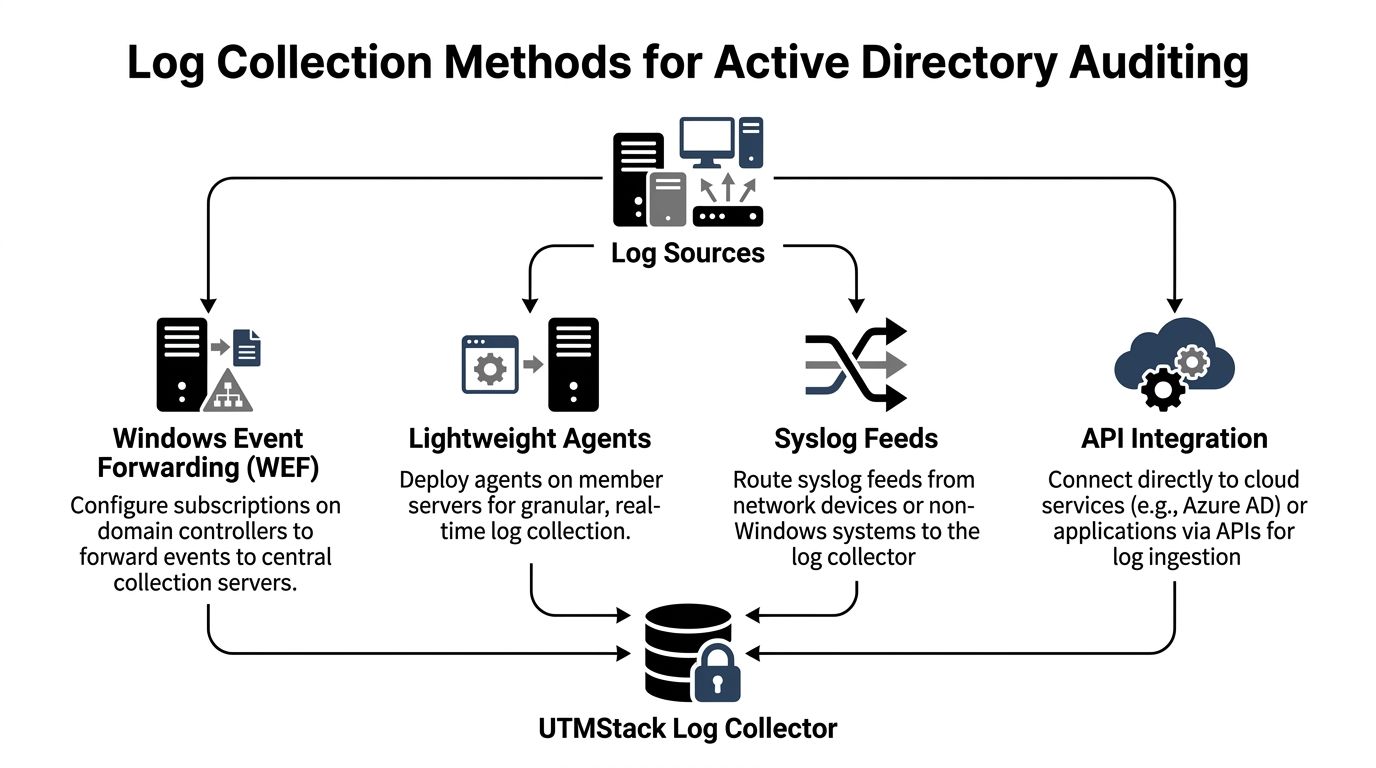
A practical hybrid model applies distinct collection paths to different sources, then sends them to a single location for search, correlation, and reporting. For Active Directory, that typically means native Windows collection on domain controllers, selective agents where delivery assurance is required, Syslog for adjacent infrastructure, and API pulls for Entra ID and Microsoft 365 identity activity. Teams seeking one operational view commonly connect those feeds to centralized log management in Unified Security Stack so that Windows, network, and cloud identity records land in a shared analysis layer.
Choose collection by source type
The collection method must match how the source behaves, not what tool is preferred.
- Windows Event Forwarding for domain controllers: WEF remains a practical option for Security logs when low overhead and native Windows transport are priorities. It performs best with narrow subscriptions and monitoring of collector health. Wide subscriptions quickly generate backlogs.
- Lightweight agents for high-value or unstable endpoints: Agents suit administrative workstations, jump servers, and systems beyond dependable WEF coverage. The cost is operational overhead. Agents require lifecycle management, version control, and tamper monitoring.
- Syslog for firewalls, VPNs, NAC, and Unix-like systems: Such events supply the access path surrounding identity activity. That context is important when an account appears suspicious but the initial signal originated from a remote access gateway or network device.
- API connectors for Azure AD or Entra ID: Cloud identity logs require direct collection via Microsoft APIs. Export jobs and portal-only review move too slowly for live investigations and keep cloud identity disconnected from on-prem account changes.
Hybrid failure points that break the timeline
Clock drift produces more harm than many teams anticipate. When domain controllers, collectors, and cloud sources are not synchronized to one time standard, sequence-based detections degrade quickly. Analysts can still query the logs. They simply cannot rely on event order during password spray, token abuse, or privilege escalation reviews.
Ownership gaps cause the next issue. Microsoft 365 data often belongs to one team, domain controller logging to another, and network telemetry to a third. The outcome is fragmented coverage and inconsistent retention. Microsoft's guidance on monitoring Azure AD activity logs and audit logs clarifies the cloud side adequately, yet many deployments still cannot link those records to on-prem AD events within a shared SIEM workflow.
That gap also matters for compliance. Auditors generally do not care which team owns which connector. They care whether you can demonstrate who changed access, where it occurred, when it occurred, and whether the record was retained.
What holds up in production
Stable collection pipelines usually share a few traits:
- Separate high-value identity streams from bulk endpoint noise: Domain controller Security logs and cloud identity audit feeds should each have dedicated collection paths and queue capacity.
- Monitor collector health and forwarding latency: A collector that fails without notice resembles a calm environment perfectly, until an incident makes you verify it.
- Protect the transport path: Adopt authenticated channels, limit collector permissions, and generate alerts for stopped services or failed subscriptions.
- Verify DS Access events arrive where expected: Teams often find Event 4662 absent despite thinking directory auditing has been turned on.
- Keep identity naming consistent across sources:
[email protected],COMPANYuser, object SID, and display name must all align at a later point. Collection provides the first opportunity to retain sufficient context for doing so effectively.
In production, I start with a limited scope. Security logs from domain controllers, Azure AD audit and sign-in logs, VPN, and privileged admin systems are first. Once those feeds are stable, tested, and properly retained, expanding coverage is straightforward. Starting broadly usually yields the opposite result: more data, less confidence, and longer investigations.
Ingest and Normalize Logs in Unified Security Stack
Collection brings data into the building. Normalization renders it usable. Raw Windows Event XML is rich, yet it isn't analyst-friendly and doesn't correlate cleanly with cloud identity data until field names, object identities, and timestamps are shaped into a common schema.
Normalize identity fields first
A useful baseline is simple. Extract the values that analysts and correlation rules will query all the time:
- User identity: username, user principal name, target account, initiating account
- Host identity: computer name, domain controller, source workstation, target system
- Event identity: event ID, event provider, log channel, action category
- Time identity: event time, ingestion time, normalized timezone
- Object identity: group name, directory object, service name, distinguished name where relevant
Consistency is the first gain. A privileged logon from a Windows event and an Azure sign-in event shouldn't demand two separate mental models. The parser should convert both into one common identity narrative with shared fields for actor, source, target, and time.
A practical implementation in Unified Security Stack begins with defining Windows and cloud identity sources, parsing the native event structure, and mapping the output into a single schema before indexing. That is where many teams cut corners. They ingest first, promise to normalize later, and later never arrives.
Reduce noise without hiding signal
Filtering too heavily during ingestion is an error because it strips data before you grasp its value. Filtering too lightly degrades query speed and causes alert fatigue. The balanced approach is to selectively suppress known-benign repetition while keeping security-relevant identity actions.
A useful way to think about it is by event behavior:
| Log pattern | Keep, filter, or down-rank | Reason |
|---|---|---|
| Repeated successful service logons from known systems | Down-rank | Useful for hunting, rarely urgent by itself |
| Failed logon bursts across many accounts | Keep and highlight | High detection value |
| Routine account management from approved admin workflows | Keep with context tags | Needed for audit trail and change validation |
| Sensitive directory object access | Keep | Often rare and high-signal |
Parse with investigation in mind first, then optimize for storage. After a field is dropped or flattened poorly, restoring context later becomes painful.
Index tuning also matters. Identity data ages differently than endpoint telemetry. Analysts typically require rapid access to recent authentication and change events, whereas compliance teams require longer retention for evidence and review. That doesn't call for one massive index. It calls for planning partitions and retention by use case, then verifying whether query patterns still perform under load.
One more practical note: keep the original event whenever possible. Analysts search normalized fields first. Investigators reach for raw event payloads when the normalized version isn't sufficient.
Develop Correlation Rules and Response Playbooks
A SIEM does not become useful for active directory auditing merely by storing the right logs. It becomes useful when it spots a sequence that a person would otherwise miss at speed.

Detections that hold up in production
Effective identity detections generally correlate several signals rather than triggering on a single event alone.
Password spraying pattern
rule "ad_password_spraying_candidate"
when
  failed_logons where event_id = 4625
  grouped by source_host, source_ip
  with distinct target_user count high
  over short_window
then
  alert severity = high
  tag = "identity_bruteforce"
This outperforms a simple failed-logon threshold because it seeks breadth across accounts from one common origin. That cuts down noise from a single user mistyping a password over and over.
Privileged logon after suspicious failures
rule "privileged_logon_after_failures"
when
  failures where event_id = 4625
  followed by privileged where event_id = 4672
  matched on user or source_host
  within investigation_window
then
  alert severity = critical
  tag = "privilege_escalation_path"
That sequence detects the sort of transition responders care about. It asks whether unsuccessful access attempts led to success with privileged rights.
Kerberoasting candidate activity
rule "kerberos_ticket_spike"
when
  kerberos_tickets where event_id = 4769
  grouped by requesting_user
  with service_ticket_volume anomalous
  over short_window
then
  alert severity = high
  tag = "kerberoasting_suspected"
You do not need a flashy model to make this valuable. You need a baseline that mirrors your own service-account behavior and enough discipline to allowlist expected bursts carefully.
After the initial detections are in place, operational teams usually benefit from a formal runbook system such as incident response playbooks in Unified Security Stack or a comparable SOAR workflow layer capable of linking identity alerts to containment actions and ticketing.
Response playbooks that don't create new problems
The largest error in automated identity response is overreaction. If each suspicious logon instantly disables an executive account or isolates a domain-connected server, the SOC causes its own outage.
A safer playbook structure looks like this:
- Enrich first: Retrieve recent sign-in records, recent modifications to groups, and details about the host.
- Decide by confidence: One anomaly might warrant a look from an analyst. A linked series might warrant acting at once.
- Contain with least disruption: Only take steps such as resetting a questionable account, ending sessions, or isolating a host if the evidence backs it up.
- Preserve evidence: Keep the triggering events and associated context stored before remediation alters the state.
An effective playbook lets responders act more quickly. A poor one merely shifts the blast radius away from the attacker and onto the SOC.
Here too, tuning counts for more than theory. Thresholds that seem reasonable in a lab frequently produce noise in production, since service accounts, legacy applications, and maintenance windows create identity activity that looks like abuse. Plan to revisit your rules, particularly for privileged logons and surges in ticket requests.
If your team wants a guided example before creating its own workflows, this video offers a helpful reference for considering automation and security operations in real-world use.
Generate Compliance Reports and Adopt Best Practices
Building AD reporting solely for auditors is the quickest route to making it worthless. The reports may appear polished, yet they do not mirror actual security operations. The first genuine incident then reveals the distance between compliance wording and operational visibility.
Build compliance views from operational telemetry
A more robust approach begins with the events being monitored and the detections layered on them. After that, you align those results with framework controls.
That approach works well because the same identity data supports multiple reporting views:
- PCI DSS: Authentication events, privileged access use, and change tracking around sensitive systems
- HIPAA: Access accountability, user activity history, and evidence of monitoring around protected environments
- CMMC: Auditability of identity activity, review processes, and incident evidence tied to access events
- ISO 27001: Control evidence for access management, monitoring, logging, and response procedures
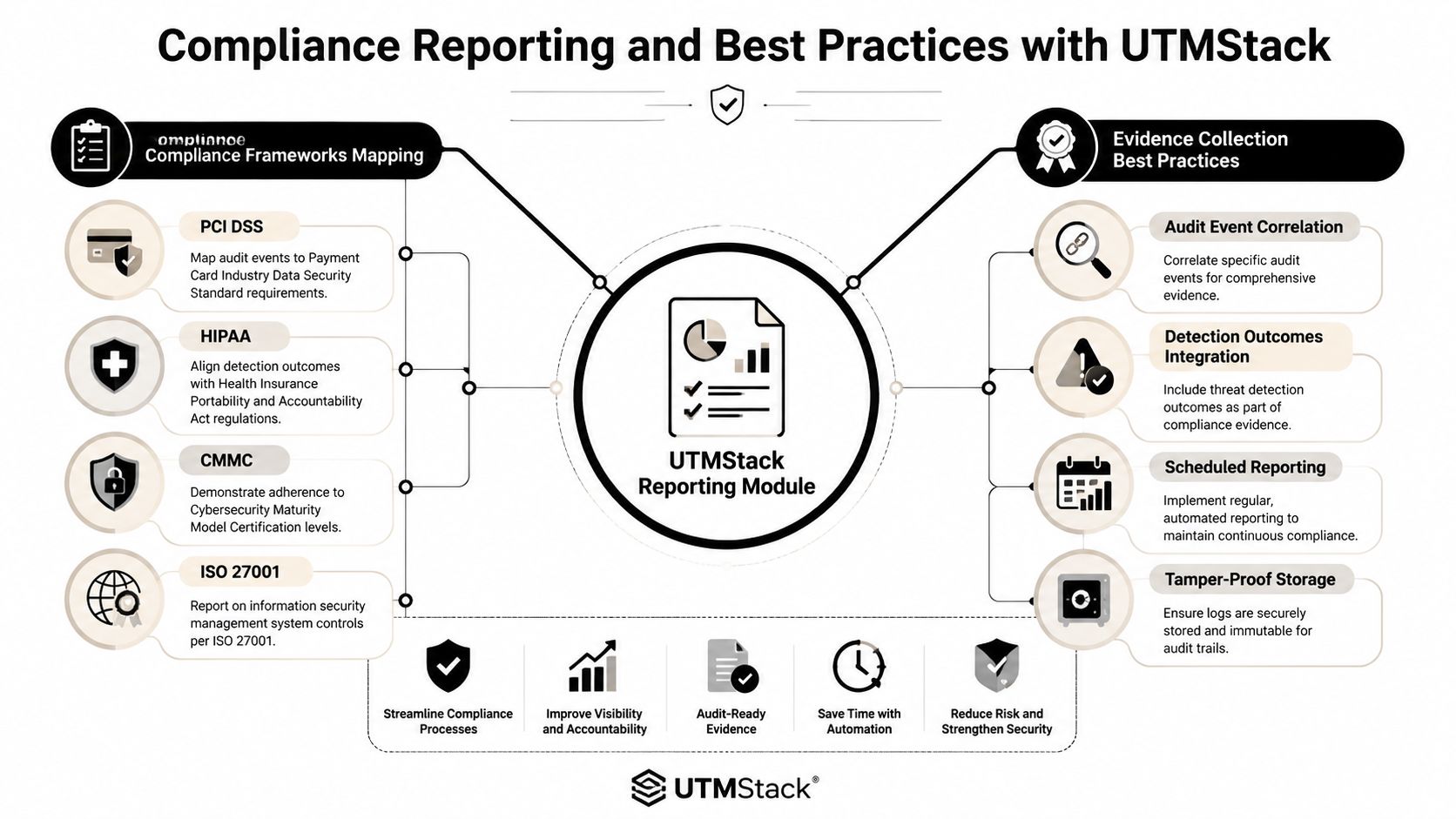
The strongest reporting modules do more than tally events. They maintain evidence chains. This requires the original event, the normalized record, the associated alert, the analyst notes, and the response outcome to remain connected, allowing a reviewer to follow a single identity incident from activity through action.
Governance checks that keep the audit program trustworthy
Industry best practices call for quarterly reviews of audit policies and privileged accounts, with special attention to dormant privileged identities that have been inactive for 90+ days, and continuous monitoring for tampering events such as 4719 and 1102, according to Lepide's Active Directory auditing guidance.
Such advice is practical rather than ceremonial. Audit settings change over time. Privileged accounts remain after their owners leave. Logging controls are modified during troubleshooting and never put back.
A durable governance loop includes:
- Quarterly policy review: Verify that the audit subcategories you intend to use remain enabled on domain controllers and that the test actions you expect still produce logs.
- Privileged account hygiene: Examine administrative groups, then remove or provide justification for inactive identities, particularly any that have gone untouched for an extended period.
- Tamper monitoring: Generate alerts for changes to audit policy and for security log clearing, since an attacker who turns off logging is targeting your evidence before anything else.
- Evidence validation: Take samples of completed reports and verify that the underlying events they link to are still present and can be searched.
Compliance reporting ought to result from genuine monitoring. If the reporting pipeline cannot address an investigator's questions, it will not satisfy a rigorous auditor either.
Executive dashboards are important as well, but they must remain truthful. Display coverage status, open tamper alerts, the state of privileged-account reviews, and significant identity detections. Steer clear of vanity graphics that suggest controls are operating well just because logs are arriving in volume.
Conclusion and Next Steps
Active directory auditing succeeds when the identity pipeline is viewed as a single system. Policy configuration, collection, normalization, correlation, response, and reporting all rely on one another. When any part is weak, the entire program becomes less trustworthy.
Hybrid identity increased the stakes. On-premises domain controller events and cloud identity activity must come together in the same workflow, or investigations will continue to fail at the worst possible time. Teams that verify logging at the source, normalize fields early, and automate the correct response steps gain something far more valuable than a checkbox audit trail. They gain a control they can actually run.
Begin with a proof of concept covering a small number of domain controllers and cloud identity sources. Confirm the core event stream, create a limited set of detections that are safe for production, and schedule quarterly reviews before configuration drift occurs.
If you're building a unified path for threat detection, response, and compliance evidence, Unified Security Stack warrants consideration as an open-source platform that combines SIEM, SOAR, XDR, identity auditing, and reporting in one operational workflow.