Antivirus and Firewall: Building Layered Defense with SIEM
Advice to install antivirus and turn on the firewall remains widespread. It is also insufficient. Such controls can stop malicious code and unwanted traffic, yet they do not on their own link an endpoint detection to the earlier firewall event, pinpoint a compromised identity, or inform an analyst if a policy change was authorized.
This operational difference is significant. Firewall and antivirus serve as basic controls rather than full detection and response platforms. Each safeguards distinct areas, generates distinct evidence, and both are vulnerable to evasion, misconfiguration, overload, or tampering. A SIEM or XDR platform provides the missing context: it gathers events, correlates activity, and transforms separate alerts into an incident that security teams can examine and contain.
Table of Contents
- Why Antivirus and Firewall Alone Are Not Enough
- Comparing Antivirus and Firewall Capabilities
- Building Layered Defense with Complementary Controls
- Deployment Best Practices and Performance Sizing
- Integrating Telemetry with SIEM and XDR Platforms
- Designing Automated Response Playbooks
- Mapping Controls to Compliance Frameworks
Why Antivirus and Firewall Alone Are Not Enough
Many organizations roll out endpoint antivirus and network firewalls during the early stages of their security programs. The error occurs afterward, once installation is viewed as evidence of protection. A firewall might block an unwanted connection and antivirus might quarantine a file, but neither control necessarily grasps how those events relate, which user was involved, what cloud workload was reached, or what activity occurred next.
The perimeter and endpoint boundary
A firewall governs network traffic. Antivirus finds or deletes malicious code on an endpoint. Separate coverage defines the dividing line clearly, neither replaces the other, since network controls cannot remediate compromised endpoints, and endpoint solutions cannot enforce traffic policies across an entire environment. This differentiation is increasingly vital as attackers focus on edge devices. Recorded Future noted that 17% of actively exploited CVEs targeted edge-security and gateway products, such as SSL-VPNs, next-generation firewalls, secure gateways, and remote access portals. Recorded Future's H1 2025 malware and vulnerability research provides that context.
Encrypted traffic introduces a further visibility gap. If a firewall cannot examine the pertinent SSL/TLS sessions, it may observe an allowed connection but not the payload, whereas antivirus may only see the delivered file or process afterward. Even so, a new attack can avoid a signature, run via a trusted tool, or exploit a legitimate account.
Alerts without context become workload
Standalone tools generate useful signals, but analysts still need to answer basic questions:
- What happened first? An allowed connection, a modified policy, a suspicious process, or an unsuccessful login?
- Which asset is affected? A workstation, server, cloud workload, or security appliance?
- Was the control working? Did a scan finish, was a file quarantined, or was logging turned off?
- What happened next? Lateral movement, persistence, data access, or recurring outbound traffic?
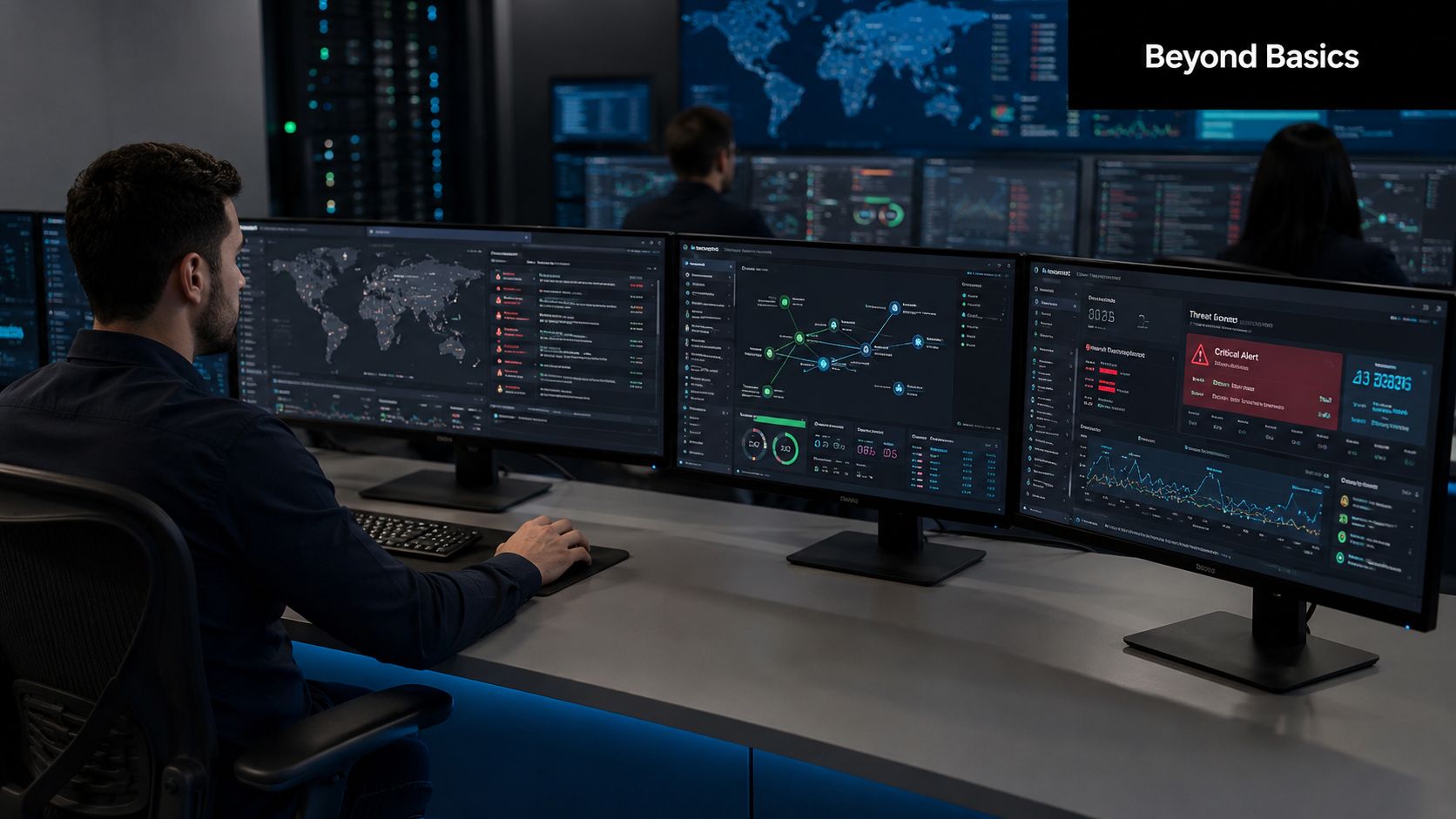
A SIEM or XDR platform can connect those answers across endpoints, firewalls, identity systems, cloud services, and vulnerability data. Without this correlation layer, teams frequently examine alerts one by one and overlook the sequence that proves compromise.
Architectural rule: Consider antivirus and firewall as enforcement points and sources of telemetry. Do not view either as the incident timeline.
Comparing Antivirus and Firewall Capabilities
Antivirus and firewall overlap in their goals, yet not in where they operate. Antivirus sits near the workload and inspects files, processes, and endpoint behavior. A firewall resides on a network path or cloud control plane and assesses connections, policies, and traffic attributes.
Commercial antivirus tools originated in the 1980s, when early products scanned local systems for signature codes associated with known viruses and isolated identified threats, as described in Security.org's annual antivirus market report. Current products preserve that detect, classify, and quarantine approach while incorporating behavioral analysis, cloud intelligence, and automated remediation.
Firewalls enforce what can be reached. They may block traffic based on policy, limit access between network zones, and inspect sessions when decryption is active. They cannot decide if an allowed application is malicious, if a user account is compromised, or if an endpoint is already infected.
Antivirus vs Firewall Comparison
| Aspect | Antivirus | Firewall |
|---|---|---|
| Primary location | Endpoint, server, or workload | Network edge, internal segment, cloud, or host |
| Main decision | Whether code or behavior appears malicious | Whether traffic should be allowed, denied, or inspected |
| Typical evidence | Scan result, detection, quarantine, remediation, tamper event | Allow or deny decision, connection attempt, policy match, session and inspection result |
| Strongest use | Detecting and containing malicious files and endpoint activity | Controlling communications and reducing unauthorized network access |
| Common limitation | Unknown or fileless activity may evade simple signatures | Authorized or encrypted traffic may conceal harmful activity |
| Operational concern | False positives, resource use, exclusions, and agent health | Rule sprawl, inspection overhead, policy drift, and audit readiness |
Antivirus effectiveness needs evaluation across both protection and usability. AV-Comparatives' 2025 real-world test covered 428 attack cases, with top products reaching 100% or 99.5% protection rates. AV-Comparatives' published test reference also accompanies enterprise evaluation data reporting a Trellix Endpoint Security configuration with 97% total accuracy and 0% false positives. Those findings show why detection and false-positive behavior should be assessed together.
Firewall capacity also calls for an equally realistic view of performance. A vendor's forwarding number is insufficient when production policy demands SSL/TLS decryption and inline antivirus inspection. A 2024 academic test of FortiGate 40F and 1500D found steady virus detection on both appliances, though the higher-end 1500D did better under HTTPS traffic with inspection features enabled. The academic FortiGate evaluation enables capacity planning for inspected traffic instead of nominal forwarding by itself.
For a deeper architectural distinction between centralized monitoring and endpoint protection, review this SIEM and antivirus comparison.
Building Layered Defense with Complementary Controls
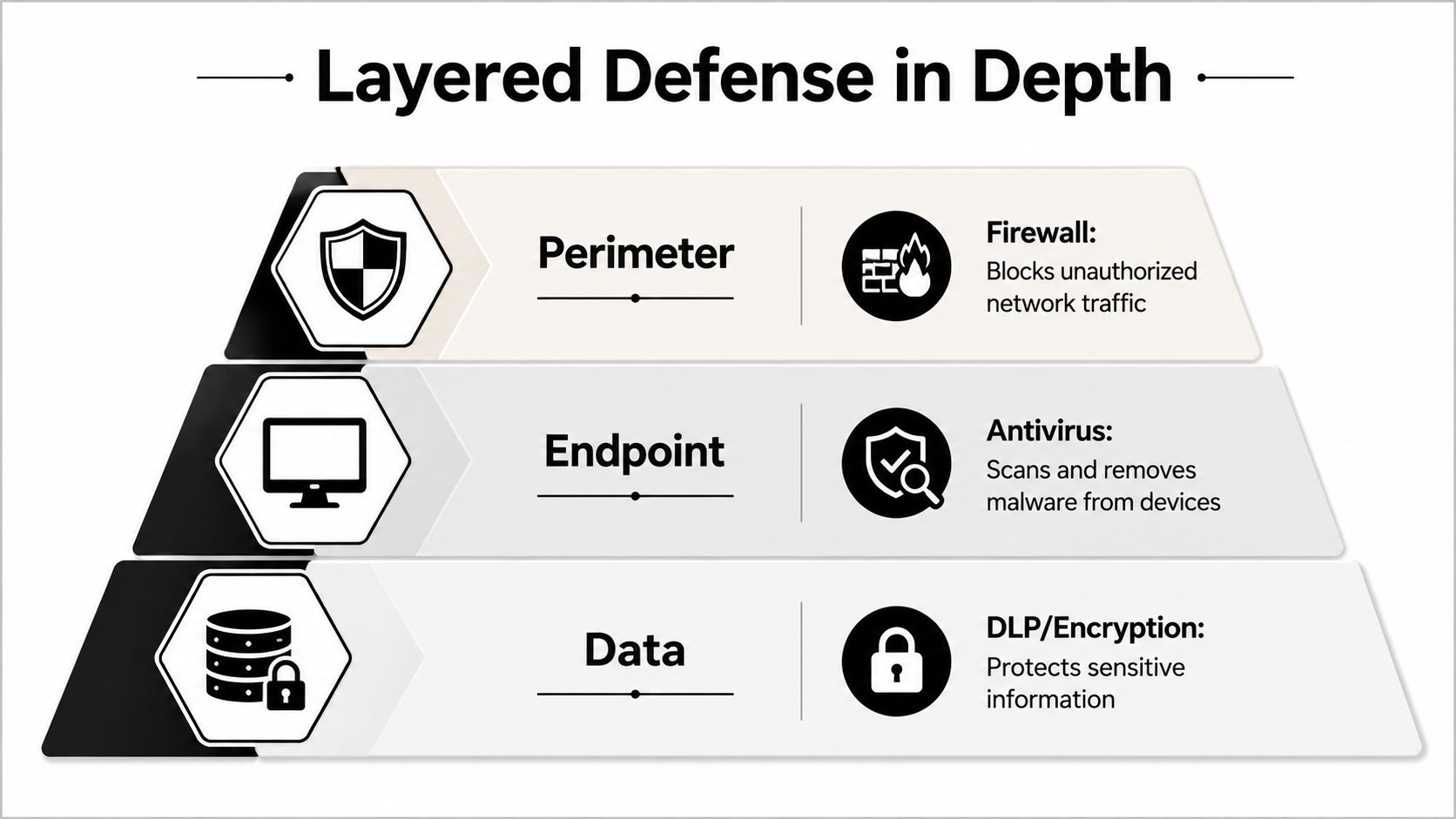
A layered architecture gives each control a defined function and presumes that any layer may fail. The firewall reduces exposure and constrains communications. Antivirus reviews activity on the endpoint. Data loss prevention, encryption, identity controls, vulnerability management, and backups cover risks that neither control can resolve.
Overlap is useful, duplication is not
The firewall can stop a known command-and-control destination before an endpoint reaches it. When the connection is permitted, antivirus might identify a downloaded payload or suspicious process. When both controls send events to a common platform, analysts can establish whether the firewall blocked delivery or the endpoint received and executed the content.
This progression holds greater value than either alert independently. It separates blocked activity from successful evasion, which alters decisions about severity, containment, and evidence preservation.
The remaining gaps are predictable:
- Encrypted traffic: If proper decryption is absent, the firewall may see only limited payload detail.
- Novel attacks: Detection that relies on signatures may overlook behavior it has not seen before or that is heavily obfuscated.
- Lateral movement: An adversary with valid credentials can traverse systems without creating a standard malware file.
- Control tampering: A local firewall or endpoint agent can be turned off, changed, or set up incorrectly.
- Cloud and remote access: Traffic can avoid the traditional perimeter by using sanctioned cloud services or remote endpoints.
The security architecture should consequently link prevention to detection. Firewall policy changes, endpoint health, identity events, DNS activity, cloud audit logs, and data access all need to feed one analytical workflow.
Build the layers around failure detection
An effective design asks not only if a control blocks an event, but also if the organization can demonstrate that the control was active, up to date, and reporting. This requires monitoring agent status, firewall configuration changes, inspection health, scan completion, and log continuity.
The firewall and antivirus serve as the initial enforcement points. SIEM/XDR provides cross-domain context and detection history. Human analysts then confirm business context, determine scope, and authorize high-impact actions where automation could disrupt critical operations.
Deployment Best Practices and Performance Sizing
In production, deployment most often breaks down where security settings meet workload reality. Architects turn on every inspection feature, spread agents widely, and later find that throughput, latency, CPU, or application reliability has declined.
Size the firewall for inspected traffic
Begin with the traffic the firewall must decrypt and inspect, not the highest forwarding figure on a datasheet. SSL/TLS decryption, inline antivirus, intrusion prevention, application identification, and logging all draw on processing resources. The FortiGate test noted earlier shows why HTTPS inspection can create a gap between nominal forwarding performance and usable security capacity.
Test using a traffic profile that mirrors actual conditions. Cover business applications, remote access, cloud services, large file transfers, and peak encrypted sessions. Also evaluate policy changes and failure modes, because a firewall that fails open, fails closed, or bypasses inspection carries distinct operational risks.
An effective configuration review should inspect rule order, broad allow statements, shadowed rules, administrative access, logging coverage, and change approval. Teams seeking a practical starting point can find firewall configuration help as they create their own review checklist.
Keep endpoint protection effective and usable
Endpoint antivirus requires dependable agent deployment, up-to-date protection content, healthy management connections, and clear ownership of exceptions. Exclusions should remain narrow, documented, limited in time where possible, and rechecked after application changes. A wide exclusion may address a performance issue while eliminating visibility into a high-value directory or process path.
Endpoint operations should monitor:
- Agent health: Find devices that have stopped services, outdated status, or absent protection.
- Scan activity: Verify that scheduled and on-demand scans finish and generate records.
- Quarantine handling: Monitor detections, requests for restoration, and any recurring return of the same artifact.
- Tamper resistance: Generate an alert if users or processes try to turn off protection or change policy.
- Resource impact: Measure endpoint performance prior to and following inspection changes.
Hybrid environments introduce an additional design limitation. Cloud-hosted firewalls, remote endpoints, branch devices, and workload-specific controls might not operate under a single administrative plane. Firewall-as-a-Service and cloud-native architectures can make reachability and policy distribution easier, yet they still demand consistent logging, identity context, and configuration monitoring across providers.
Integrating Telemetry with SIEM and XDR Platforms
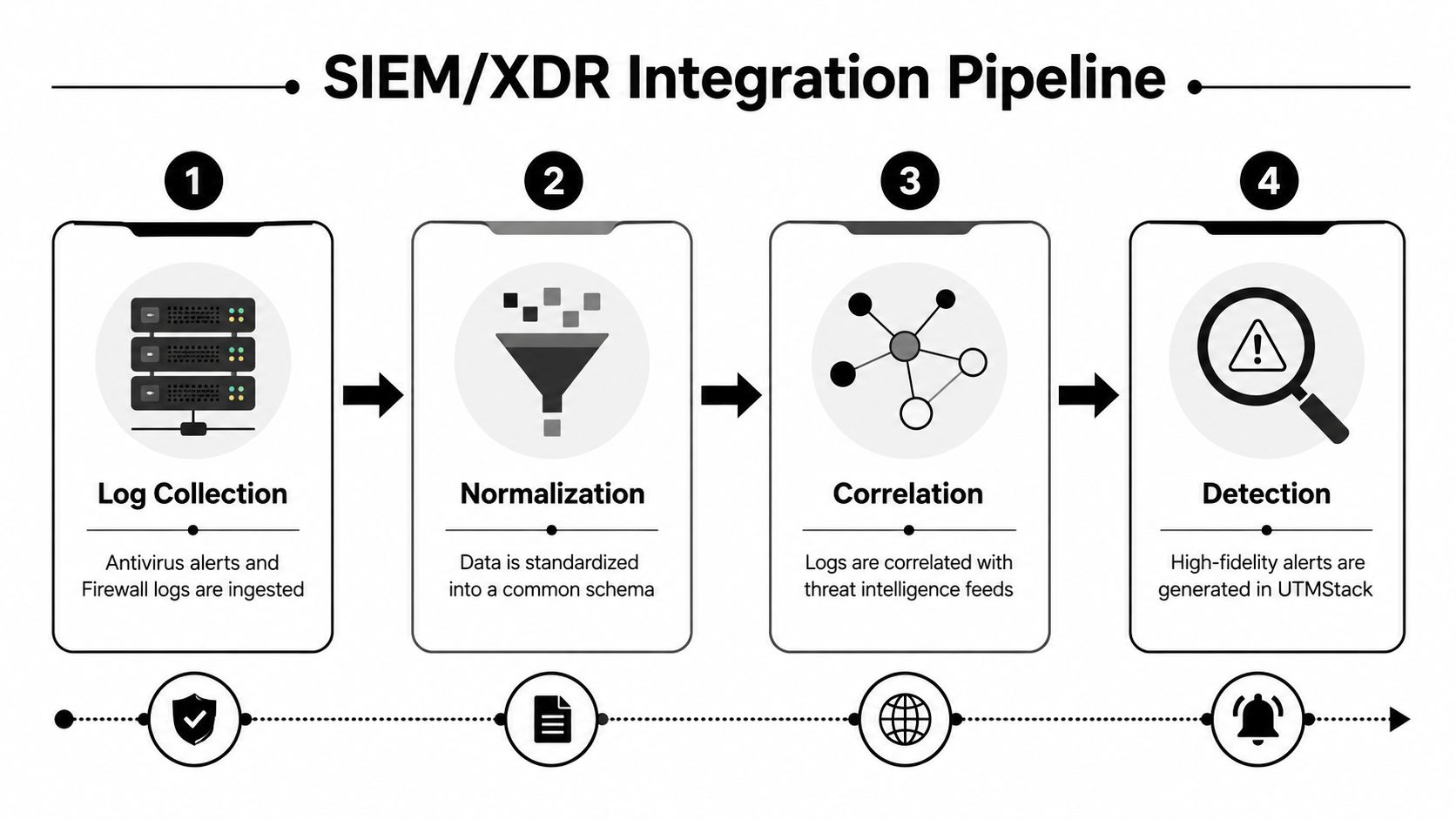
The gap between deployed controls and operational defense typically appears in telemetry design. Gather events that account for prevention, detection, control health, and administrative change. Then normalize those events so a correlation rule can match an endpoint event against a network event without depending on vendor-specific field names.
Collect evidence that answers operational questions
At minimum, ingest these event families:
- Antivirus results: Detection name, context for the file or process, host, user, action, and confidence.
- Quarantine events: Location of the artifact, quarantine action, restoration attempt, and remediation state.
- Firewall decisions: Allow or deny outcome, source and destination context, policy identifier, application, and inspection result.
- Connection attempts: Recurring failures, unusual outbound destinations, unexpected services, and shifts in communication patterns.
- Control changes: Antivirus policy updates, agent disabling, firewall rule changes, and administrative activity.
Through Syslog, APIs, and agents, Unified Security Stack can ingest security data, and its firewall integrations cover products such as Cisco, Fortinet, Palo Alto, pfSense, and SonicWall. Its centralized log management capability offers the collection layer required before normalization and correlation.
Write rules around sequences, not isolated alerts
A simple high-priority rule can link a firewall allow event to an antivirus detection on the same endpoint inside a set investigation window. That combination indicates the network control allowed delivery or communication, and the endpoint later encountered malicious activity. Enrich the alert with the user, asset criticality, destination reputation, vulnerability context, and whether the endpoint agent tried remediation.
Other useful correlation patterns include:
- Policy change followed by outbound communication: A change to a firewall rule followed by unusual external traffic could indicate administrative misuse or control impairment.
- Repeated denied connections followed by a successful connection: This can reveal an account or process that ultimately found an allowed path.
- Quarantine followed by recurrence: Recurring detections on one host could point to persistence, reinfection, or an incomplete cleanup.
- Scan failure plus agent tampering: A failed scan along with a disabled service should draw more attention than either event on its own.
PCI-related guidance states that antivirus mechanisms must be current, perform scans, generate audit logs, remain active, and not be alterable. KirkpatrickPrice's PCI-focused guidance establishes measurable telemetry for scan activity, log creation, and tamper resistance. Such fields belong in dashboards and detection rules, not just in an audit folder.
Designing Automated Response Playbooks
Automation should respond based on confidence and business impact, rather than to every antivirus alert. A playbook requires a trigger, enrichment steps, a containment action, an approval path, and a rollback method. Without these elements, automation may either leave an active threat unaddressed or disrupt a legitimate workload.
Start with the event sequence
A malware detection on a workstation paired with suspicious outbound communication is a stronger containment signal than a low-confidence detection without network activity. The playbook can quarantine the endpoint, retain relevant evidence, alert the analyst, and ask for a scan or remediation action.
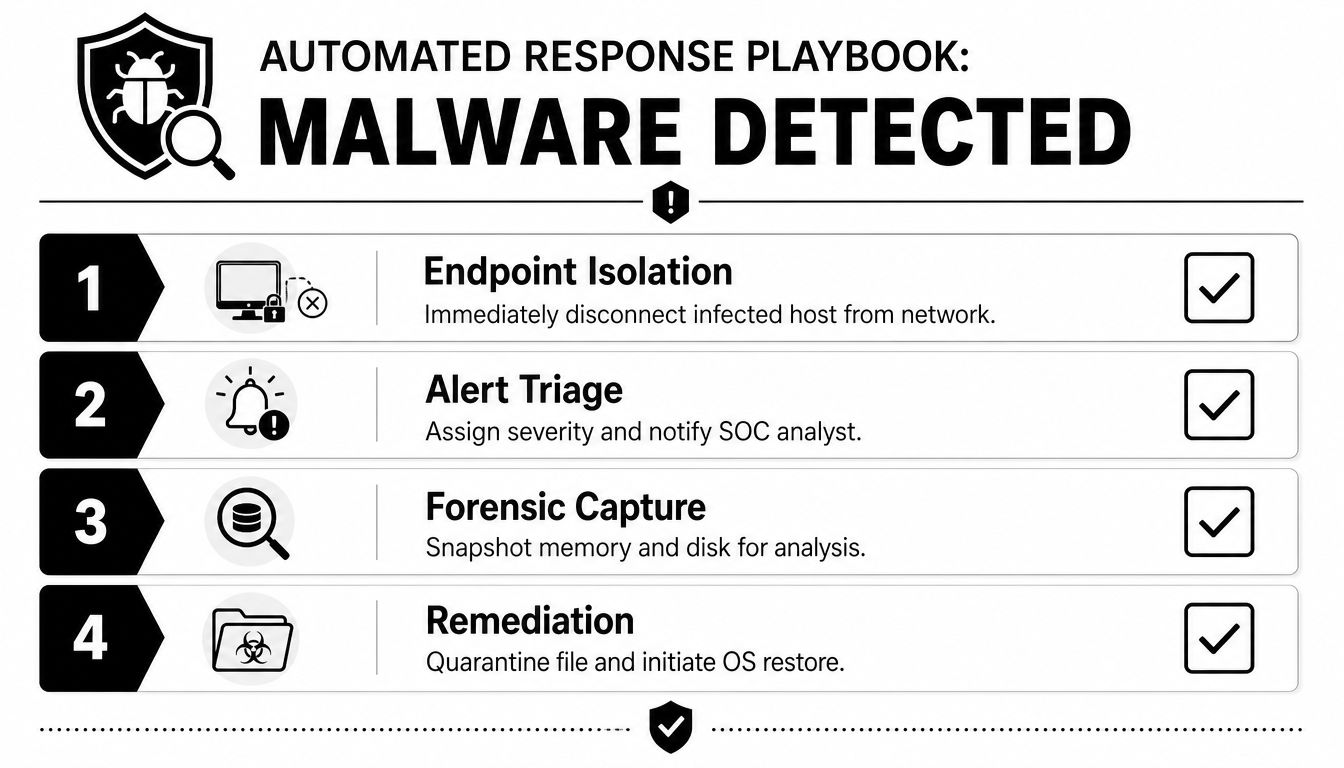
A suspicious outbound connection stopped by the firewall can initiate a targeted antivirus scan on the source endpoint. Repeated failed connection attempts can increase severity, start an identity review, and notify the responsible analyst. The response should retain the original firewall and endpoint events so investigators can reconstruct what occurred.
Separate containment from destructive action
Endpoint isolation can usually be reversed. File deletion, operating system restoration, account lockout, or blocking a business-critical service carries more operational risk. Use confidence thresholds and asset context to decide which actions execute automatically.
A workable playbook sequence looks like this:
- Enrich first: Include the asset owner, role, user, vulnerability status, recent sign-ins, and associated network traffic.
- Contain proportionally: Contain a workstation or limit a specific destination before enforcing a wider network block.
- Preserve evidence: Collect the available endpoint, memory, disk, process, and network information before remediation deletes artifacts.
- Verify recovery: Verify that the threat has been removed, protection is enabled, and the endpoint is checking in as expected.
- Roll back safely: Reinstate access only once an analyst approves it, and document why that decision was made.
A human approval step fits servers, clinical systems, payment workloads, and other assets where isolation may disrupt essential services. The playbook must state who may approve the action, how long that approval lasts, and what occurs when no one responds.
Teams can use Unified Security Stack incident response playbooks as a benchmark for structuring predefined and custom workflows. The key design principle is not automation as an end in itself. It's consistent, explainable response that cuts analyst delay without concealing uncertainty.
Mapping Controls to Compliance Frameworks
Antivirus and firewall controls generate audit evidence in addition to security decisions. If organizations view them solely as protective tools, they will struggle during assessments, since the auditor needs proof that controls were deployed, configured, monitored, maintained, and safeguarded against unauthorized change.
PCI DSS makes the requirement specific. Requirement 5 explicitly requires organizations to deploy antivirus software on systems commonly affected by viruses, and the same control family needs regular updates. The PCI DSS guidance positions antivirus as an official control in payment-card environments, not a discretionary recommendation.
Turn control activity into evidence
For antivirus, retain evidence that shows:
- Deployment coverage for systems within scope.
- Existing protection status and update activity.
- Scan schedules, completion outcomes, and exceptions.
- Detection, quarantine, remediation, and recovery events.
- Events involving agent health and tamper-resistance.
For firewalls, retain rule configurations, administrative changes, policy approvals, allow and deny logs, inspection settings, and proof that logging stayed enabled. That evidence should be tied to assets and control owners, rather than remaining as isolated exports without review history.
Map evidence to the framework in use
The same telemetry can serve different control objectives. A firewall rule change can underpin change management, access restriction, and monitoring evidence. Antivirus scan logs can underpin malware protection, system monitoring, and incident response. Endpoint isolation and firewall containment events can document response execution and recovery decisions.
Unified Security Stack's compliance workflows map detections and evidence to frameworks including CMMC, HIPAA, SOC 2, ISO 27001, PCI, GDPR, and GLBA. This type of mapping is valuable when it connects a requirement to a real event, configuration record, review task, and accountable owner. It shouldn't substitute for control testing, but it can lessen the manual effort needed to build an audit trail.
Microsoft's industry-test page reports Microsoft Defender Antivirus with a 6.0/6.0 Protection score, 100% scores in November and December, and a 99.8% real-world protection rate in the referenced test. Microsoft's industry testing information illustrates how vendor-neutral test results can augment internal evidence, although test performance does not prove that an organization's deployment is healthy.
AV-TEST's June 2025 Windows 11 evaluation tested 17 endpoint security packages, using nearly 1,400 zero-day malware samples and nearly 19,000 malware samples in its reference set, with 11 products detecting all attackers at 100%. AV-TEST's Windows 11 evaluation shows the range of current endpoint testing. Internal assurance continues to depend on deployment coverage, configuration, telemetry, and response evidence.
Unified Security Stack integrates antivirus and firewall telemetry into an open-source SIEM, SOAR, and XDR workflow, providing log collection, real-time correlation, automated response playbooks, and compliance evidence mapping for hybrid environments. Visit Unified Security Stack to assess how its integrations can link endpoint events, firewall decisions, detection rules, and audit workflows within a single operational platform.