What Is Vulnerability Scanning: A 2026 Guide to Cyber
More than 40,000 new vulnerabilities are disclosed annually, and that volume is one reason the global security and vulnerability management market reached USD 16.51 billion in 2024 and is projected to hit USD 24.47 billion by 2030 according to Grand View Research on the security and vulnerability management marketThat ought to reshape your understanding of what vulnerability scanning is.
It is not a quarterly housekeeping task. It is not a PDF report waiting in a ticket queue. In an effective SOC, vulnerability scanning is a continuous detection input that helps teams see where exposure exists, which systems matter most, and where compliance gaps are becoming operational risk.
If someone asks what vulnerability scanning is, the practical response is direct. It is the automated practice of inspecting systems, applications, and infrastructure for known weaknesses and misconfigurations so defenders can correct them before attackers take advantage of them. The deeper response is more valuable. Vulnerability scanning succeeds only when connected to asset inventory, prioritization, remediation, SIEM or XDR correlation, and audit evidence.
Table of Contents
- The Unwinnable Race Against Digital Risk
- How Vulnerability Scanning Actually Works
- The Five Core Types of Vulnerability Scans
- Beyond the Scan The Full Vulnerability Management Lifecycle
- Integrating Scan Data into Your SIEM and XDR
- Mapping Vulnerability Scans to Compliance Frameworks
- Best Practices and Avoiding Common Pitfalls
The Unwinnable Race Against Digital Risk
A single week can deliver hundreds of new CVEs. For security teams, the hard part is not recognizing that risk exists. The hard part is keeping asset visibility, prioritization, and response aligned while the environment continues to change beneath them.
That is why vulnerability scanning is significant. It offers defenders a repeatable method to uncover exposed systems, missing patches, weak configurations, and software that has moved outside policy before an incident makes the issue unavoidable.
Risk starts with exposure and context
In many environments, patching is not the first problem. The first problem is knowing what is present, what is reachable, and what has changed since the last review. A forgotten VM, a cloud workload no one tracks, or a remote endpoint that has missed several update cycles can remain outside normal operational oversight for weeks.
Scanning converts that blind spot into usable data. When done well, it helps teams answer four operational questions:
- What exists: Which assets are active across on-prem, cloud, remote, and ephemeral environments
- What is exposed: Which services, applications, and systems map to known weaknesses or unsafe configurations
- What changed: Which new hosts, images, or software versions introduced fresh risk
- What needs action first: Which findings belong in immediate remediation based on exposure, criticality, and active threat activity
Practical rule: When scan results fail to sharpen asset visibility and remediation priority, the program is generating reports rather than reducing risk.
Periodic scans miss how modern environments behave
A monthly scan cycle was reasonable when infrastructure changed slowly and most systems stayed in a single data center. That approach fails in hybrid estates, cloud-native environments, and MSSP operations, where tenants, workloads, and internet exposure can change every day.
A scanner alone cannot tell a SOC what is important at this moment. A critical finding on an isolated lab host differs from the same finding on an internet-facing application, a domain controller, or a payment system. Priority shifts again when the SIEM already observes suspicious authentication, exploit attempts, or endpoint alerts linked to that asset.
That is the operational shift many teams overlook. Vulnerability scanning is not merely a scheduled hygiene task. It is a continuous input for detection, triage, remediation, and audit readiness. SOC teams use it to bring technical exposure data into live investigations. MSSPs use it to distinguish noisy findings from tenant issues that require rapid action. Security leaders use it to demonstrate that remediation work follows risk and policy, not only patch cadence.
Teams that view scanning as a static report often become overwhelmed by backlog. Teams that send scan data into SIEM, XDR, ticketing, and compliance workflows can make stronger decisions under pressure and explain the reasoning behind them.
How Vulnerability Scanning Actually Works
A vulnerability scanner does not reason like a human assessor. It performs structured checks. It measures observed conditions against known weakness data. It searches for missing patches, exposed services, insecure configurations, and software versions tied to documented flaws.
According to Red Canary's explanation of vulnerability scanning tools, vulnerability scanning works by executing deterministic if-then scenarios against services and configurations and comparing the results to known flaw databases such as the CISA Known Exploited Vulnerabilities catalog. That same source points out that the process is non-intrusive, which means it identifies and alerts on probable weaknesses without actively exploiting them in the way penetration testing does.
What the scanner is really doing
The simplest way to describe it to a new analyst is to compare it with a building inspection. The scanner examines doors, locks, wiring, and safety systems against a known set of code violations. It does not set the building on fire to prove that the fire alarm fails.
That difference matters because scanning is often confused with offensive validation. A scanner is built to detect probable issues at scale. A penetration test is built to prove exploitability through controlled attack activity. Both are important, but they address different questions.
A practical scan workflow usually looks like this:
- Identify reachable assets spanning network ranges, hosts, applications, images, or cloud resources.
- Interrogate services and configurations by applying established checks for versions, settings, and exposed interfaces.
- Match findings to vulnerability intelligence and set severity with frameworks like CVSS.
- Generate remediation guidance for patch deployment, configuration changes, or compensating controls.
- Hand results to analysts for validation, review of false positives, and priority setting.
Credentialed and uncredentialed scans serve different jobs
Many weak programs depend too much on uncredentialed scans because those scans are simpler to deploy. That provides an attacker-style external view, but it overlooks a significant amount of internal risk.
A credentialed scan logs in to the target and examines the system from within. This generally yields better visibility into installed software, patch state, local configuration, and host-level weaknesses that a network probe cannot infer reliably.
| Aspect | Uncredentialed Scan (External View) | Credentialed Scan (Internal View) |
|---|---|---|
| Perspective | Sees the target like an outside observer | Sees the target with authenticated access |
| Best for | Internet exposure, open ports, exposed services | Missing patches, insecure local settings, installed software issues |
| Visibility | Limited to what responds externally | Deeper host and configuration insight |
| Typical blind spots | Internal misconfigurations, local package state, weak endpoint settings | Depends on reliable credentials and permissions |
| Operational trade-off | Easier to start, less invasive to credential handling | More complete data, more setup discipline required |
A scan without credentials shows what is visible from the street. A scan with credentials reveals what is broken inside the server room.
On its own, neither method suffices. Experienced teams use both. External scans reveal what attackers can reach from outside. Credentialed scans reveal the real condition of your internal attack surface and administrative hygiene.
The Five Core Types of Vulnerability Scans
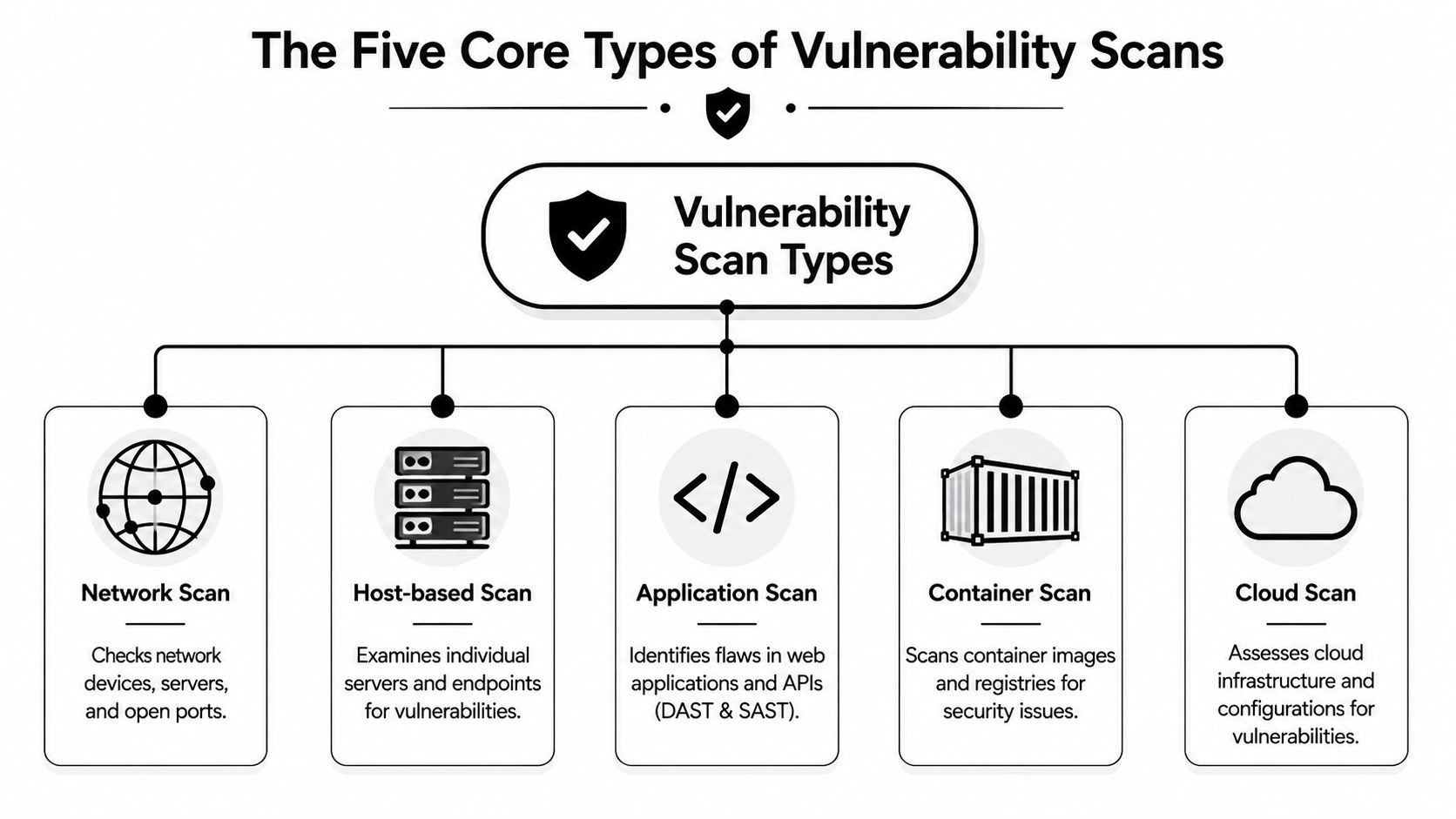
One scanner cannot cover every layer of modern infrastructure effectively. Networks, endpoints, web applications, containers, and cloud control planes each fail in distinct ways. Strong programs choose scan types according to asset class and operating model, not merely tool licensing.
Network scans
Network vulnerability scanners concentrate on infrastructure. They examine reachable devices, exposed services, open ports, and common misconfigurations on routers, firewalls, switches, servers, and perimeter systems.
They often offer the quickest way to uncover obvious exposure issues. They also help validate segmentation assumptions. If a scanner reaches a service from where it should not, that is a significant finding even before patch levels are reviewed.
Host-based scans
Host-based scanning examines the endpoint or server more closely. It can happen through agents or authenticated remote checks. The purpose is to review local operating system state, installed packages, patch status, and security-related settings.
In this context, teams generally find problems that network scans miss, such as outdated software components, weak local policy, or missing updates that do not reveal themselves clearly over the network.
Application scans
Application scanning is where many teams learn that running does not mean safe. Web applications and APIs fail differently from operating systems or network devices.
As explained in CoreWin's breakdown of DAST and SAST vulnerability scanners, application scanners are commonly split into DAST and SAST:
- DAST: Examines a live running application externally and emulates attack behavior against exposed functionality.
- SAST: Reviews source code without executing it and helps developers find defects earlier in the software lifecycle.
These methods complement each other. DAST helps reveal exploitable behavior in a deployed application. SAST helps catch risky coding patterns before release.
Container scans
Container scanning targets images and registries. Teams use it to find vulnerable packages, outdated base images, and embedded software components before workloads reach production.
Because containers move quickly and are replicated widely, if a bad image enters a pipeline, the same weakness can spread across many workloads rapidly. Container scanning is strongest when tied to CI/CD controls and registry governance, not merely occasional manual review.
Cloud scans
Cloud scanning typically targets infrastructure configuration and platform-level exposure. In practical terms, this often means checking how resources are configured, what permissions exist, and whether cloud services align with policy.
For security architects, vulnerability scanning begins to overlap with posture management. A cloud workload may be technically patched yet still exposed because a storage policy, identity permission, or security group is incorrect.
An effective program often blends all five types. The aim is not tool proliferation. The aim is coverage across the points where attackers gain a foothold.
Beyond the Scan The Full Vulnerability Management Lifecycle
Findings are generated by a scanner. Risk is lowered by a vulnerability management program. These are not identical.
Too many teams halt at detection. They execute scans, export CSVs, and create an enormous stack of tickets with minimal business context. Then everyone questions why the backlog expands more quickly than it contracts. The explanation is simple. Scanning without a lifecycle produces administrative work, not measurable security gains.
The workflow that actually reduces risk
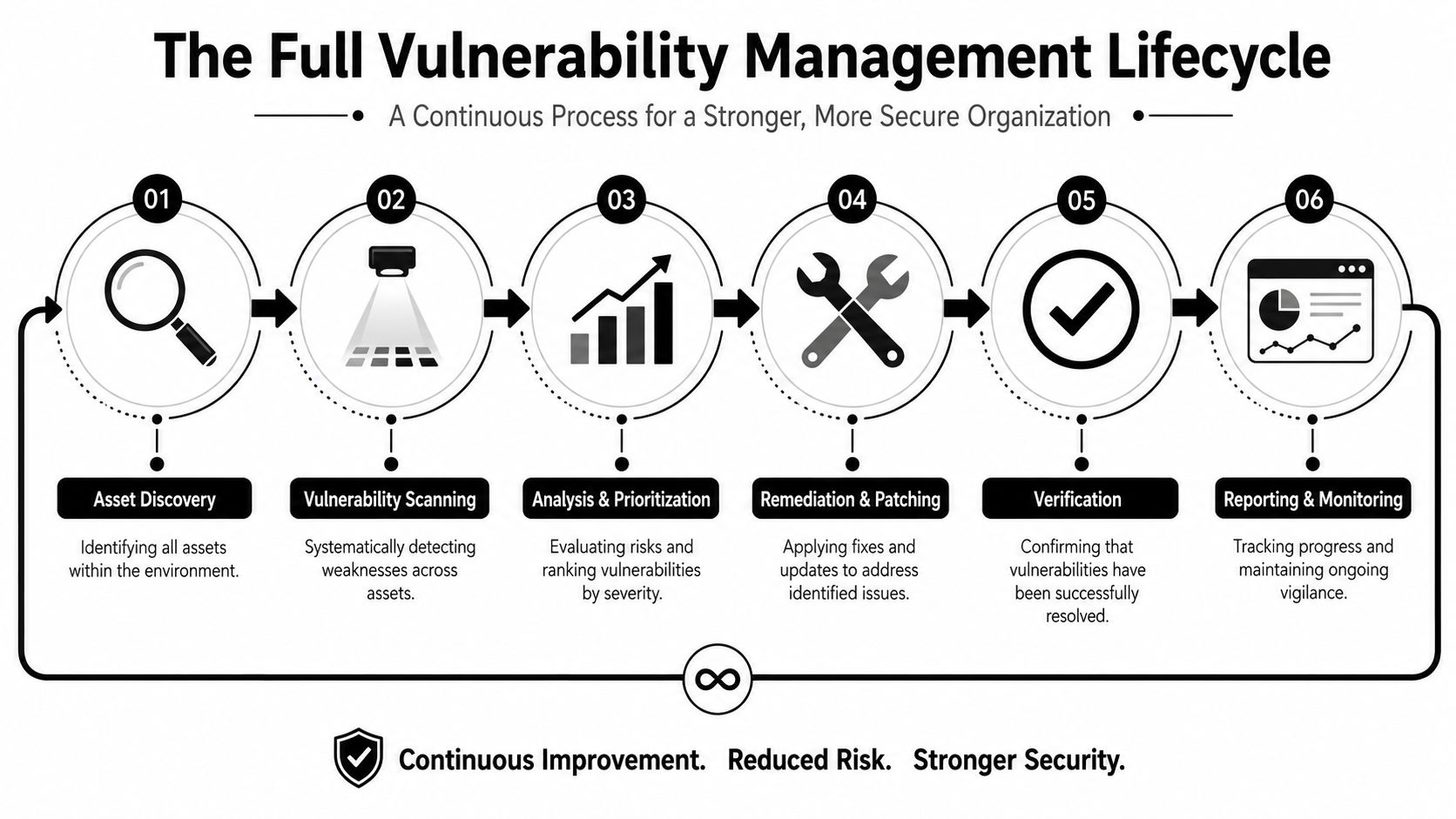
The formal sequence is widely recognized. Meegle's summary of vulnerability management and SIEM workflows describes the process as Asset Discovery, Vulnerability Scanning, Risk Assessment, Prioritization based on business impact, Remediation, and Continuous MonitoringThat structure is right because every stage depends on the one that precedes it.
In practice, each step answers a different operational question:
- Asset discovery asks what you have and what is within scope.
- Vulnerability scanning asks which known weaknesses exist.
- Risk assessment asks how serious those findings are in context.
- Prioritization asks what should be remediated first.
- Remediation Inquires which team can patch, reconfigure, isolate, or mitigate the issue.
- Continuous monitoring asks whether the exposure is no longer present and whether it comes back.
Many failed programs falter at the asset stage. When discovery is weak, every later part of the pipeline rests on poor assumptions. You cannot safeguard assets whose existence you do not know about.
Why prioritization fails in many programs
Another frequent breakdown is severity-only thinking. Teams rank by CVSS, work the highest items first, and still overlook the issues most likely to cause real harm. CVSS is useful. It is not sufficient.
A scanner can report that a vulnerability is severe. On its own, it usually cannot tell you whether that system faces the internet, holds sensitive data, can be reached by attackers from their current footholds, or already appears in suspicious activity within your SIEM. This is where exploitability context becomes important.
Wiz's discussion of vulnerability scanning notes that 60% of organizations overwhelmed by scanner noise cannot distinguish between assets that are exploitable and assets that are only theoretically vulnerable or otherwise mitigated. This issue appears in nearly every SOC. The queue becomes noisy. Analysts pursue high-scoring findings that have little operational importance, while risky combinations of exposure and live threat activity sit too long.
Field note: Prioritization improves when a finding is linked to asset criticality, reachability, identity exposure, and real-time security telemetry. It suffers when the ticket includes nothing beyond a CVE and a deadline.
Unified security platforms alter the workflow. Solutions that merge scanning with log correlation, endpoint context, and response automation can help teams shift from merely discovering a vulnerability to knowing that a vulnerable asset is exposed, business-critical, and acting suspiciously at this moment. That provides a far stronger rationale for remediation order.
Verification is also essential. When teams patch but do not rescan, they cannot tell if the exposure is closed, partly mitigated, or still there because of a failed deployment, outdated images, or a rollback. Mature programs view rescanning as evidence, not an optional cleanup step.
Integrating Scan Data into Your SIEM and XDR
Every time an analyst leaves the alert queue to check if the affected asset is vulnerable, exposed, or already under active attack, the SOC loses time. This delay explains why scanner data should be part of daily detection and response workflows rather than living in a separate dashboard that only the vulnerability team reviews.
If scan results remain isolated, triage quickly slows. An analyst notices suspicious PowerShell on an endpoint, then looks in the SIEM for related authentication events, then searches for the newest scan result, then tries to determine the system owner and whether it faces the internet. By the time the full picture is assembled, the queue has expanded and prioritization has already degraded.
Static findings need live context
A bare CVE record seldom answers what the SOC actually needs to know. Analysts must determine if the vulnerable asset is producing suspicious telemetry, if it can reach sensitive systems, and if the finding impacts a business-critical service.
Correlation between SIEM and XDR supplies the scanner output with that absent context. Helpful enrichment typically covers:
- Endpoint events: Process execution, privilege escalation, persistence activity, or malware detections
- Network telemetry: Inbound exploit attempts, unusual east-west traffic, or unexpected outbound connections
- Identity signals: Administrative logons, lateral movement patterns, or risky service account behavior
- Threat intelligence: Known exploitation activity, KEV alignment, or indicators tied to current campaigns
This combined perspective changes decision-making. A vulnerable lab workstation without sensitive access is not treated like a vulnerable domain controller that is displaying anomalous authentication failures and suspicious remote execution.
What good integration changes for the SOC
Integrated scanning enhances operations by converting findings into actionable detection context. A SIEM can elevate an alert when the affected host has a severe unpatched vulnerability. An XDR platform can add exposure data to an investigation, letting the analyst view exploitability and host behavior in a single case. SOAR playbooks can create tickets, alert owners, initiate rescans, or isolate systems when risk exceeds a set threshold.
This is even more important for MSSPs. Multi-tenant teams require uniform triage rules, shared asset context, and evidence they can deliver to customers without manually reconstructing each case. Scan data that supports detections, case management, and remediation workflows is much more valuable than a monthly PDF report.
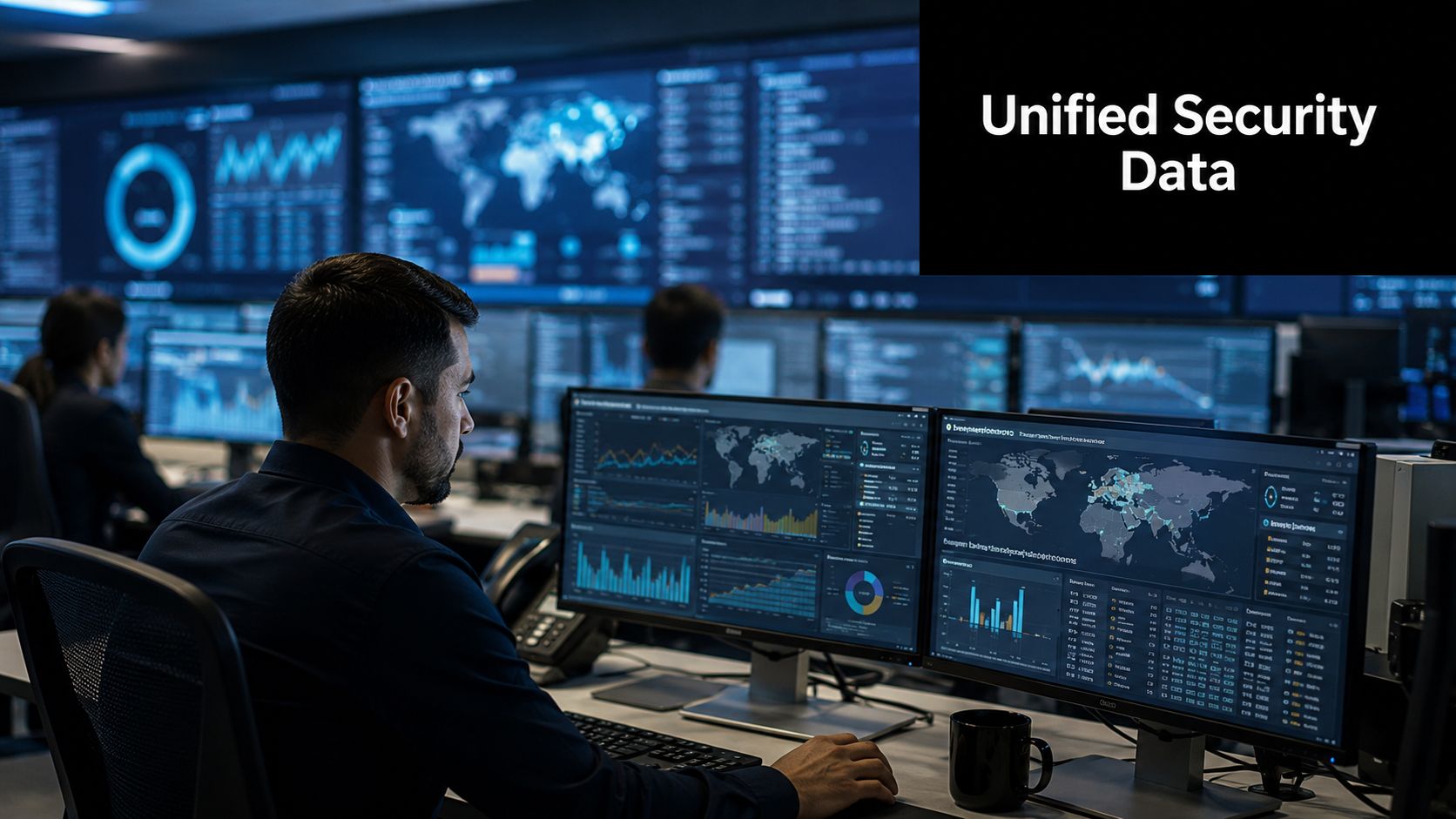
Unified Security Stack illustrates a platform that unites SIEM, SOAR, XDR, compliance workflows, and vulnerability scanning in one operational view. For internal SOCs and MSSPs, this approach lowers context switching and simplifies correlating scan findings with logs, endpoint telemetry, and response actions.
Correlation also strengthens analyst discipline. It does not eliminate the need to validate findings, but it helps teams distinguish theoretical exposure from problems connected to active risk. That produces better tickets, quicker escalation, and clearer reporting for leadership and auditors.
Mapping Vulnerability Scans to Compliance Frameworks
In regulated settings, vulnerability scanning is not optional. It serves as evidence. Auditors expect proof that systems are assessed on schedule, that findings are tracked, and that remediation follows a documented process.
The clearest example is payment security. As stated by SecurityMetrics on vulnerability scanners and compliance, PCI DSS Requirement 11.2 requires organizations to perform internal and external network vulnerability scans at least quarterly and after any significant change. The same source states that external scans have to be performed by a PCI-approved Approved Scanning Vendor, and that FedRAMP requires container images to be scanned before deployment and not remain in a registry for more than 30 days without screening.
Where scan frequency becomes an audit issue
These requirements demonstrate why vulnerability scanning lies where security operations and governance meet. Frequency, scope, and the quality of evidence are all important.
For PCI, the requirement is not met by simply stating that a scanner is in place. Teams must demonstrate that scans ran on schedule, covered the proper scope, and included required external validation. If a significant network change took place, timing becomes important again.
In cloud and containerized settings, FedRAMP expresses that same operating principle in a newer way. When container images go into production without prompt scanning, a gap opens between how quickly teams release and how well security is assured. That gap is simultaneously a risk problem and a compliance problem.
How security teams should present evidence
A strong scanning program focused on compliance generates records that operators and auditors can both use. Typically, this covers:
- Scope records: Which systems, segments, workloads, and registries were included
- Execution history: When scans ran and what triggered them
- Findings and status: Open, accepted, mitigated, or remediated vulnerabilities
- Verification records: Rescan results or other proof that fixes were applied
- Exception handling: Documented rationale for deferred remediation or compensating controls
The point extends far past PCI and FedRAMP. Teams pursuing HIPAA, GLBA, CMMC, ISO 27001, and SOC 2 also gain from demonstrating that vulnerability scanning forms part of continuous risk management, not a once-a-year rush.
To a CISO, the board message is simple. A scanning program does more than lower technical exposure. It creates defensible proof that security controls are working as they should.
Best Practices and Avoiding Common Pitfalls
IBM's 2024 Cost of a Data Breach Report puts the average worldwide cost of a breach at $4.88 million. The figure matters here for a single reason. Poor vulnerability scanning efforts leave avoidable exposure, and the expense appears later through incident response, downtime, audit findings, and remediation backlog.
Mature scanning programs are run as ongoing discipline, not a quarterly activity. The tool is important, but coverage, validation, workflow integration, and ownership are more important. In practice, the best programs use scan results as live operational data that supports ticketing, SIEM correlation, XDR context, and compliance evidence.
What mature programs do consistently
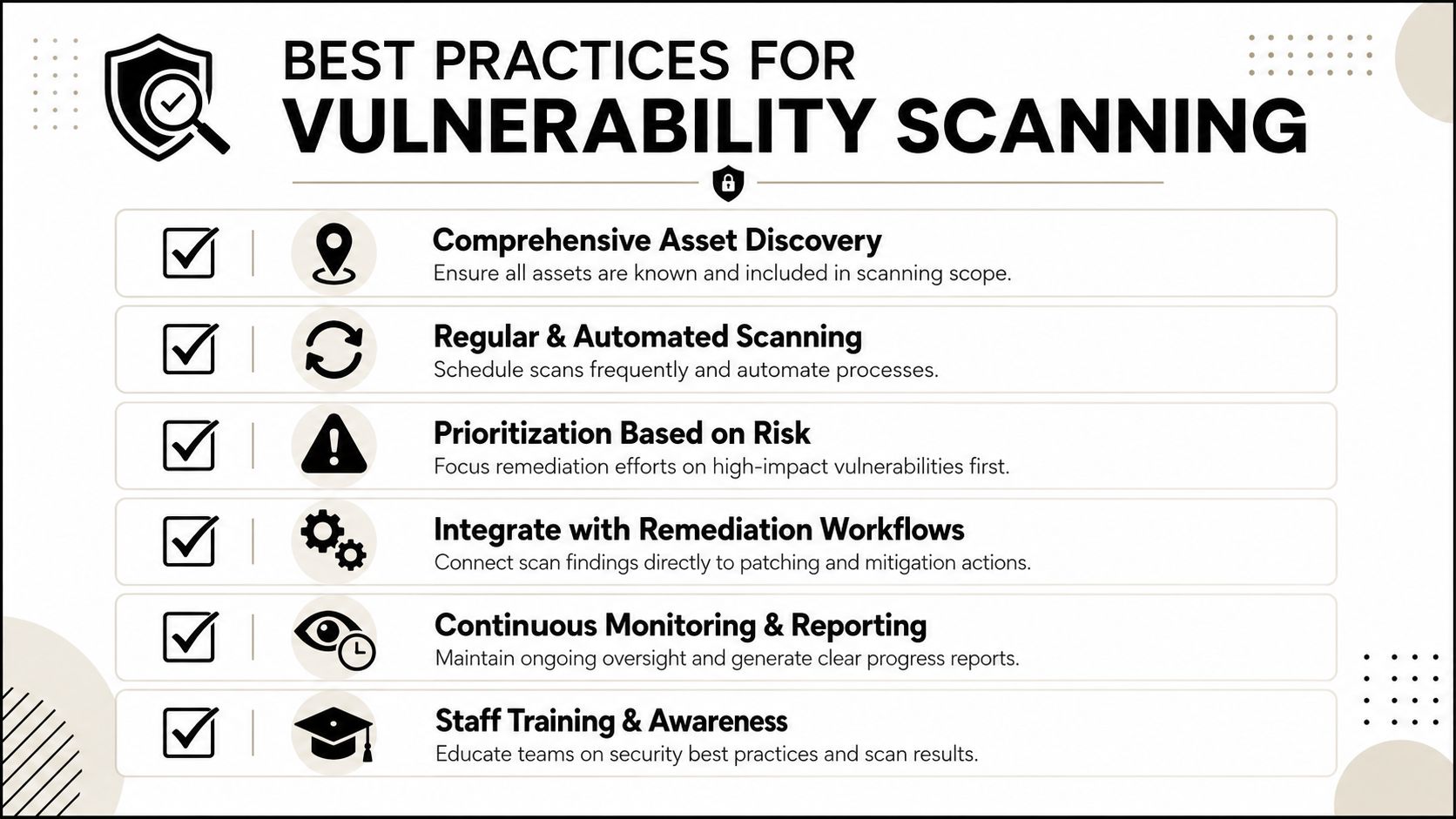
The teams that keep vulnerability scanning useful tend to do the same few things well:
- They start with asset coverage: When inventory is inaccurate, scan data is already incomplete before the first job starts.
- They use authenticated scans where they can: Greater host-level visibility generally warrants the added credential management and access controls.
- They validate findings before sending work downstream: Filtering out false positives saves patch teams needless work and preserves confidence in the program.
- They connect scan output to operations: Findings should drive tickets, change workflows, SIEM enrichment, and follow-up verification.
- They track risk reduction over time: A higher scan count matters little when internet-facing exposure, exploitable paths, and overdue remediation do not change.
One pattern deserves more recognition than it receives. Teams that get good outcomes rescan after fixes and verify closure. Without that step, the organization is measuring activity, not improvement.
Key takeaway: The objective is fewer meaningful production exposures, not greater scanner output.
Mistakes that keep teams stuck
The typical failure modes are operational rather than technical.
One is scan and forget. A scanner generates a lengthy list, someone exports a report, and the backlog expands without ownership, SLA tracking, or evidence that fixes stayed in place after deployment.
Another is poor routing of findings. Security teams route every issue to one queue, no matter the asset criticality, exploitability, business owner, or maintenance window. This creates noise, delays patching for the most important systems, and exhausts the teams asked to fix everything simultaneously.
A third is blind spot acceptance. Cloud assets, ephemeral workloads, remote endpoints, and unmanaged business systems frequently sit outside scan scope because they are harder to inventory or scan consistently. For SOC teams and MSSPs, these gaps are even more damaging because they disrupt correlation. If a SIEM or XDR platform detects suspicious activity on an asset that never entered the scanning pipeline, analysts lack context they should have had from the outset.
Three questions usually expose whether the program is working:
- Are high-value and high-exposure assets covered on a consistent basis?
- Do findings reach the proper owner quickly enough to support operational response?
- Can the team demonstrate that remediation lowered exposure rather than merely closing a ticket?
If any answer is no, the remedy is typically wider than scanner configuration. Asset governance, workflow design, and validation are often part of the issue.
For teams seeking vulnerability scanning connected straight to SIEM, SOAR, XDR, and compliance workflows within one platform, Unified Security Stack is a strong match for this challenge. If you are looking for a means to convert scan results into correlated detections, remediation steps, and audit-ready proof across hybrid environments, consider Unified Security Stack.