Living Off the Land Attacks: Detection and Response Guide
The most popular advice about living off the land attacks is likewise the least useful in isolation: search for suspicious PowerShell, prevent LOLBins, and alert whenever a signed Microsoft binary acts unexpectedly. Those controls have merit, but they do not address the operational problem. PowerShell, WMI, certutil.exe, and bitsadmin.exe are valid administrative tools, and adversaries exploit them exactly because security teams cannot eliminate them without interrupting normal operations. MITRE ATT&CK describes this pattern as abuse of normal system functions, while Microsoft's Azure LoLBins guidance highlights that binaries installed by default can fulfill both legitimate and malicious aims.
The practical question isn't, “Did someone run PowerShell?” It's, “Did this identity use PowerShell against an asset it doesn't normally administer, at an unusual time, followed by cloud access, persistence, or network movement?” That distinction changes LOTL defense from binary hunting into an identity, baseline, and correlation problem.
Table of Contents
- Why Living Off the Land Is No Longer Just an Endpoint Problem
- How Attackers Abuse Legitimate System Binaries
- Real-World LOTL Attack Chains Across Hybrid Environments
- Telemetry Sources and Detection Rules That Actually Work
- Correlation Strategies and Automated Response Playbooks
- Incident Response and Containment for LOTL Intrusions
- Building a Sustainable LOTL Defense Program
Why Living Off the Land Is No Longer Just an Endpoint Problem
Approaching LOTL strictly as a Windows endpoint problem leaves significant areas of the attack surface without monitoring. A workstation executing PowerShell is merely one potential origin. The same pattern occurs when an intruder issues an AWS CLI command against cloud storage, uses Azure PowerShell modules against a subscription, kubectl against a cluster, or relies on native management protocols within an industrial network.
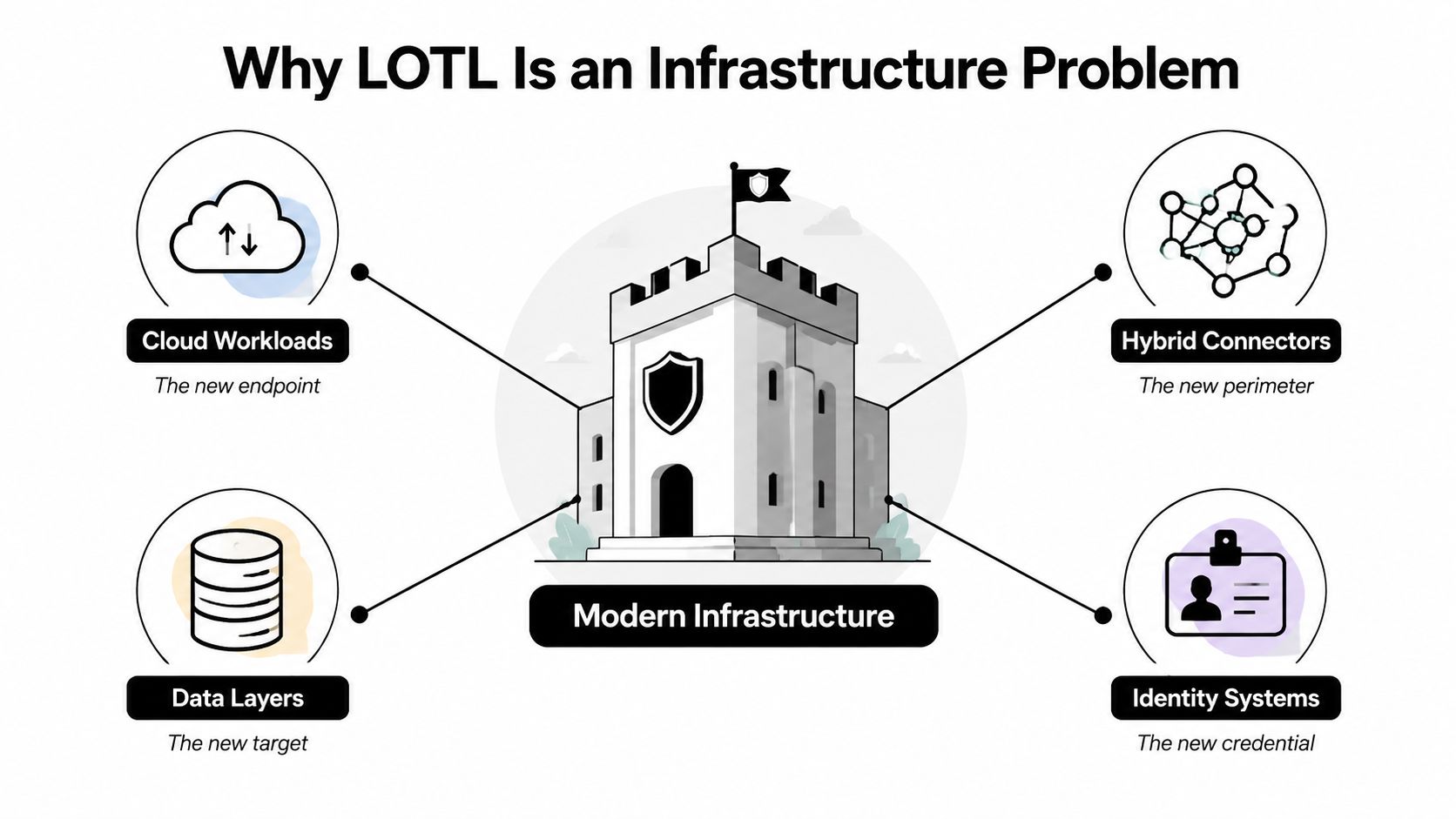
Modern LOTL activity crosses several trust boundaries:
- Identity systems Supply the context for credentials and authorization.
- Cloud workloads furnish management planes, APIs, runbooks, and storage services.
- Hybrid connectors coordinate identities and allow movement across environments.
- OT networks surface protocols and engineering tools that endpoint-centric detections may fail to interpret.
An adversary who employs an Azure management command via a compromised identity is still operating off the land, even when no endpoint process starts. The native tool may now be an API, a cloud shell, or an approved automation workflow. This makes identity telemetry and cloud audit logs just as important as endpoint process trees.
This hybrid lens also applies to operational technology. LOTL reporting in industrial environments addresses abuse of protocols such as Modbus/TCP, OPC-UA, EtherNet/IP, and DNP3, not only PowerShell or WMI. A 2026 OT assessment found that 81% of environments had poor IT/OT segmentation and that 56% of penetration tests abused LOTL tools without detection, according to Armis's analysis of living-off-the-land cyber threats. Those figures indicate a visibility gap spanning plant-floor protocols, identities, remote-management tools, and cloud services.
Operational rule: A LOTL detection that omits identity, asset role, and destination context amounts to a lead, not an incident.
Endpoint telemetry remains relevant. Windows process creation, PowerShell script blocks, WMI activity, and EDR network events frequently supply the first useful clue. Yet a SOC that collects only Sysmon and PowerShell logs on endpoints will not detect cloud-native execution or OT protocol misuse. Centralized cloud security monitoring should combine those signals with identity events, management-plane activity, and network flows so analysts can trace the operation instead of investigating isolated commands.
How Attackers Abuse Legitimate System Binaries
LOLBins are dual-use tools. Their files are legitimate, typically installed, and frequently signed by trusted vendors. Malicious significance comes from the command line, parent process, user, destination, timing, and follow-on activity.
certutil.exe, for instance, enables certificate administration but may also retrieve or decode content. mshta.exe can handle HTML applications, providing an attacker a route to execute script through a trusted Windows component. WMI can query systems, manage devices, and support remote administration, but it can also enable remote process creation. bitsadmin.exe supports background transfer jobs and may be repurposed to retrieve or move files. CyberDefenders' LOTL overview identifies PowerShell, WMI, certutil.exe, and bitsadmin.exe as frequent examples leveraged for execution, retrieval, persistence, and lateral movement.
The defensive error is treating the binary name as the final verdict. A signed certutil.exe It is routine for a certificate-management service to start the binary under the service account it is expected to use. If an Office process starts the same binary, it contacts an unfamiliar external destination, and script execution follows, that activity warrants immediate investigation.
| Binary | Legitimate purpose | Attack abuse technique | Detection signal |
|---|---|---|---|
powershell.exe |
Administration, automation, and scripting | Script execution, discovery, retrieval, and remote administration | Script-block content, encoded arguments, unusual parent process, identity and host deviation |
| WMI tools and providers | System management and queries | Remote process creation, discovery, and persistence | WMI activity, remote target, caller identity, child process, destination host |
certutil.exe |
Certificate and trust-store operations | Content retrieval, decoding, and staging | URL or unusual destination, decode arguments, child process, file creation |
bitsadmin.exe |
Background intelligent file transfer | Background retrieval or transfer of attacker-controlled content | New transfer job, unusual endpoint, initiating user, subsequent execution |
mshta.exe |
HTML application execution | Remote or script-based execution | URL or script argument, Office or browser parent, network connection |
wmic.exe |
WMI command-line administration | Remote querying and execution | Remote host, unusual query, account-to-asset mismatch |
| Cloud CLI tools | Cloud resource management | Storage enumeration, configuration changes, and privilege activity | API audit trail, unusual principal, new region or service, sequence of actions |
The same rule extends past Windows. Native cloud CLIs, SSH clients and agents on Linux, and standard macOS utilities such as osascript can all serve as LOTL mechanisms. EDR might log only the local process, while the significant action surfaces in an AWS CloudTrail event, an Azure Activity Log entry, a Kubernetes audit record, or an identity-provider session.
In operational terms, signature-based controls fall short because the executable itself is not what distinguishes the activity. Blocking mshta.exe can disrupt enterprise workflows. Blocking PowerShell may interrupt administration and automation. Even allowlisting may clear the tool while overlooking its suspicious use.
A useful detection model asks four questions:
- Who invoked the utility?
- Where did it execute, and does that asset fall within the user's usual scope?
- What which arguments, scripts, queries, or APIs did it employ?
- What happened next, including network access, persistence, privilege alteration, or lateral movement?
Real-World LOTL Attack Chains Across Hybrid Environments
A LOTL intrusion seldom relies on a single dramatic command. The risk comes from a chain of ordinary actions that only become suspicious once linked.
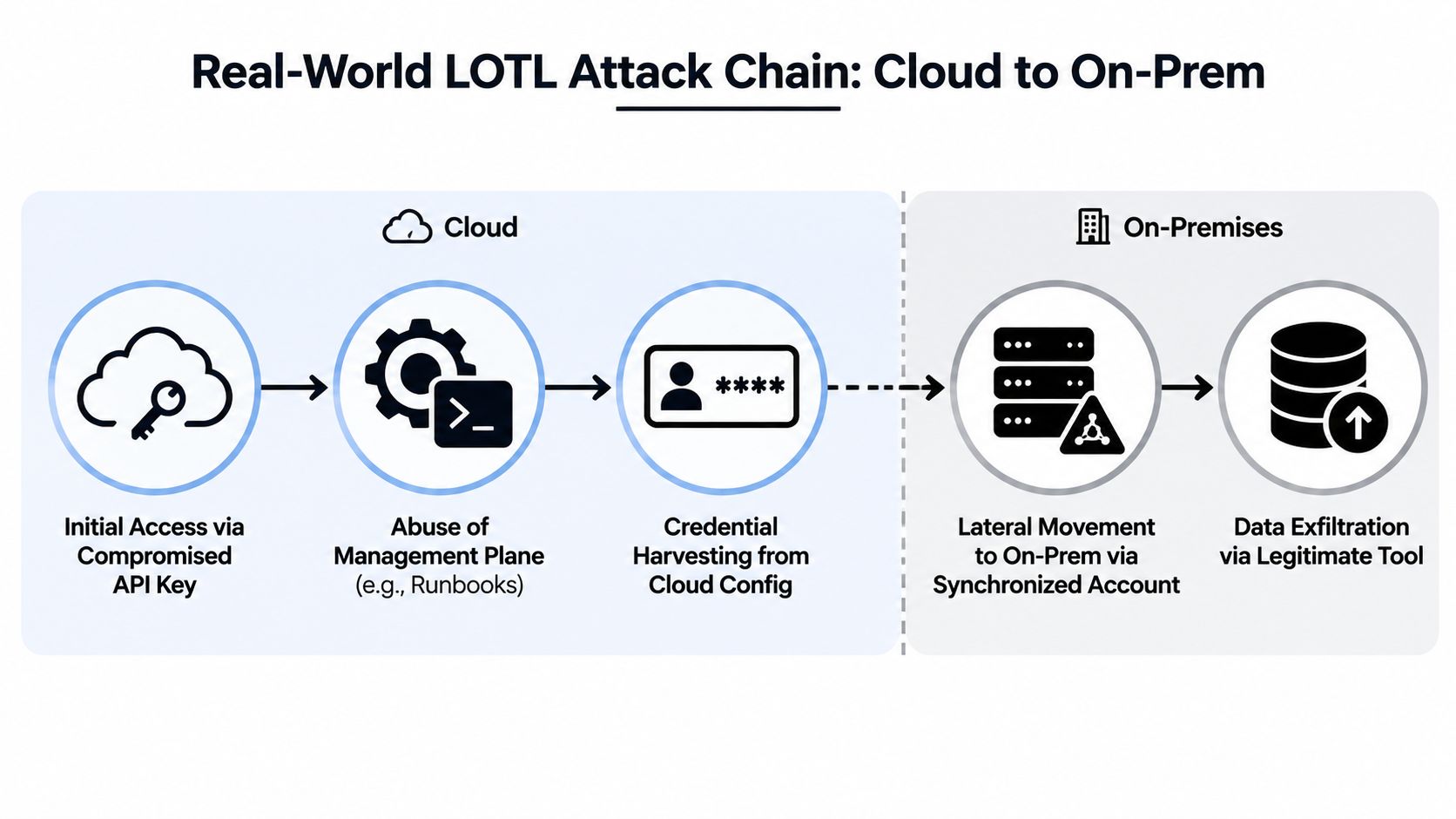
Chain one through identity synchronization
An employee opens a phishing document, which launches a script interpreter. The attacker uses PowerShell and native modules to query Active Directory, looking for privileged groups, servers, and service relationships. WMI then enables remote administration against another host, creating a process tree that may resemble routine systems work unless the initiating identity and target asset are unusual.
The operation crosses a cloud boundary when the intruder interacts with an Azure AD Connect installation or another synchronized identity path. The key detection opportunity is not the presence of PowerShell alone. It is the progression from Office execution to directory reconnaissance to remote WMI activity, followed by access involving a synchronized account or cloud administrative resource.
Chain two from cloud workload to on-premises access
A compromised cloud workload provides the attacker with an authenticated execution context. Native cloud commands enumerate storage and identity permissions, then try to make changes through the management plane. The attacker does not need a custom implant if the workload already has a CLI, service identity, and network route.
A shift to on-premises infrastructure can use native SSH tooling or an approved remote-management route. Cloud audit logs show the API actions, identity telemetry names the principal, and network logs record the connection to a VPN or administrative appliance. No one layer is guaranteed to reveal the intrusion. Correlation among the workload, IAM activity, and destination network can.
Chain three inside OT
An attacker gains access to an engineering workstation and uses Windows Task Scheduler or VBScript to set up recurring execution. Native tools then carry activity toward SCADA-adjacent systems, where protocol traffic may look valid because the commands use expected industrial interfaces.
Containment decisions are harder than on a standard workstation. Isolating an engineering asset without understanding its operational role can disrupt production or eliminate visibility into a safety-sensitive process. Detection must therefore merge Windows events with asset ownership, maintenance schedules, remote-access sessions, and OT network telemetry.
The interruption points are consistent across all three chains:
- Initial execution: A trusted parent process launches a scripting engine outside its usual workflow.
- Identity transition: A user or service account accesses assets beyond its baseline.
- Management-plane use: Cloud or WMI actions take place without a corresponding change record.
- Persistence: A scheduled task, WMI subscription, or automation object shows up unexpectedly.
- Cross-layer movement: Events from endpoints, cloud, and OT create a coherent sequence.
The lack of custom malware does not mean there are no artifacts. It means the artifacts are spread across systems that the SOC must correlate.
Telemetry Sources and Detection Rules That Actually Work
Unprocessed process creation logs will not reveal a LOTL program. Analysts require command-line detail, parent-child relationships, script content, network context, and cloud audit records.
On Windows, collect Security Event ID 4688 for process creation and turn on command-line auditing. Sysmon contributes process detail via Event ID 1, network connections through Event ID 3, image-load visibility through Event ID 7, and file-creation visibility through Event ID 11. PowerShell Event ID 4104 records script-block content, which is far more useful than knowing only that powershell.exe began. WMI activity can be examined via Sysmon Event IDs 19, 20, and 21, as outlined in this Microsoft-binary detection guide from Exabeam.
| Telemetry source | Key event IDs or logs | LOTL behaviors detected | False-positive risk |
|---|---|---|---|
| Windows Security | 4688, with command-line auditing | Process creation, command-line use, parent-child relationships | High without role and host baselines |
| Sysmon | 1, 3, 7, 11, plus WMI events 19, 20, 21 | Process trees, network activity, image loads, file writes, WMI persistence | Moderate to high in administrator-heavy environments |
| PowerShell | 4104 and module logging | Script content, encoded commands, discovery, remote actions | Moderate, especially for automation accounts |
| AWS CloudTrail | Cloud API audit records | Resource enumeration, IAM changes, management-plane use | Moderate, depending on service-account volume |
| Azure Activity Log | Subscription and resource activity | Cloud administration, role changes, runbooks, resource access | Moderate, with substantial automation noise |
| OT network monitoring | Protocol and flow telemetry | Native management activity and industrial protocol misuse | High if maintenance windows and asset roles aren't modeled |
Three rules worth tuning
Parent-child anomalies offer a solid starting point. Generate an alert when winword.exe launches cmd.exe, powershell.exe, mshta.exe, or a different scripting element, then increase confidence when the child reaches the network or establishes persistence. In environments with document automation, this rule may be noisy, so allowlisting should rely on signed workflow identity and known application paths, not a blanket exclusion for the binary.
Signed binary network activity identifies tools that communicate externally without expectation or connect to unusual internal destinations. A Microsoft binary making a connection is not automatically malicious. Correlate the event with the initiating account, asset role, destination reputation, and whether the process normally communicates at all.
Encoded PowerShell execution merits content-level inspection. Base64 or obfuscated arguments on their own can occur in legitimate deployment workflows, so the useful signal emerges from decoding the script, comparing it against approved automation, and correlating it with new processes, remote sessions, or cloud access.
Teams building collection pipelines can also consult Capgo's expert log tools guide for practical guidance on log handling and analysis. For investigations specific to Windows, Windows Event Log analysis in a SIEM helps position process and script telemetry within a wider monitoring workflow.
This trade-off cannot be avoided. Lower thresholds increase analyst workload. Higher thresholds produce blind spots. The correct approach is environment-specific baselining, with detections that evaluate identity, asset criticality, execution context, and event sequence rather than treating all administrative commands the same.
Correlation Strategies and Automated Response Playbooks
One LOTL alert rarely proves compromise. A WMI event might be routine administration. An odd Azure sign-in might result from travel or a valid remote session. Together, suspicious WMI execution and an anomalous cloud sign-in by the same user within a set investigation window can indicate that the identity has moved across layers.
Build correlation around event, identity, asset, and time:
- Connect a scripting process with its parent, command content, network destination, and file activity.
- Associate the initiating account with its usual hosts, administrative scope, sign-in history, and privilege level.
- Tie a remote execution event to the target's role, recent changes, and subsequent persistence.
- Connect cloud API activity with the workload, token, source location, and synchronized on-premises identity.
A practical SIEM rule could increase confidence when WMI remote execution is followed by a scheduled task on the target, particularly if the task runs in a privileged context or occurs outside a documented maintenance window. Another rule can link a suspicious PowerShell process to an Azure sign-in anomaly and an access-token change. The rule should not alert an analyst merely because one event is unusual. It should alert because the sequence is hard to explain as benign.
SOAR actions must match confidence
When confidence is high, an orchestration platform can invoke the EDR API to isolate a workstation, disable a compromised Active Directory account, revoke cloud sessions, or enforce conditional access. Lower-confidence events should create an investigation package, enrich the alert, and seek analyst approval rather than immediately disrupting an administrator.
This distinction safeguards operations. Automatic isolation may be suitable for a user workstation but risky for an OT engineering system. A playbook should verify asset criticality and ownership before applying containment, while still preserving evidence.
The workflow also generates compliance evidence. Every correlation rule can document the monitored control, source logs, decision criteria, response action, approver, and resulting ticket. Such evidence supports security-control narratives for SOC 2, ISO 27001, and NIST CSF without relying on the memory of an analyst.
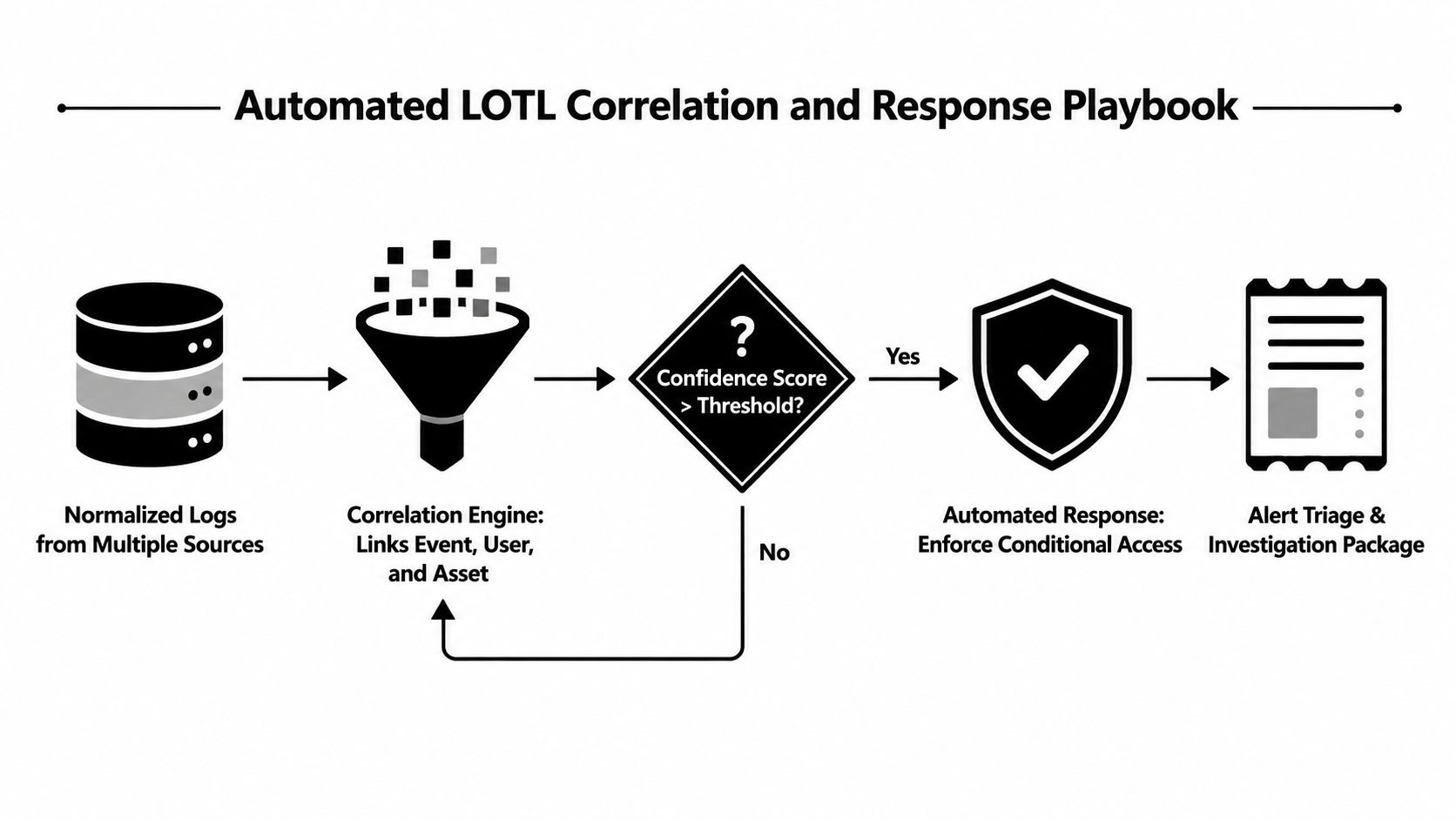
A practical orchestration design should also retain raw logs, process trees, cloud audit records, and identity context before remediation alters the environment. Teams assessing security orchestration tools should verify whether playbooks can make those decisions using the context available to their SOC.
Incident Response and Containment for LOTL Intrusions
LOTL response is different from malware response since there may be no external executable to quarantine. The infrastructure of the adversary is made up of your own PowerShell, WMI, scheduled tasks, cloud APIs, and administrative accounts.
Establish the blast radius first
Start with the compromised identity, not just the first host that generated an alert. Chart its access across Active Directory, cloud tenants, synchronized accounts, service principals, remote-management systems, and OT segments. Examine where the identity authenticated, which assets it queried, and whether it created persistence.
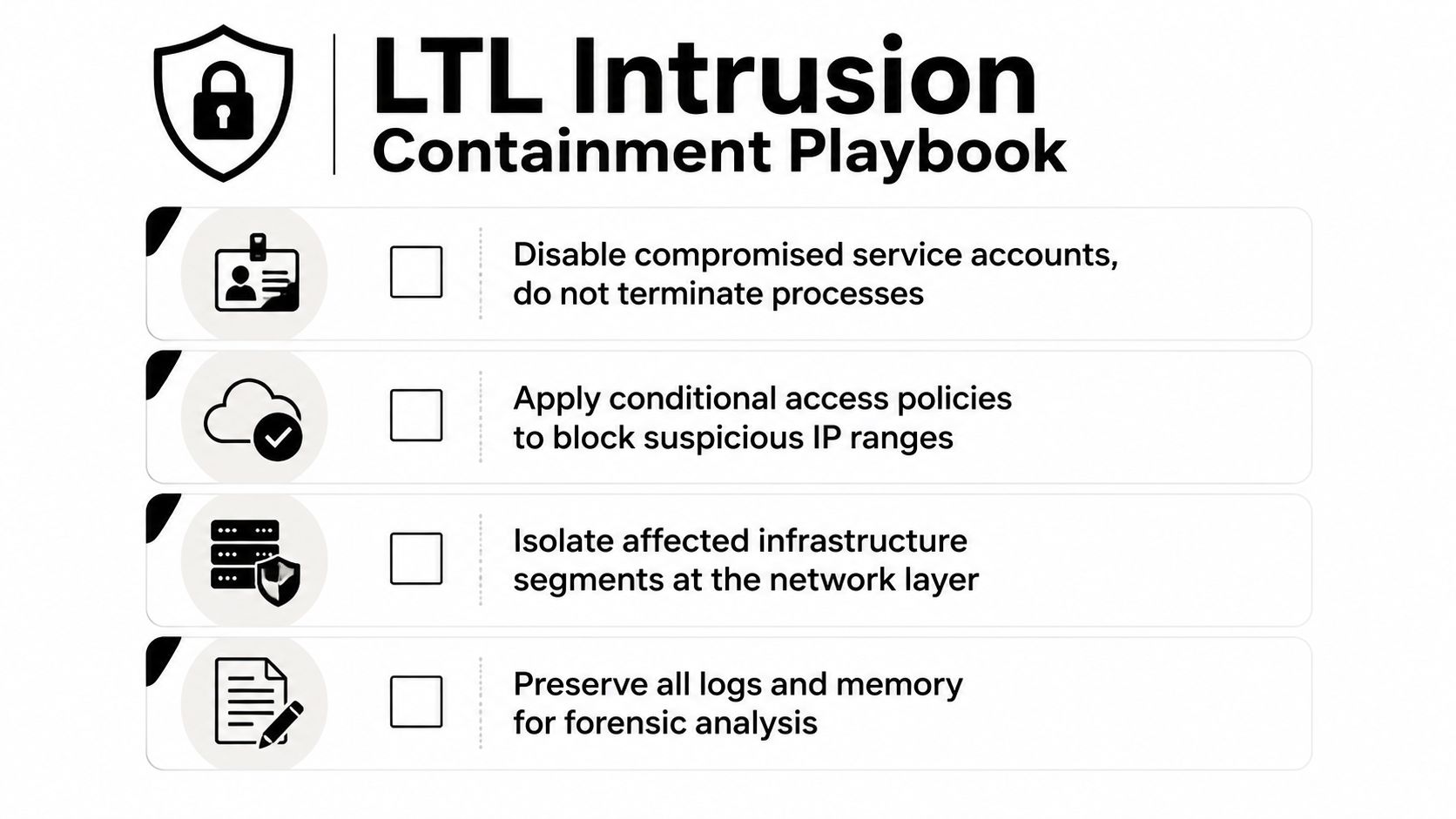
Before any aggressive cleanup, secure evidence. Gather process trees, command lines, PowerShell script blocks, WMI records, scheduled-task definitions, registry changes, cloud audit logs, and pertinent memory when it is operationally safe to do so. The goal is to uncover the entire chain, not just delete the most obvious command.
Sequence containment carefully
- Invalidate active sessions and tokens. This severs current access ahead of password changes that would otherwise generate new authentication events.
- Turn off or limit the identity. Use the least disruptive measure capable of stopping continued use, particularly where service accounts are concerned.
- Contain affected hosts at the network layer. This constrains lateral movement and keeps the host available for examination.
- Review persistence. Review WMI event subscriptions, registry Run keys, startup items, scheduled tasks, services, and cloud automation objects.
- Validate eradication. Verify that the identity, tokens, tasks, subscriptions, and access paths are no longer functional.
Do not automatically kill every suspicious process. It may be a legitimate system component, and terminating it can erase valuable evidence or disrupt operations. In OT, bring in the plant owner before isolating an engineering workstation or interfering with protocol traffic. Where an immediate shutdown would create unacceptable safety or availability risk, rely on passive monitoring, segmentation, and controlled access.
Prepare playbooks in advance for the usual high-confidence pairings. A suspicious remote WMI event followed by persistence should prompt identity enrichment and approval for host isolation. A cloud privilege change followed by access to synchronized infrastructure should revoke sessions and create an investigation package. Each action should capture who or what started it, what evidence justified it, and whether an operator approved it.
Building a Sustainable LOTL Defense Program
A lasting LOTL program begins by rejecting the notion that the binary is the main indicator. The binary is typically known. The hard question is whether a particular identity used a legitimate capability in an illegitimate context.
Start with high-fidelity detections for recognized abuse patterns. Gather process creation, command-line, PowerShell, WMI, network, file, cloud, and identity telemetry. Leverage those signals to define normal administrative workflows for help-desk staff, infrastructure engineers, deployment systems, service accounts, cloud operators, and OT engineers.
Next, introduce identity-centric analytics. A PowerShell command from a managed automation host might be routine, but the same command from a finance workstation directed at a domain controller is anomalous. Asset criticality is equally important. A scheduled task on a test endpoint and one on an engineering server should not get the same risk score.
Unified Security Stack can offer a single implementation route for this operating model. Its open-source SIEM, SOAR, and XDR platform ingests endpoint, cloud, network, and other infrastructure logs, correlates events, enables automated response playbooks, and maps evidence to compliance workflows. The practical benefit is not that it removes tuning. It gives the SOC one place to merge identity, command, asset, and cross-layer context rather than examining every log source in isolation.
A sustainable roadmap looks like this:
- Begin with established LOLBin patterns. Confirm process trees, command-line collection, PowerShell logging, WMI visibility, and cloud audit ingestion.
- Shift to identity and asset context. Measure actions against user roles, expected hosts, maintenance periods, and privileged scope.
- Refine continuously. Adjust thresholds based on analyst decisions, approved workflows, purple-team exercises, and OT change windows.
- Automate proportionally. Allow high-confidence detections to contain ordinary endpoints rapidly, while requiring approval for critical cloud and OT assets.
- Map evidence as you go. Retain the rule, event sequence, response, approval, and outcome to satisfy evidence requirements for NIST, ISO 27001, SOC 2, HIPAA, GLBA, PCI, and CMMC.
Independent research has found that even popular antivirus products struggle with malicious LOTL binary abuse because legitimate administration and malicious activity often share the same tools, as discussed in the published Windows malware detection research. This constraint is the reason the mature program measures context quality and investigation efficiency, rather than the count of LOLBin alerts generated.
Unified Security Stack equips security teams with one SIEM, SOAR, and XDR platform for correlating endpoint, identity, cloud, network, and OT telemetry, then automating proportionate containment and compliance evidence collection. Visit Unified Security Stack to assess how its open-source model can help your SOC identify living-off-the-land activity through behavior and context rather than binary names alone.