In what way do AWS Security Groups function?
AWS Security Groups are key elements that assist in protecting your resources in Amazon Virtual Private Cloud (Amazon VPC). By using Security Groups, you can control the traffic types permitted to reach your resources, such as particular ports, source IP ranges, or even protocols.
Next, you will quickly discover how AWS Security Groups function with their default inbound and outbound rules.
What purpose do AWS Security Groups serve?
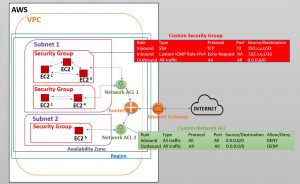 AWS Security Groups in the Amazon Virtual Private Cloud
AWS Security Groups function as virtual firewalls that manage incoming and outgoing traffic among Amazon EC2 Instances via inbound and outbound rules.
How do AWS Security Groups function?
When you create an Amazon account to set up your VPC, it automatically includes several default Subnets and one default Security Group.
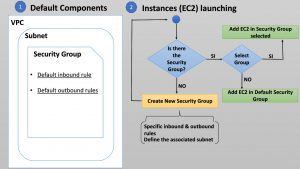 Workflow of AWS Security Groups in the VPC
AWS Security Groups are intended to safeguard EC2 instances by means of inbound and outbound traffic rules. Essentially, Security Groups serve as the first line of defense operating at the instance level. This means every instance you assign to a Security Group will be governed by the associated security group rules.
It is important to note that an instance in a subnet within your VPC can have up to five different Security Groups assigned. If you do not choose the group or groups for an instance when launching it in your VPC, it will be attached to the default Security Group.
You can use the command line (AWS Tools for Windows PowerShell/AWS CLI) or Amazon EC2 console to set up a particular new Security Group.
Unified Security Stack recommends creating a new AWS Security Group according to interest-specific rules. This way, the traffic rules automatically applied to a default security group will not be affected. Still, remember that you can use or modify the default Security Group rules, but you cannot delete the default group.
AWS Security Group default rules
A default Security Group also has assigned default rules:
- Default inbound rule.
- Default outbound rules.
The single default inbound rule permits the Security Group to accept inbound traffic from every network protocol and port (network interfaces). It also permits inbound traffic among instances assigned to the same security group. Consequently, outbound traffic to the Internet is allowed by default only when the Security Group is associated with a default VPC.
The default outbound rule permits all outbound traffic for all IPv4 across every protocol and port range. Likewise, another default rule exists with the same permission for all IPv6. However, that last default rule is added automatically when you create a VPC with an IPv6 CIDR block or associate an IPv6 CIDR block with your existing VPC.
In turn, if you create a new Security Group, it will have a unique outbound rule that permits all traffic to leave the instances. You need to add rules to enable any inbound traffic or restrict the outbound traffic.
AWS Security Group rules
Every Security Group, depending on its purpose, will need inbound and outbound traffic rules so instances can communicate. In essence, the rules act as a whitelist for allowed inbound and outbound traffic, meaning you cannot add rules that deny traffic.
Inbound rules specify the incoming traffic that an AWS Security Group permits to reach its associated instances. Outbound rules specify the allowed traffic that exits the EC2 machines associated with the Security Group.
You can add inbound and outbound rules in the AWS Security Groups specifying the following components:
- Protocol: Network Protocols including Transmission Control Protocol (TCP), User Datagram Protocol (UDP), and Internet Control Message Protocol (ICMP).
- Port range: A designated port or a port range for permitting traffic.
- Source (only for inbound rules): The source traffic may be a specific IP, an IP range, or other security groups that are permitted access.
- Destination (only for outbound rules): Similar to the source in inbound rules. However, it refers to a destination to which the security group allows outgoing traffic.
Security Groups have the particular feature of being stateful. If you send a request (outbound traffic) from your instance, the response traffic (inbound traffic) will be permitted. independent of the inbound rules, and the reverse is also true.
Take care when launching an instance associated with different Security Groups. Keep in mind that instances attach all rules from their associated groups. As a result, this can affect access to the instance.
Difference between AWS Security Groups and Network
ACLs
Network Access Control Lists (NACLs) serve as a firewall that controls traffic entering and leaving one or more subnets. Thus, a Network ACL works at the subnet level, while a Security Group works at the instance level. When security groups' rules are too permissive, they are an optional additional security layer for your VPC.
As a more sophisticated security mechanism, a Network ACL can recognize allow rules as well as deny rules.
Network ACLs, in contrast to AWS Security Groups, are stateless; this means inbound rules must explicitly allow return traffic.
You must understand that Network ACLs review every rule in ascending order to determine whether traffic is allowed. That is, an accept or deny rule can be executed for that traffic according to the priority order. By contrast, security groups evaluate every rule before deciding whether to allow traffic.
Users link AWS Security groups to EC2 instances when launching them or after they are created. In contrast, ACLs are applied automatically to every instance within the subnets associated with those ACLs.
Conclusions
Understanding how AWS Security Groups operate is the only way to protect your Amazon EC2 Instances from unauthorized access. Applying best practices will help you manage inbound and outbound traffic moving to and from your instances through restrictive rules.