How to Improve MTTR: A Practical Guide for Security Teams
During the overnight shift, a critical alert lands in the SOC queue. By morning, the dashboard displays a reasonable headline MTTR since the incident was closed soon after an analyst eventually took it. The timeline reveals another reality: the alert remained unassigned for nine hours because severity routing directed it to the wrong queue. The team improved the metric on display while the risky delay stayed as it was.
This pattern occurs often in SIEM and XDR settings. Security leaders ask how to improve MTTR, then adjust rules, purchase automation, or hire analysts without first demonstrating where time is actually being spent. Measurement integrity takes precedence over optimizing response. Unless detection, acknowledgment, triage, containment, and recovery each carry separate timestamps, a better average may be merely an artifact of reporting.
Table of Contents
- Why MTTR Is the Metric That Actually Matters in Security Operations
- Defining MTTR the Right Way Before You Try to Improve It
- Tuning Detection So Alerts Are Worth Responding To
- Designing a Triage Workflow That Removes Handoffs
- Using SOAR Playbooks to Automate the First 15 Minutes
- Consolidating Tools to Cut Context Switching
- Measuring What Changed and Proving MTTR Actually Moved
Why MTTR Is the Metric That Actually Matters in Security Operations
Within security operations, MTTR typically means the time that passes from detecting an incident to finishing a specified containment, remediation, or recovery action. The precise boundary has to be agreed on beforehand, yet the operational question remains the same: for how long was the organization exposed or impaired once the signal became actionable?
One security vendor defines MTTR as total repair time divided by the number of repairs, which makes it a simple benchmark for tracking change over time. In cybersecurity, the metric covers more than the final fix. It may include triage, investigation, containment, eradication, and recovery, as described in this security operations overview of MTTD and MTTR.
MTTR is not the same as every response metric
Mean time to detect, or MTTD, tracks the duration required to identify suspicious activity. Dwell time describes how long an attacker stays active before being detected or disrupted. Time to close often measures ticket closure, which can encompass documentation and follow-up tasks after the immediate threat has been contained.
MTTR links those operational specifics to business risk, since it spans the response window in which a threat may spread, credentials may be misused, or a compromised endpoint may stay active. A short time-to-close does not show that containment was fast. A low MTTR does not show that detection was timely. Every number answers a separate question.
Practical rule: Do not treat a reduced aggregate MTTR as evidence of improvement unless you can demonstrate which lifecycle stage got faster.
The most valuable view is a timeline broken down by stage. If alerts are detected quickly but acknowledged slowly, correct routing and ownership. If acknowledgment is fast but investigation lags, strengthen enrichment and correlation. If containment is delayed after the decision is made, concentrate on EDR, identity, network, or SOAR execution.
Why automation changes the metric
A review of hybrid-cloud incident response found that automating triage and containment improved response efficiency by approximately 50% (hybrid-cloud SOAR review). A different empirical case study reported that mean time to respond dropped from roughly 45 minutes to under 10 minutes, while mean time to detect dropped from over 20 minutes to under 4 minutes after automation was implemented, as recorded in the same research reference.
Those findings do not mean every SOC will achieve the same result. They reveal where improvement usually exists: cutting manual handoffs, eliminating repetitive analyst tasks, and carrying out known response steps consistently. MTTR is cumulative, so the quickest route to improvement is seldom telling analysts to work faster. It is eliminating the waiting around their work.
Defining MTTR the Right Way Before You Try to Improve It
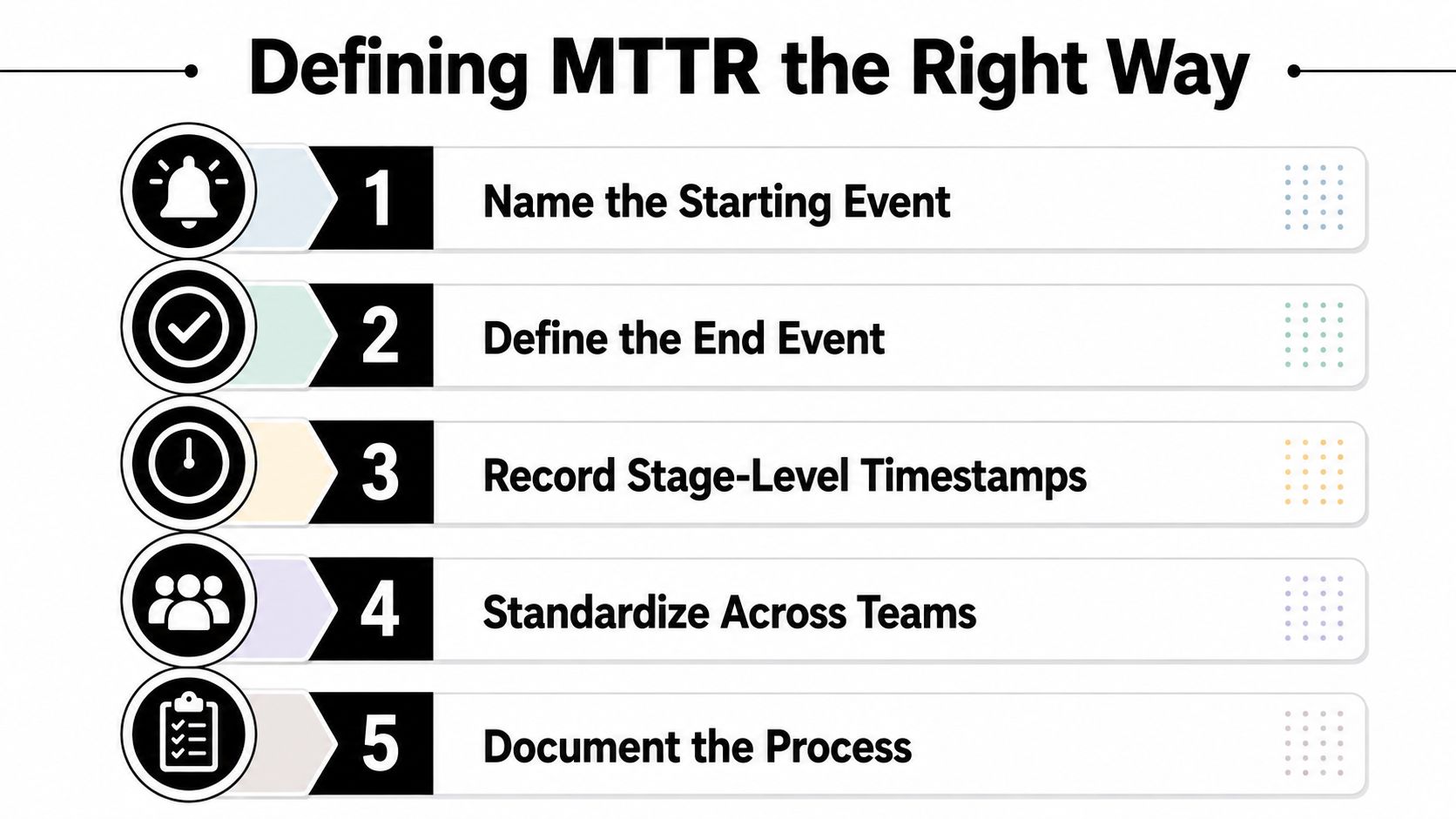
Before you modify a correlation rule or deploy a playbook, document precisely when the MTTR clock begins and ends. One team may begin at the first SIEM signal, while another begins when an alert has sufficient context for triage. Those measurements are not comparable, even if both teams label them MTTR.
A reliable definition needs stable timestamps for impact start, alert acknowledgment, first mitigation, service restoration, and postmortem completion. Guidance for improving MTTR recommends standardizing timestamps, keeping the definition fixed, and analyzing the metric by severity, service, and time of day instead of depending on a single aggregate value (stage-level MTTR measurement guidance).
Freeze the measurement contract
Use this checklist before an optimization sprint:
- Name the starting event: Determine whether the clock starts at the first detection signal, when a triage-ready incident is created, or at confirmed user impact.
- Define the end event: Select containment, eradication, service recovery, or verified resolution. Do not default to ticket closure.
- Assign timestamp owners: Determine which system logs each event, for example the SIEM for alert creation, the case system for acknowledgment, and EDR for host isolation.
- Resolve duplicates consistently: Determine whether grouped alerts share a single incident clock and how duplicate signals influence the incident record.
- Separate human-time from system-time: Separate analyst wait time, automated execution, vendor delay, and planned recovery work.
Time drift among a SIEM, ticketing system, and EDR can make an incident seem to travel backward in time. Standardize timestamps to one common basis and retain the original event time next to ingestion time.
Alerts closed automatically warrant particular attention. An automated closure rule should not yield a zero-minute response unless the organization can demonstrate that the closure reflected a validated outcome. If not, the metric rewards removal from the queue instead of risk reduction.
Instrument the lifecycle, not just the ticket
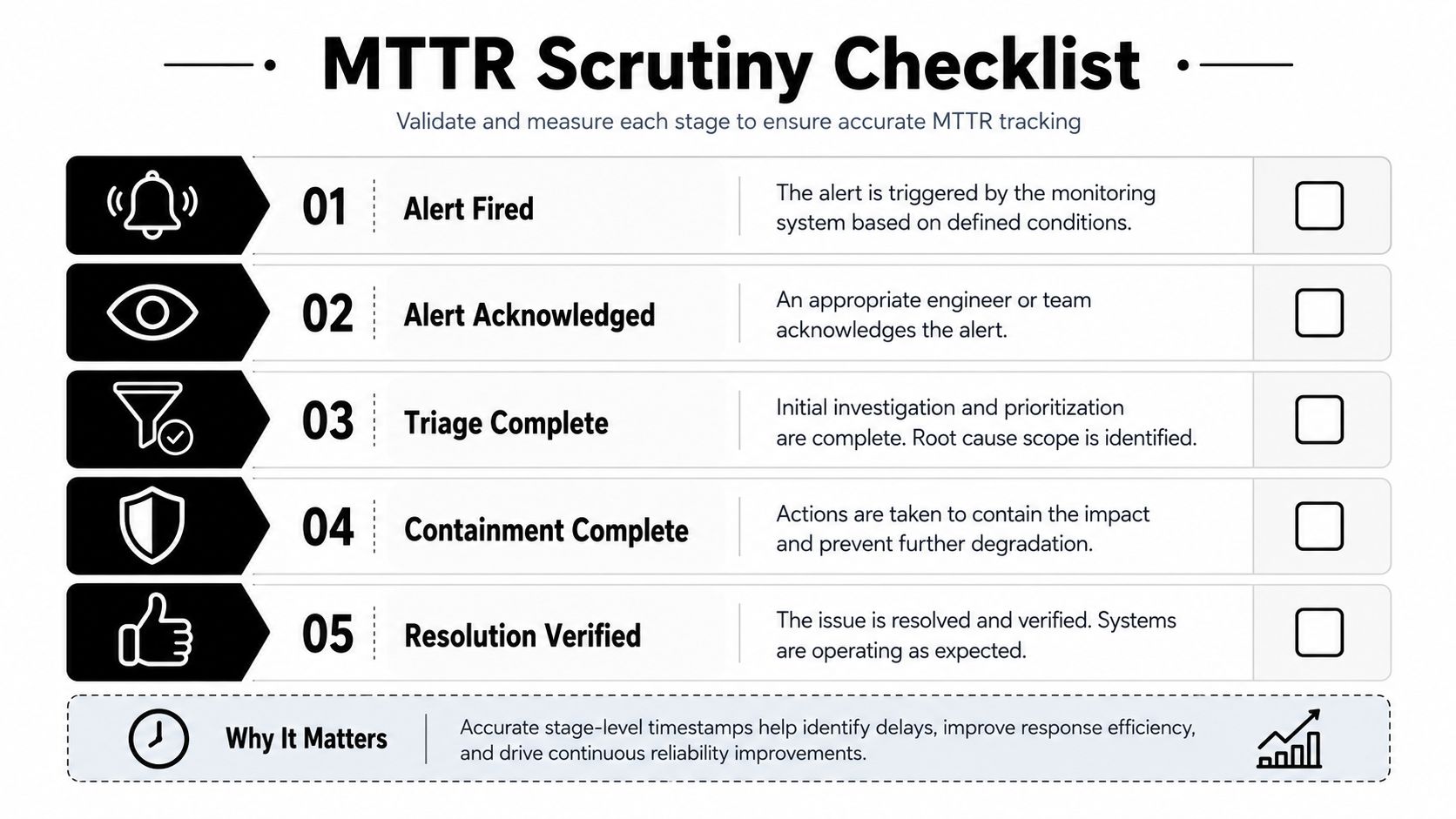
Approach this as instrumentation. Each incident should reveal a sequence like alert fired, alert acknowledged, triage completed, containment completed, eradication completed, and recovery verified. The organization can then compute the overall metric and determine which stage consumed it.
The 2026 reliability guidance emphasizes that inconsistent meanings of “repair” and inconsistent timestamps make MTTR comparisons misleading, particularly when incident data is fragmented across tools (reliability measurement guidance). Until those definitions remain stable, optimization results cannot be trusted.
Tuning Detection So Alerts Are Worth Responding To
Detection tuning lowers MTTR by reducing the queue-to-handoff delay. It does not make an analyst type more quickly. It keeps low-confidence events from competing with incidents that demand immediate action.
The first lever is correlation density. One suspicious sign-in might be weak on its own, but a sign-in anomaly paired with impossible travel, privilege escalation, and endpoint execution can create a more useful incident. Correlation rules should cluster related evidence around a campaign or attack path rather than open a separate case for each event.
IOC ingestion also matters, but freshness and context outweigh volume. Threat intelligence should add confidence, source, age, and relevance to the affected asset when enriching an alert. An outdated indicator can consume as much analyst time as a false positive.
Compress the longest queue
Suppression logic should eliminate known-good noise without concealing meaningful changes. Scanner traffic from an approved source can be suppressed by ASN or another controlled identifier, yet the exception requires an owner and review. Severity routing must also account for asset criticality. An alert on a development laptop should not take precedence over a comparable event involving a domain controller.
A practical grouping example is collapsing 40 Office 365 phishing alerts into one incident, which keeps the analyst centered on the campaign, affected users, and containment choices instead of duplicate investigation. That figure and example belong to the operating scenario here, not a measured industry benchmark.
| Tuning Lever | Stage Compressed | Typical Time Saved |
|---|---|---|
| Correlation rules | Event review to incident creation | Qualitative reduction in duplicate investigation |
| IOC enrichment | Alert review to triage decision | Faster confidence assessment |
| Known-good suppression | Queue wait to analyst assignment | Fewer alerts competing for attention |
| Asset-aware severity | Assignment to ownership | Faster prioritization |
| Campaign grouping | Triage to investigation | Fewer repeated pivots |
The guide to reducing false positives in SIEM systems is valuable when examining suppression and alert-fatigue controls. The trade-off is clear: aggressive suppression improves queue health but may conceal a real attack if exceptions are not scoped, logged, and tested at regular intervals.
Detection tuning fails when teams measure success only by alert volume. Track whether high-severity incidents reach the right owner, whether analysts dismiss fewer events as benign, and whether the time from alert creation to triage completion decreases for the same severity and service cohort.
Designing a Triage Workflow That Removes Handoffs
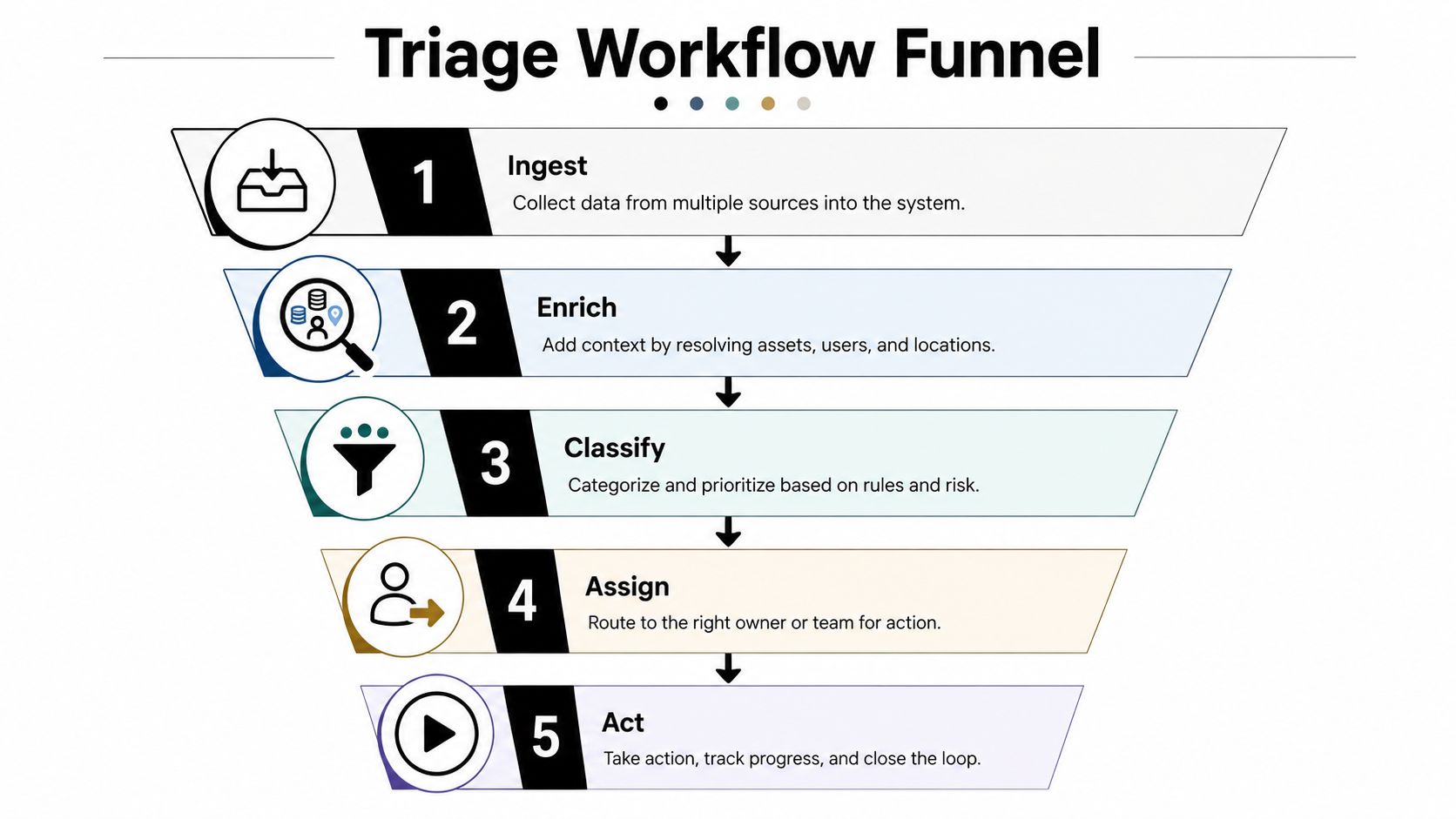
A dependable triage funnel has five stages: ingest, enrich, classify, assign, and act. The sequence matters. Sending an unenriched alert to an analyst creates a handoff, then forces that analyst to collect the context required to determine where the alert belongs.
Every alert should initiate enrichment before human review when the integrations allow it. Pull asset criticality, identity context, recent ticket history, and geographic or IP reputation into the incident log. When the signal involves a host or account, add endpoint process history, recent administrative actions, and linked detections.
Build ownership around services
Ownership should track the service or asset owner, not the analyst rotation. A severity tier can set urgency, but it should not be the sole routing key. The system must know who owns endpoint response, identity, cloud infrastructure, and the affected business service.
Take a Severity 1 ransomware-suspect alert as an example. The workflow should:
- Ingest the SIEM or XDR detection that has been correlated.
- Enrich it with asset criticality, user identity, recent administrative logons, and endpoint process data.
- Classify the event based on detection confidence and business impact.
- Assign it to the endpoint lead on call, while alerting incident command when required.
- Act by attaching a prepared case that contains the suspect host, user, evidence, and the recommended isolation command.
An analyst should not need to ask in a chat channel who owns this domain. That question indicates absent service ownership data, not inadequate analyst commitment.
Avoid premature downgrades
Downgrading severity before enrichment finishes produces concealed delay. An analyst might reduce priority when the first alert appears weak, only to find afterward that the account had privileged access or the host ran a critical service.
A better order is enrichment first, classification second, and assignment third. Before the workflow, analysts gather context by hand and negotiate ownership. After the workflow, the case arrives with evidence, an accountable team, and a governed next action. That is where time is lost, in the handoffs between decisions, not only in the decisions themselves.
Using SOAR Playbooks to Automate the First 15 Minutes
SOAR should buy back the first 15 minutes of an investigation, not pretend that analysts can be eliminated. The best playbooks manage repetitive evidence collection and low-risk actions while leaving judgment-heavy decisions to a responder.
Consider a phishing email alert. On a manual path, the analyst reviews the email, inspects headers, detonates the attachment in a sandbox, looks up the user, and creates a ticket. In this operating comparison, that path consumes 18 to 22 minutes. A playbook can carry out the enrichment and leave the analyst with 90 seconds of human review, as long as the necessary integrations are in place.
| Step | Manual Time (min) | SOAR Time (min) | Automation Type |
|---|---|---|---|
| Email triage | 3 to 4 | Automated | Alert parsing |
| Header analysis | 3 to 4 | Automated | Message enrichment |
| Sandbox detonation | 5 to 7 | Automated | File analysis |
| User lookup | 2 to 3 | Automated | IAM enrichment |
| Ticket creation | 2 to 4 | Automated | Case creation |
| Human decision | 3 to 4 | 1.5 | Approval and review |
These figures pertain to workflow design for the comparison, not an industry benchmark. The aim is to identify which activities belong in automation and which need a security decision.
Automate evidence before intervention
The highest-value actions usually include:
- Automated enrichment: Before review, query EDR, IAM, and threat-intelligence sources.
- Identity and asset lookup: Include ownership, privilege, location, and recent activity in the case.
- Sandbox analysis: Detonate suspicious files or URLs when the environment can support safe analysis.
- Containment calls: When confidence and policy allow, isolate a host, disable an account, or block an indicator.
- Case preparation: Create a ticket containing evidence, affected entities, the recommended action, and audit history.
Teams evaluating security orchestration tools should validate execution rather than only workflow diagrams. A playbook that enriches an alert yet cannot connect to the EDR or identity control plane can look complete while the actual containment step remains manual.
Guardrails are essential. Set confidence thresholds for automatic containment, demand human approval before destructive actions, and provide rollback procedures when isolation, account disablement, or blocking disrupts a legitimate business process. Automation theater happens when a playbook looks polished in a demo but has no permissions, integrations, failure handling, or usable evidence.
Consolidating Tools to Cut Context Switching
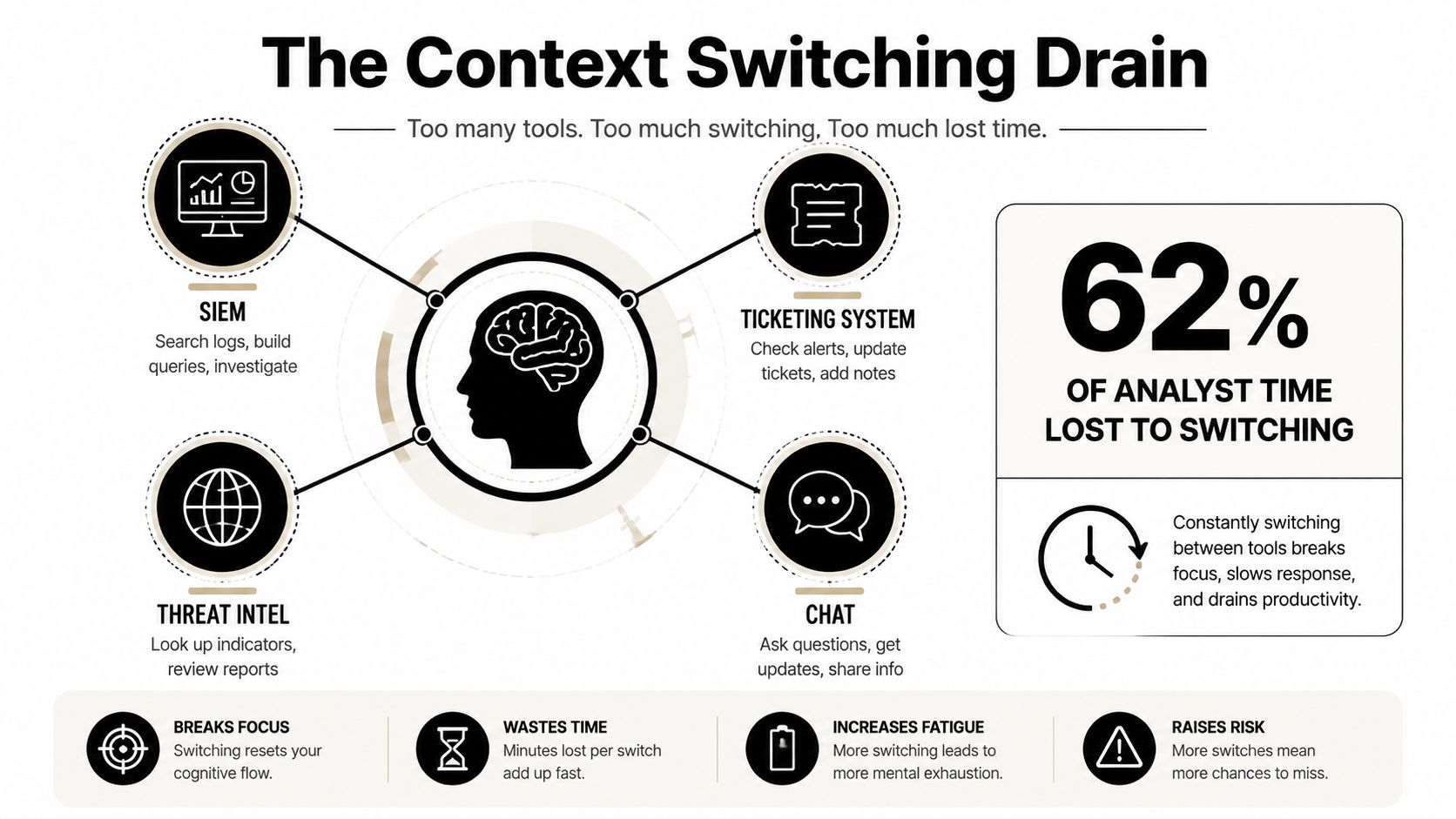
Once detection and triage are reasonably tuned, context switching becomes a major MTTR drag. An analyst may travel from the SIEM to EDR, then to an identity console, threat-intelligence portal, ticketing system, and chat. Every pivot breaks reasoning and opens another chance to lose the incident thread.
One operating model estimates roughly 23 seconds of refocus time per pivot, with a queue of 40 alerts producing more than 15 minutes of switching overhead in a shift (tool-consolidation and MTTR guidance). Those figures outline the cost model, not a universal SOC outcome, though they reveal why more analyst speed is not the sole answer.
Choose the right consolidation path
Begin with a unified case workspace that incorporates investigation pivots. From the incident record, the analyst should be able to reach endpoint process trees, identity activity, reputation data, and related cases instead of searching across separate consoles.
A practical sequence looks like this:
- Unify the case view: Make the incident record the operational base for evidence, decisions, and actions.
- Connect EDR and identity: Introduce single-click pivot options for process activity, logons, privilege, and account state.
- Embed threat intelligence: Display reputation and indicator context within the alert view.
- Retire redundant portals: Retire standalone tools once their useful functions can be accessed through the operational workspace.
The trade-off varies by architecture. A comprehensive single-vendor XDR stack may trade flexibility for speed. A best-of-breed stack keeps choice open but requires a robust integration layer. SIEM-native case management offers a middle route, particularly when the SIEM already handles correlation and evidence retention.
Measure the change with alerts handled per analyst per shift, pivots per alert, and median time from alert open to the first enrichment click. If those measures do not improve, a new dashboard has not resolved the workflow problem.
Measuring What Changed and Proving MTTR Actually Moved
MTTR claims ought to withstand skeptical scrutiny. Every alert or incident record must include the same lifecycle timestamps:
- Alert fired: The detection signal was received by the operational system.
- Alert acknowledged: Ownership was assumed by a responder.
- Triage complete: The responder arrived at an initial classification and action decision.
- Containment complete: The specified containment action was completed.
- Eradication complete: Where applicable, malicious persistence or artifacts were removed.
- Recovery complete: The affected service, host, or account came back to an approved state.
The metric can still be calculated simply, as total resolution time divided by incident count, but the supporting records must prove where that total came from. A distinct empirical evaluation reported a 44.7% reduction in mean time to resolution, from 85 minutes to 47 minutes, with setup assisting the handling. That same assessment reported a 42% drop in incident escalations and a 46.4% decrease in cross-team dependencies (empirical incident-response evaluation).
Use a KPI matrix instead of one average
| Lifecycle Stage | Operational Target | Leading Indicator |
|---|---|---|
| Alert acknowledgment | p90 under 5 minutes | Ownership and routing coverage |
| Triage completion | Defined by severity policy | Enrichment completeness |
| Containment completion | Defined by response playbook | Successful action execution |
| Eradication completion | Verified before closure | Artifact and persistence checks |
| Recovery verification | Evidence-based closure | Health or control validation |
The acknowledgment example, p90 under 5 minutes, is a control objective for this framework, not a universal benchmark. It gauges whether routing and ownership operate consistently. It should not be used to reward individual heroics while the queue structure stays broken.
Slice every KPI by Sev1, Sev2, and Sev3, service, and time-of-day interval. Performance at night may distort a daytime SOC average, and a single service with unclear ownership can make the whole organization appear slow. Separately, tell automated execution time apart from human waiting time. A fast-running playbook is of little use when approval requests go unanswered.
Freeze the comparison
Use a 30/60/90 review cadence. During every review, compare the same incident cohort, maintain a frozen control set of detection rules, and document changes to routing, integrations, playbooks, and staffing. Without a control set, a team can tune detection, shift the incident mix, and attribute the resulting average to automation.
The practitioner checklist is short:
- Instrument timestamps: Record all lifecycle stages within one consistent system.
- Freeze the cohort: Compare equivalent incidents and retain the baseline rules.
- Slice the data: Segment results according to severity, service, and shift.
- Publish variance weekly: Display movement at each stage, not just the overall average.
- Challenge small changes: Treat any quarter-over-quarter drop under 10% as noise instead of progress unless stage-level evidence demonstrates otherwise.
Automation and integration can deliver meaningful gains when they eliminate handoffs. Independent XDR research reports that data integration can cut MTTR by 59% compared with siloed security tools (XDR data-integration research). The number matters only when your own timestamps reveal the same mechanism, such as faster enrichment, fewer escalations, or shorter containment execution.
For teams building that measurement and response layer, Unified Security Stack delivers centralized incident management, SIEM, SOAR, and XDR capabilities, including correlated detection, automated enrichment, and response playbooks for actions such as host isolation and account control. Visit Unified Security Stack to evaluate whether its open-source architecture and compliance workflows suit your environment, then test it against a frozen incident cohort and your stage-level MTTR baseline.