Automation in Security: Fast Track to Compliance
Manual security operations are not only a drag on teams. They also raise the cost of breaches. When organizations deploy advanced security automation, they reduce breach response time by over 100 days and save an average of $3.05 million per incident, according to JumpCloud's 2024 analysis. That statistic changes the discussion. Security automation is not a nice-to-have for mature SOCs. It is an operating model.
Operational pain is a familiar reality for security professionals. Alert volume overwhelms analysts. Investigations slow down because log data is scattered across too many systems. Teams manually repeat the same containment actions. Then compliance adds another layer of delay, since evidence is frequently gathered after an incident rather than while it is unfolding.
Many programs fail at that divide. Security teams focus on speed. Compliance teams focus on documentation. This creates friction, delays, and fragile workflows that no one completely trusts. A stronger approach views response and evidence collection as one pipeline. If you are tackling that design problem, the Applied guide provides useful context on how AI and regulatory controls increasingly overlap.
The operational change is easy to outline and difficult to execute well. Gather telemetry in one place. Normalize it. Correlate it. Use playbooks to initiate actions. Retain evidence at every stage. Escalate only incidents that need human judgment. This transforms manual chaos into an automated defense posture that is quicker, more reliable, and simpler to audit.
Table of Contents
- The Four Pillars of Security Automation
- The Business Value and ROI of Automation
- Common Architectures and Key Components
- Measuring Success with the Right Metrics and KPIs
- Automation in Action Real World Use Cases and Playbooks
- Your Roadmap to Implementing and Scaling Automation
The Four Pillars of Security Automation
Security automation resembles assisted driving in many ways. Initially, the system takes on limited, repeatable jobs. Later, it begins coordinating several actions according to context. Humans are still required for exceptions, but the machine handles the repetitive work and responds faster than any person could.
That framework is useful because many teams use the single term security automation for capabilities that are very different. In reality, four pillars exist. When they are blurred together, playbooks grow messy and accountability becomes unclear.
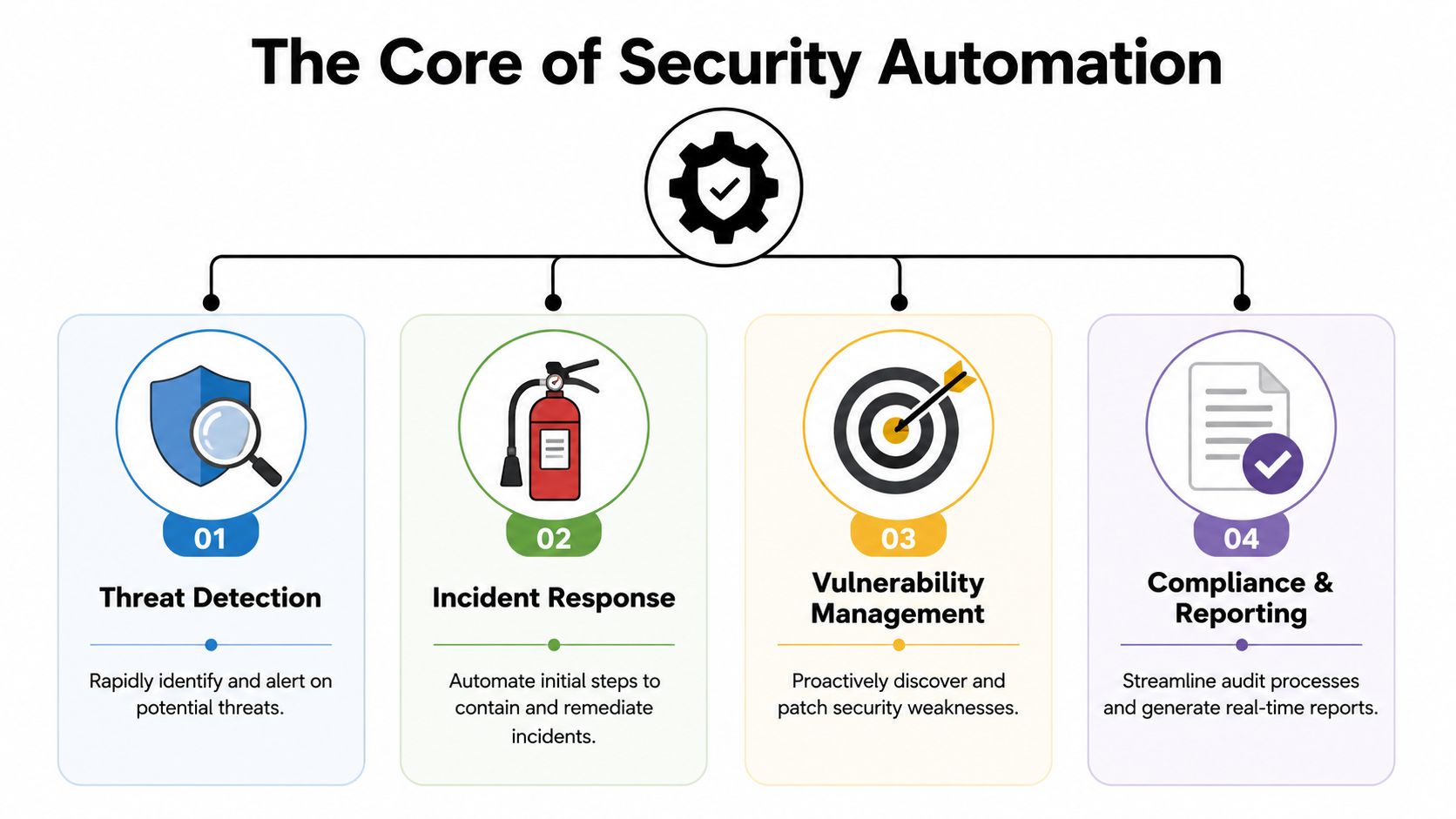
Detection automation
Detection automation quickly answers a single question: should this event receive attention?
An advanced detection pipeline collects logs from endpoints, cloud services, identity providers, firewalls, and applications. It normalizes the events, applies correlation logic, and enriches alerts with threat context. Rather than giving an analyst ten separate signals, it delivers one incident with sufficient context for action.
Examples include:
- Impossible travel login alerts: The platform links identity events and identifies an access pattern that looks suspicious.
- Malware execution signals: Endpoint telemetry, hash reputation, and process lineage are automatically connected.
- Cloud privilege changes: A set of rules detects abnormal administrative activity in cloud control planes.
Response automation
Response automation carries out the initial containment and remediation actions. At this point, teams either build confidence in automation or see it erode.
Effective response playbooks begin with reversible, low-risk actions. Common examples include quarantining an email, disabling a risky session, gathering volatile data, or creating a ticket. More disruptive steps, such as isolating a host or disabling an account, usually require approval gates unless confidence is extremely high.
Practical rule: Automate the tasks you perform repeatedly each week. Require human approval for actions that may disrupt business operations.
Orchestration automation
Orchestration provides the connective framework. It does more than detect or respond. It aligns tools that would otherwise work in isolation.
A phishing incident provides a useful example. The message is marked by email security. Relevant mailbox activity is retrieved by the SIEM. Threat intelligence examines the sender artifacts. The identity platform checks for suspicious sign-ins. The ticketing system creates a case. Chat alerts inform the appropriate responders. None of it matters if a person still must switch between consoles for every task.
APIs, Syslog, and agents are essential. Without integrations, automation turns into a side script. With integrations, it becomes an operational workflow.
Compliance automation
Most guides give this pillar too little attention, which is an error. Compliance automation is not merely scheduled report generation. It is the automatic generation of evidence within operational workflows.
If a playbook isolates a device, it should retain the alert that triggered it, the user context, the decision path, the time of action, and the follow-up record. That evidence should not rely on an analyst recalling to document it afterward. When your security controls and audit trail operate as separate workstreams, you introduce friction into every incident.
A simple way to think about the four pillars is this:
| Pillar | Primary job | Typical output |
|---|---|---|
| Detection | Identify suspicious activity | Prioritized, enriched alert |
| Response | Contain or remediate | Executed action and case update |
| Orchestration | Coordinate multiple tools | End-to-end workflow |
| Compliance | Preserve proof of control | Searchable evidence trail |
Most teams begin with detection and response. More mature teams layer in orchestration. Teams that grow in regulated settings make compliance a native part of the workflow from the outset.
The Business Value and ROI of Automation
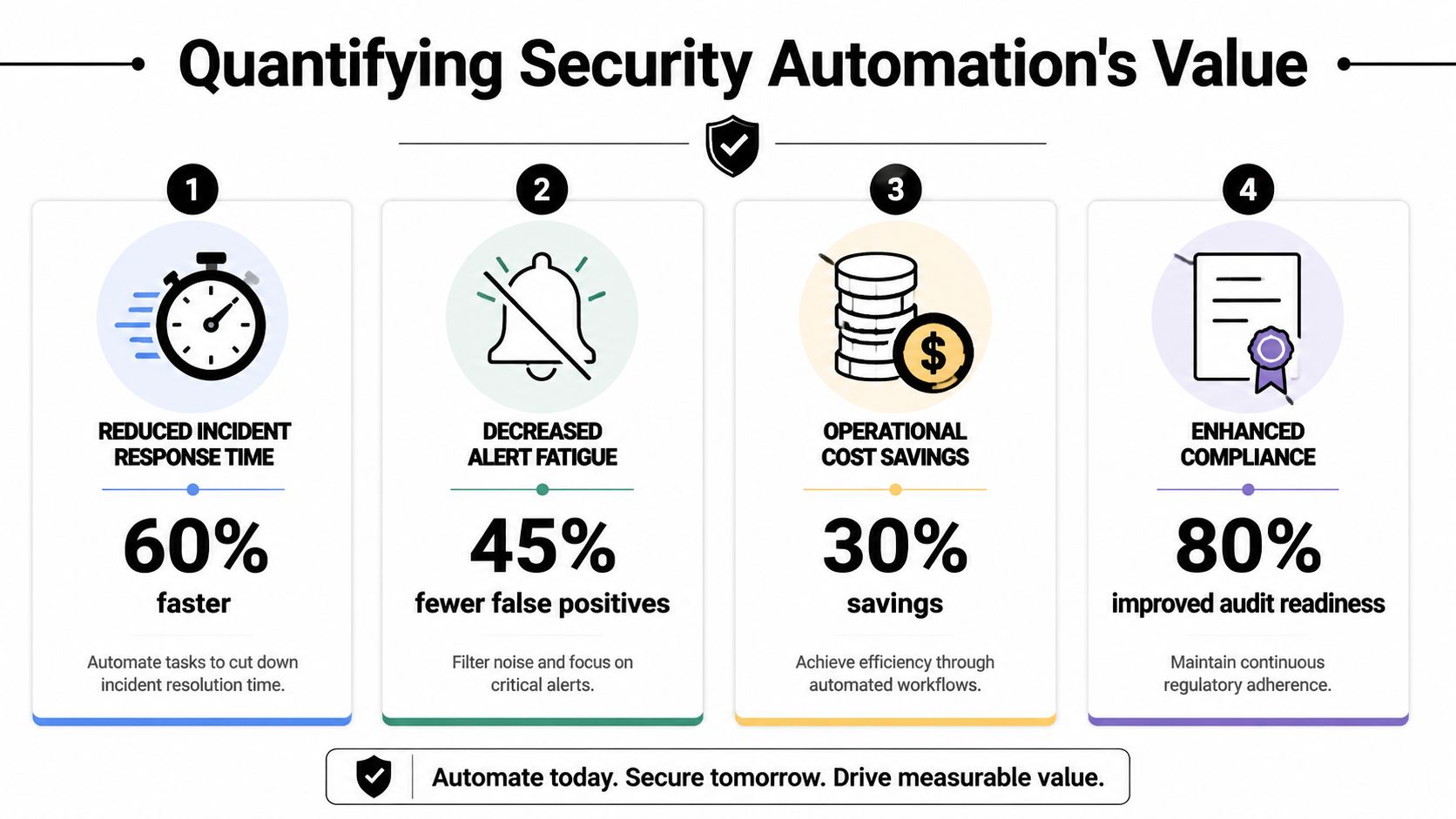
Security teams seldom secure budget through vague claims about reducing risk. They secure it by demonstrating that automation cuts response time, reduces operational cost, and generates audit evidence within routine work.
That final point carries more weight than many programs acknowledge. A response workflow that contains an incident yet leaves the team hunting for screenshots, timestamps, approvals, and case history still has hidden cost. A stronger model designs automation so the same workflow that triages and responds also captures evidence for auditors, internal control owners, and leadership.
Why boards approve automation programs
Boards provide funding for security programs that connect spending to business outcomes. Automation makes that argument in three specific ways:
- Lower incident cost: Quicker triage and containment shorten the window an attacker has to move laterally, maintain persistence, or disrupt operations.
- Better use of skilled staff: Analysts devote less time to repetitive enrichment, routing, and documentation, and more to decisions that call for judgment.
- More consistent control execution: Playbooks execute consistently under pressure, lowering variation across shifts, analysts, and incident types.
Compliance should sit within that same business case. When evidence is created during the workflow, audit preparation no longer remains a separate project with its own labor cost. Teams assessing that model can examine Unified Security Stack's compliance management capabilities as an illustration of how incident handling and evidence collection can exist within the same operating process.
Where the return comes from
The value of automation does not stem from removing analysts from the process. It stems from eliminating manual steps that consume analyst time and delay response.
In most SOCs, those steps are well known. An alert triggers. An analyst reviews asset context in one tool, user activity in another, and threat intel in a third, then creates a ticket, copies details into chat, and begins gathering proof for later review. Each task makes sense by itself. Combined, they produce delay, inconsistency, and fatigue.
This is where the return on investment becomes clear.
A unified platform like Unified Security Stack alters the economics by cutting console switching and converting those tasks into a single workflow. The alert is enriched, the case is created, the action is taken, and the evidence trail is kept within the same process. That lowers mean time to respond, while also reducing the labor associated with post-incident reporting and audit follow-up.
A staffing advantage exists as well. Repetitive queues exhaust strong analysts and force senior responders into administrative work. Automation helps teams keep experienced staff focused on exceptions, investigations, and tuning decisions rather than routine handling.
What weakens ROI
Automation that is poorly selected generates cleanup work rather than savings. I repeatedly observe the same failure patterns:
- Automating noisy detections before tuning the signal
- Triggering high-impact actions without approval logic or guardrails
- Building playbooks that stop at containment and ignore documentation
- Treating compliance evidence as a manual task after the incident closes
Teams that achieve strong returns begin with a narrower scope. They select high-volume, high-confidence use cases, including phishing triage, suspicious login response, malware containment, and privileged account changes. They specify who owns each playbook, which conditions trigger action, when human approval is necessary, and what evidence must be captured every time.
That discipline transforms automation into a business asset rather than a collection of scripts.
A practical method for assessing value is straightforward. Track reduced exposure, analyst hours redirected to higher-skill work, faster case resolution, and improved audit readiness from the same workflow. When response and compliance improve together, the program is delivering genuine ROI.
Common Architectures and Key Components
Automation breaks down when the architecture is fragmented. If your logs are inconsistent, your integrations are incomplete, or your action layer cannot enforce decisions, even a well-designed playbook becomes unreliable.
The technical basis is straightforward. Security events come from various systems. The platform normalizes and correlates these events. Response logic triggers action through linked controls. The hard part is making every layer clean enough for automation to be trusted.
The ingestion layer
This layer collects telemetry through APIs, Syslog, and agentsIn a hybrid environment, this typically covers network devices, endpoint tools, identity providers, SaaS applications, cloud services, and internal infrastructure.
Here, data quality counts more than many teams anticipate. When a firewall describes actions in one way and a cloud service tags comparable events another way, your correlation logic grows brittle. Before automation can decide reliably, the architecture must standardize event types, timestamps, asset identifiers, usernames, and severity labels.
Effective automation requires the collection and normalization of security events from multiple sources into a centralized SIEM or SOAR platform that uses correlation rules to identify suspicious activity, often processing over 30 billion IOC elements, as described by Unified Security Stack's platform overview.
For teams building this foundation, centralized log management This is often the first real milestone. When telemetry is not centralized, every downstream automation decision is weaker.
The decision layer
A SIEM, SOAR, or integrated platform generally serves as the central brain. This layer ties events together, adds threat intelligence context, and determines if a workflow should begin.
An effective decision layer does not merely fire rules. It also cuts down noise. It should combine duplicate detections, add context, link incidents to assets and users, and document the rationale for a playbook action. In regulated settings, that record of decisions is as critical as the response.
Privacy and governance considerations also shape the design at this point. Automated systems handling identity data, endpoint events, and application logs require clear limits on retention, access, and data usage. If you are assessing that part of the architecture, understanding AI privacy risks and regulations serves as a valuable supplementary reading.
The action layer
The action layer links automation with enforcement, letting playbooks interact with EDR tools, firewalls, email security platforms, ticketing systems, IAM platforms, and collaboration tools.
Typical actions include:
- Containment actions: contain an endpoint, invalidate a token, suspend an account, place a message in quarantine.
- Investigation actions: gather host information, retrieve associated logs, add context to file hashes, look up recent sign-ins.
- Workflow actions: open a case, alert a responder, amend a CMDB record, add evidence to a ticket.
The most robust architecture is not the one with the greatest number of integrations. It is the one in which every integration enables a clear, proven decision path.
A lot of teams overengineer at this stage. They wire everything together before deciding what must occur when an alert triggers. A stronger order is to begin with a single incident type, chart the telemetry flow, set the response path, and then introduce integrations only when they ease effort or improve confidence.
Measuring Success with the Right Metrics and KPIs
Security leaders frequently note that automation is helping because the team feels less burdened. That is valuable, yet insufficient. To secure continued investment, you need measurements that show operational change.
The most important pair is MTTD and MTTRMTTD shows how fast the team detects a genuine incident. MTTR shows how fast the team contains or resolves it. In automation initiatives, MTTR is often where the earliest substantial gains emerge, since playbooks eliminate delay between triage and initial action.
Organizations using SOAR platforms can reduce MTTR by up to 80%, according to IBM's SOAR overviewThat is significant because the attacker's opportunity window narrows when containment begins at once rather than sitting in a queue.
Metrics that reflect real operational change
MTTD and MTTR are necessary, yet they cannot stand alone. A team can improve its MTTR appearance by rapidly closing poor-quality incidents. The KPI set must provide sufficient context to reveal whether automation is enhancing operations or merely moving the numbers.
Use a scorecard like this:
| KPI | What it tells you | What good looks like |
|---|---|---|
| MTTD | Detection speed | Alerts reach analysts with enough context to act quickly |
| MTTR | Response speed | First containment happens without waiting on manual triage |
| Automation rate | Workflow coverage | Routine incidents are handled without manual handoffs |
| Escalation quality | Trust in playbooks | Analysts receive fewer but better cases |
| Evidence completeness | Audit readiness | Each incident leaves a consistent activity record |
Note what is missing. Vanity metrics. Tallying all alerts processed may mislead when the platform continues to overwhelm the team with noise.
A practical KPI scorecard
An effective measurement rhythm combines trend review and incident review.
- Track workflow-level MTTR: Evaluate at the playbook level, not merely by SOC aggregate.
- Review exception paths: Tally where automation stopped, failed, or required an override.
- Sample evidence quality: Verify that incidents contain timestamps, triggering indicators, response actions, and approvals.
- Compare analyst time allocation: Watch for a shift from repetitive triage to investigation and improvement efforts.
One operational lesson is especially clear. Metrics require ownership. When no one owns the performance of a playbook, the workflow quietly deteriorates. Rules become noisy. Integrations fail. Analysts begin to bypass automation because that is easier than repairing it.
Effective KPI design gauges both speed and trust. Automation that is quick but constantly overridden by analysts is not maturity. It is a warning sign.
The teams that scale automation in security don't only ask, "Did the playbook run?" They ask, "Did it produce the right outcome, with the right evidence, and did the team trust it enough to keep using it?"
Automation in Action Real World Use Cases and Playbooks
Playbooks turn automation into something concrete. Without them, most conversations remain theoretical. Value appears when a detection starts a repeatable sequence across tools and the system manages the initial response wave before an analyst opens the case.
Phishing triage and containment
Phishing makes a strong initial use case since the workflow repeats and the response path is clearly understood.
A standard playbook begins when email security or a user-reported mailbox event generates an alert. The system pulls sender details, URLs, attachments, and message headers. It then compares those artifacts with internal reputation data and threat intelligence sources. After that, it looks for similar messages in other mailboxes and links the email event to recent user sign-in activity.
At that point, the playbook can take several actions in sequence:
- Quarantine matching emails across affected inboxes.
- Open or update a case within the ticketing system, with the message artifacts attached.
- Notify the affected user and the SOC channel.
- Escalate for analyst review when the campaign looks targeted or credentials might have been entered.
- Preserve evidence through documentation of the trigger, enrichment results, timestamps, and actions performed.
Context separates a weak phishing playbook from a strong one. If the system merely deletes messages, it might address one symptom while overlooking the broader campaign. If it also examines mailbox spread, user activity, and related indicators, the team gains a more complete operational view.
Ransomware containment
Ransomware response tolerates less delay, so the playbook requires high-confidence triggers and careful design.
A practical workflow frequently starts with endpoint telemetry indicating suspicious encryption behavior, mass file modification, or a malicious binary chain. The platform links that event to host activity, user context, and network signals. When confidence exceeds the defined threshold, the playbook begins containment.
A disciplined sequence looks like this:
- Isolate the endpoint via the EDR platform.
- Disable or limit user access if there is suspicion of identity abuse
- Block related indicators at the firewall or email layer when applicable.
- Collect forensic context including process lineage, recent detections, and linked assets.
- Create an incident record alongside the action history and evidence package.
As such, incident response automation proves particularly valuable. The workflow must act quickly, yet it also must leave a full record of what triggered the action and how the platform responded.
A frequent mistake is attempting to automate complete remediation too soon. Initial containment is generally the correct boundary. Root cause analysis, recovery decisions, legal review, and wider business coordination still require people.
Privileged access misuse
The third use case is less visible but equally important. Suspicious privileged account activity often shows up as a set of minor anomalies instead of one striking alert.
A playbook could begin with an unusual admin login, an unexpected privilege change, or a sensitive system access event that falls outside the normal pattern. The platform ties together identity events, host activity, and change logs. It then verifies whether the account matches an approved maintenance window or known administrative workflow.
If the activity looks risky, the automation can:
- Step up identity controls by revoking active sessions or requiring a reset.
- Gather related changes based on recent configuration and access logs.
- Notify both security and system ownership teams since access misuse frequently spans operational boundaries.
- Attach a compliance-ready activity trail to the case for subsequent review
This use case is where compliance-aware automation truly delivers value. When the system records not only what occurred but also which control was invoked, later audit and investigation work become much clearer.
Your Roadmap to Implementing and Scaling Automation
Teams gain value from automation when they sequence it effectively. Programs falter when the first wave attempts to automate high-risk decisions before telemetry, ownership, and evidence handling are stable.
A stronger roadmap begins with a single question: which recurring decisions take up analyst time, follow a clear pattern, and can create a defensible record every time? That is the correct starting set because it enhances response speed while reducing audit friction.
Start with low-regret automations
Begin with use cases that have low blast radius and high frequency. Strong first candidates include phishing enrichment, alert deduplication, evidence collection, user notification, and ticket creation. Those tasks cut queue noise and save analyst time without causing the operational disruption that premature auto-containment creates.
A practical rollout pattern looks like this:
- Stabilize telemetry first: Standardize log formats, correct asset and identity labels, and confirm time synchronization between sources.
- Choose one playbook family: Select phishing, endpoint triage, or suspicious login handling, and tune that use case before broadening.
- Separate enrichment from action: Collect context before anything else. Introduce containment only once the team has confidence in the inputs and thresholds.
- Use approval gates for disruptive steps: Ensure analysts or system owners stay informed about account lockouts, host isolation, and policy changes.
- Review outcomes on a fixed cadence: Adjust thresholds, exception paths, and evidence fields according to what incidents revealed during that week.
At this stage, many security teams either build momentum or cause extra work. When initial automations are noisy or difficult to explain, confidence falls quickly.
Design playbooks for evidence, not just speed
Speed of response is important. It is equally important to demonstrate what occurred, why the system took action, and which control requirement was met by that action.
Problems arise when teams automate containment while evidence collection remains manual. The incident might be resolved more quickly, yet the audit trail is split among tickets, chat threads, and analyst notes. Eventually, someone must rebuild the decision path under time pressure.
From the beginning, design every playbook to produce two outputs: an operational outcome and a compliance outcome.
| Playbook element | Operational output | Compliance output |
|---|---|---|
| Detection trigger | Incident starts | Rule logic and source event recorded |
| Enrichment step | Context added | Artifact history preserved |
| Response action | Threat contained | Timestamp, actor, and system action logged |
| Escalation path | Analyst review | Approval, exception, or override captured |
This design decision alters the cost equation of the program. The workflow that lowers mean time to respond also cuts audit preparation time, control testing effort, and post-incident documentation work. Compliance is no longer a separate reporting project; it becomes a real-time byproduct of everyday operations.
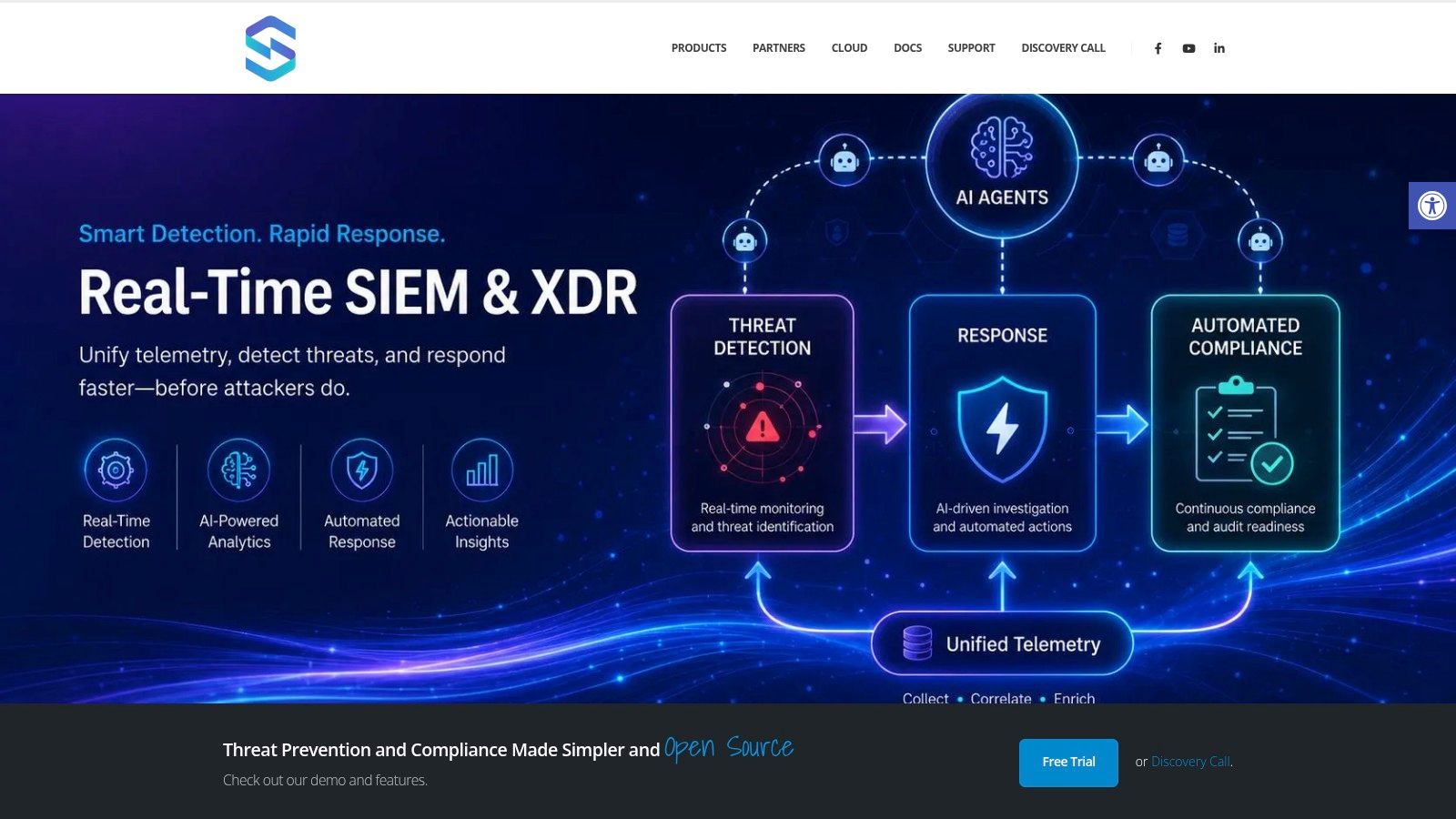
A unified platform approach
As automation grows, transfers among distinct SIEM, SOAR, XDR, ticketing, and compliance tools turn into a design issue, not merely a tooling hassle. Data models diverge. Case context disappears. Control evidence resides in one location while response actions reside in another.
A unified platform such as Unified Security Stack cuts that fragmentation by consolidating telemetry ingestion, correlation, playbook execution, and evidence retention under a single operating model. In practice, this allows the team to initiate a response, retain the source artifacts, document approvals, and align the activity with frameworks including HIPAA, CMMC, SOC 2, ISO 27001, PCI, GDPR, and GLBA without manually joining those steps.
That is important for scale. Security leaders require more than scripts that shave a few minutes off each alert. They need an architecture that delivers consistent actions, consistent records, and reduced operating cost as alert volume increases.
The lesson for implementation is simple. Approach automation as a control system with three clear flows: event flow, action flow, and evidence flow. When those flows are clearly defined, the program can accelerate, reduce risk sooner, and produce compliance-ready output during routine response work.
Security automation provides the greatest value when it lowers analyst workload and creates a clear audit trail from the same workflow. If you are assessing a unified approach to detection, response, and compliance workflows, Unified Security Stack merits consideration on that architecture shortlist.