NIST 800-53 Controls: Master Implementation in 2026
At this moment, you likely face one of two scenarios. An auditor has requested evidence that your controls work, or your SOC gathers abundant telemetry yet no one can clearly trace that activity back to NIST 800-53 controlsBoth issues generally stem from one shared gap. The framework resides in policy binders, while the evidence sits in disconnected tools.
In FedRAMP, CMMC-aligned, and other regulated environments, that gap becomes painful quickly. Teams can document account management, event logging, incident response, and system monitoring. Then the assessor asks which alerts, which log sources, which retention settings, and which records demonstrate that the control functions today. At that point, theory no longer helps.
The practical way through is to translate each control into four things: required data, detection logic, response workflow, and retained evidenceIf you take that approach, the catalog stays manageable. If you do not, NIST becomes a lengthy set of unclear duties that exhaust your security team.
Table of Contents
- Navigating the NIST 800-53 Framework for Modern Compliance
- Understanding the NIST 800-53 Structure and Baselines
- A Deep Dive Into Key Control Families and IDs
- Mapping Controls to SIEM Signals with Unified Security Stack
- Essential Logging Sources for Continuous Control Monitoring
- Automating Audit Evidence Collection and Reporting
- NIST 800-53 Crosswalks to Other Compliance Frameworks
- Building Your Real-Time NIST Compliance Dashboard
Navigating the NIST 800-53 Framework for Modern Compliance
The hardest part of NIST 800-53 controls The task is not reading the catalog. It is deciding what operational reality each control should produce. Security leaders frequently inherit a spreadsheet of control IDs, a stack of policies, and a SIEM filled with logs that were never onboarded with compliance use cases in mind.
That is why mature programs approach the framework as an engineering challenge, not merely a documentation exercise. A control is not finished just because a policy exists. It is finished when the team can demonstrate where the signal originates, who reviews it, what causes escalation, and which record is retained for assessment.
A useful starting point is to align your implementation with broader enterprise cybersecurity best practicesNot because another checklist resolves NIST, but because sound control design always returns to the same basics: least privilege, dependable logging, controlled change, validated response, and repeatable evidence.
What works in practice
Three implementation habits consistently separate clean audits from painful ones:
- Control narratives tied to systemsLink every requirement to specific platforms, owners, and telemetry sources rather than using broad claims such as saying logs are monitored.
- Detection use cases tied to control intentAU and SI controls should produce actual detections, not simply passive storage.
- Evidence captured during operationsDo not wait until the audit to gather screenshots and exports that should already be included in routine reporting.
What usually fails
Some patterns look compliant on paper but collapse under questioning:
- Policy-only coverageAuditors will inquire how the policy is enforced.
- Logging without health monitoringIf a critical source stops sending data, your control coverage becomes ineffective along with it.
- Manual evidence huntsIf analysts must rebuild evidence from several consoles, the process will not scale.
Practical rule: If a control cannot be connected to an alert, a report, a ticket, a dashboard panel, or a retained log path, it likely is not operational yet.
Understanding the NIST 800-53 Structure and Baselines
NIST SP 800-53 becomes easier to use when you read it as a catalog rather than as a legal document. The framework organizes related requirements into families, then divides those families into individual controls, and then adds enhancements when implementation needs to be stronger or more specialized.
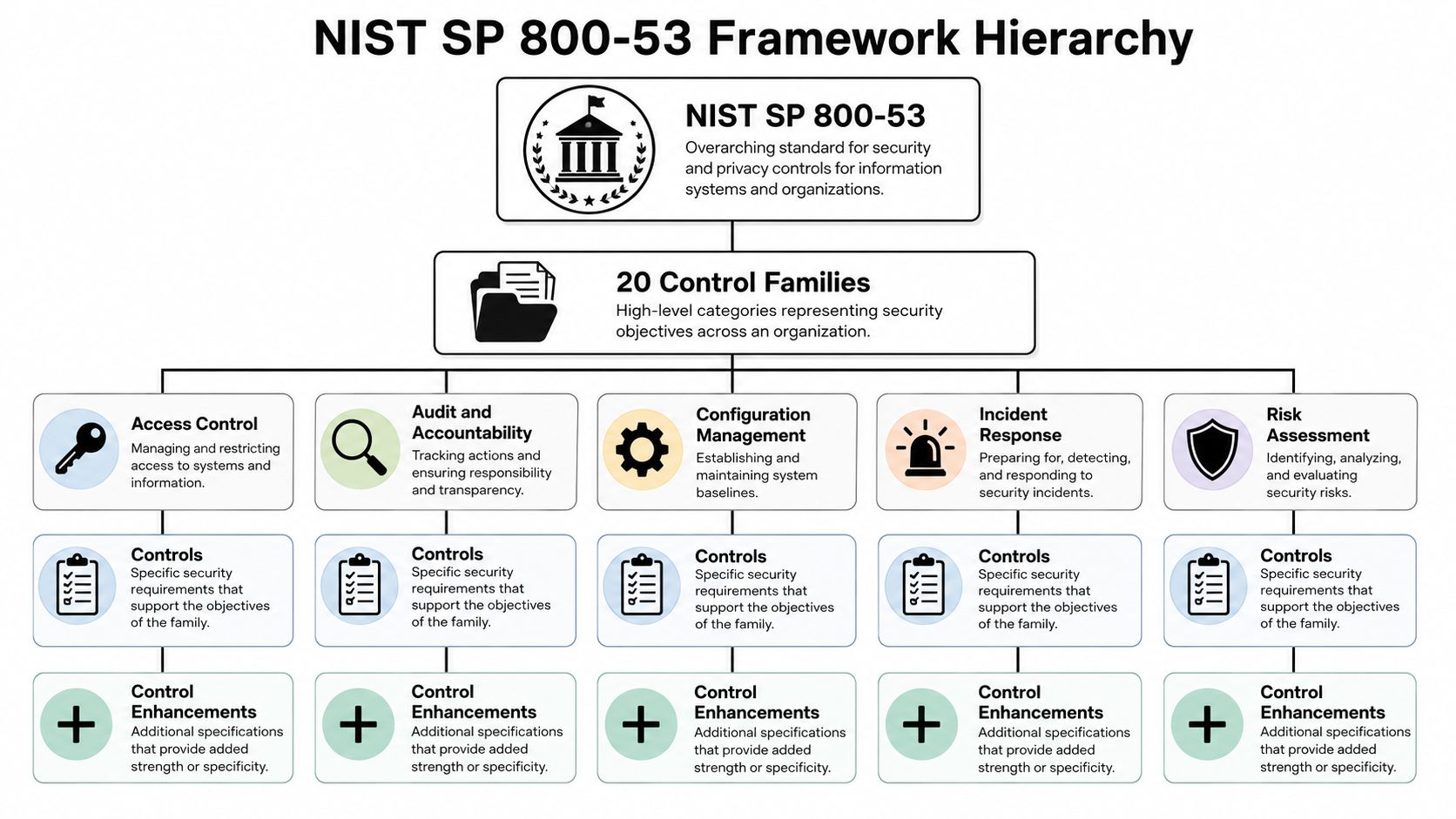
How the catalog is organized
A library analogy helps. The control family serves as the library's section. The control is the specific book. The control enhancement is the annotated version that includes additional requirements for a more demanding environment.
For instance, you might begin with a family such as Access Control. Within it, you will find controls covering account management, session control, separation of duties, and information flow. Certain controls include enhancements that drive stronger safeguards, closer review, or deeper monitoring.
A simple way to visualize the structure is this:
| Level | What it means | How to use it operationally |
|---|---|---|
| Family | Broad security theme | Assign program owner and governance scope |
| Control | Specific requirement | Define process, technical enforcement, and evidence |
| Enhancement | Added rigor or depth | Add stronger monitoring, review, or automation |
That hierarchy matters because teams frequently over-engineer at the family level and under-specify at the control level. Saying we manage access is too broad. Saying privileged account creation is logged, reviewed, and reported through a centralized workflow is something an assessor can test.
How baselines change implementation
Baselines decide which controls apply according to impact and risk context. In practice, the baseline is your initial set, not your final architecture. Teams still must tailor controls to data sensitivity, hosting model, administrative boundaries, and audit expectations.
The implementation trade-off is simple. If you treat the baseline as a checklist, you will meet minimum mapping but overlook environmental risk. If you tailor aggressively without documenting the rationale, you will create disputes during assessment.
Use this sequence instead:
- Select the applicable baseline depending on your system categorization and compliance target.
- Tailor controls around real technologies, trust boundaries, and business processes.
- Document inherited controls in situations where cloud providers, identity providers, or managed services shoulder part of the requirement.
- Identify controls needing continuous monitoring so that they turn into operational use cases within the SOC.
A baseline shows you the starting point. Your architecture determines what you must monitor each day.
Top-performing teams maintain two perspectives on the framework simultaneously. One is the formal compliance perspective. The other is the SOC perspective, in which every control becomes telemetry, logic, workflow, and evidence. That second perspective is what makes NIST 800-53 controls able to endure in a modern environment.
A Deep Dive Into Key Control Families and IDs
Not every family has a place in your SIEM strategy, yet certain families clearly do. If you are building operational coverage, the controls that typically demand robust log correlation, investigative support, and retained evidence are found in Access Control (AC), Audit and Accountability (AU), System and Information Integrity (SI), and Incident Response (IR).
Access Control family
The AC family controls who receives access, how that access is constrained, and how its use is governed. During audits, this family is examined from multiple angles at the same time. Account creation, privilege use, remote access, and segmentation all tend to appear.
AC-2 Account Management
This control focuses on the account lifecycle. Teams require a process for creating, changing, disabling, reviewing, and deleting accounts, particularly privileged accounts.
The assessment objective generally reduces to this: can you demonstrate that accounts are governed, rather than simply created ad hoc?
A practical implementation pattern includes:
- Identity source integration with directory services or cloud identity platforms
- Administrative event logging for account creation, role assignment, disablement, and group membership changes
- Review workflow evidence such as tickets, approvals, and periodic access attestations
Centralizing administrative activity and tying identity changes to a human workflow is effective. Depending on screenshots from the identity platform without retained evidence of who approved what does not work.
AC-4 Information Flow Enforcement
AC-4 is the point where architecture and detection converge. The goal is not simply to state that traffic is filtered. The goal is to enforce approved information flows among systems, users, and trust zones.
The assessment question typically asks whether controls are in place to stop unauthorized data or traffic movement across boundaries.
Common implementation patterns include:
- Firewall and network policy enforcement
- Segmentation controls between user, server, management, and sensitive data zones
- Cloud security group and policy change monitoring
- Alerting on denied or unusual cross-zone traffic patterns
Teams frequently struggle with AC-4 because they document segmentation once and never put it into operation. The control grows far stronger when denied traffic, policy changes, and exceptions are all monitored.
AC-6 Least Privilege
Least privilege is among the clearest controls that is easy to support and difficult to prove. The requirement itself is simple. Users and processes should have only the access their role requires.
The burden of evidence is anything but simple. You need records demonstrating how privilege is granted, how privileged access is used, and how exceptions are reviewed.
Strong implementation patterns include PAM logs, monitoring of admin groups, command execution logging on privileged systems, and alerts for privilege escalation or role changes that occur outside approved paths.
Field advice: Least privilege becomes auditable when privilege changes create a trail across identity logs, endpoint logs, and ticketing records at the same time.
Audit and Accountability family
The AU family is where many compliance programs either become measurable or remain abstract. It addresses which events are logged, how logs are protected, and how they are reviewed.
AU-2 Event Logging
AU-2 requires the organization to identify which events must be logged and to log them consistently. That sounds easy until you recognize that many environments ingest whatever is convenient rather than what the control demands.
The assessment objective typically asks whether logged events are defined, relevant, and adequate for monitoring and investigation.
Strong implementation patterns include:
- Defined event categories for authentication, privilege use, policy changes, process execution, and security events
- Source onboarding standards for servers, endpoints, cloud services, network controls, and critical applications
- Validation that required systems continue sending logs
A weak implementation logs everything from certain systems and nothing from others. A strong implementation selects high-value events and verifies source health continuously.
AU-6 Audit Record Review, Analysis, and Reporting
AU-6 asks whether anyone reviews and analyzes audit records. Passive retention is no longer sufficient.
The control is best satisfied with:
- Correlation rules that identify suspicious patterns
- Analyst workflows for triage and escalation
- Reporting that shows recurring review of critical events
Keeping logs for months and reviewing them only after an incident does not work. The review activity itself must exist as evidence.
AU-12 Audit Record Generation
AU-12 centers on creating the records that are required. While AU-2 establishes what is important, AU-12 ensures those records are actually generated by systems.
Gaps in application logging, cloud service settings, and endpoint telemetry depth are frequently revealed by this control. Identity events are often covered well, whereas database, application, or script execution logs may be absent or uneven.
System and Information Integrity family
Detection of flaws, malicious activity, unauthorized changes, and integrity problems falls under the SI family. Within a SOC, it is among the most active families from an operational standpoint.
SI-4 Information System Monitoring
SI-4 is typically the control linked to SIEM and XDR. It requires monitoring the system for attacks, indicators of potential attacks, and unauthorized connections locally, over the network, and remotely.
Assessment objectives generally examine whether monitoring is present throughout the environment and whether it can detect security activity that matters.
Common implementation patterns include:
- Centralized event aggregation
- Correlation rules across identity, endpoint, and network telemetry
- Alerting on suspicious access, malware activity, policy changes, and lateral movement indicators
- Investigation workflows with enrichment and case tracking
Effective monitoring is how a modern SOC proves its value. When monitoring lacks links to asset criticality, user context, or alert routing, it creates noise. Contextualized monitoring yields findings that can be acted on.
SI-7 Software, Firmware, and Information Integrity
SI-7 commonly appears in file integrity monitoring, baseline validation, and detection of unauthorized changes. This control centers on safeguarding integrity and identifying unauthorized modification.
In practice, implementations monitor critical operating system files, security tool configurations, startup mechanisms, and sensitive application directories. In cloud environments, this also covers configuration drift across key services.
SI-3 Malicious Code Protection
This control goes beyond anti-malware signatures. It encompasses prevention, detection, quarantine, and response for malicious code events.
Evidence for operations typically originates from endpoint telemetry, malware detections, blocked execution events, sandbox verdicts, and analyst case notes connected to response work.
Incident Response family
Whether an organization can identify, manage, and learn from incidents is demonstrated by the IR family. For many programs, this family is better documented than put into practice.
IR-4 Incident Handling
IR-4 addresses detection, analysis, containment, eradication, and recovery. Auditors frequently check whether the organization can progress from an alert to a managed incident using a consistent workflow.
Good implementation patterns include:
- Severity-based triage criteria
- Playbooks for common incident types
- Ticketing or case records with timestamps, owners, and disposition
- Evidence of containment actions and lessons learned
When IR-4 is implemented poorly, an incident response plan sits in a document repository while no case records demonstrate real handling.
IR-5 Incident Monitoring
IR-5 centers on tracking and documenting incidents over time. That matters because many teams can produce alerts but cannot produce a lasting incident record.
A robust pattern involves creating cases from high-confidence detections, tracking status during investigation, and keeping notes that capture analyst decisions. Such history is essential for audits and post-incident review alike.
IR-6 Incident Reporting
This control covers incident reporting inside the organization and, when required, outside it. Operationally, it includes notification workflows, escalation paths, and retained records of communications.
The most common implementation error I encounter is treating reporting as an email habit instead of a controlled process. When no trigger is defined and no record shows who was notified, defending the control becomes difficult.
Mapping Controls to SIEM Signals with Unified Security Stack
Many compliance programs stop at saying the SIEM supports the control. That claim is too vague to hold up in actual operations or an audit. A more precise approach is useful: Control -> Required Data -> Platform Configuration -> Detection Signal.
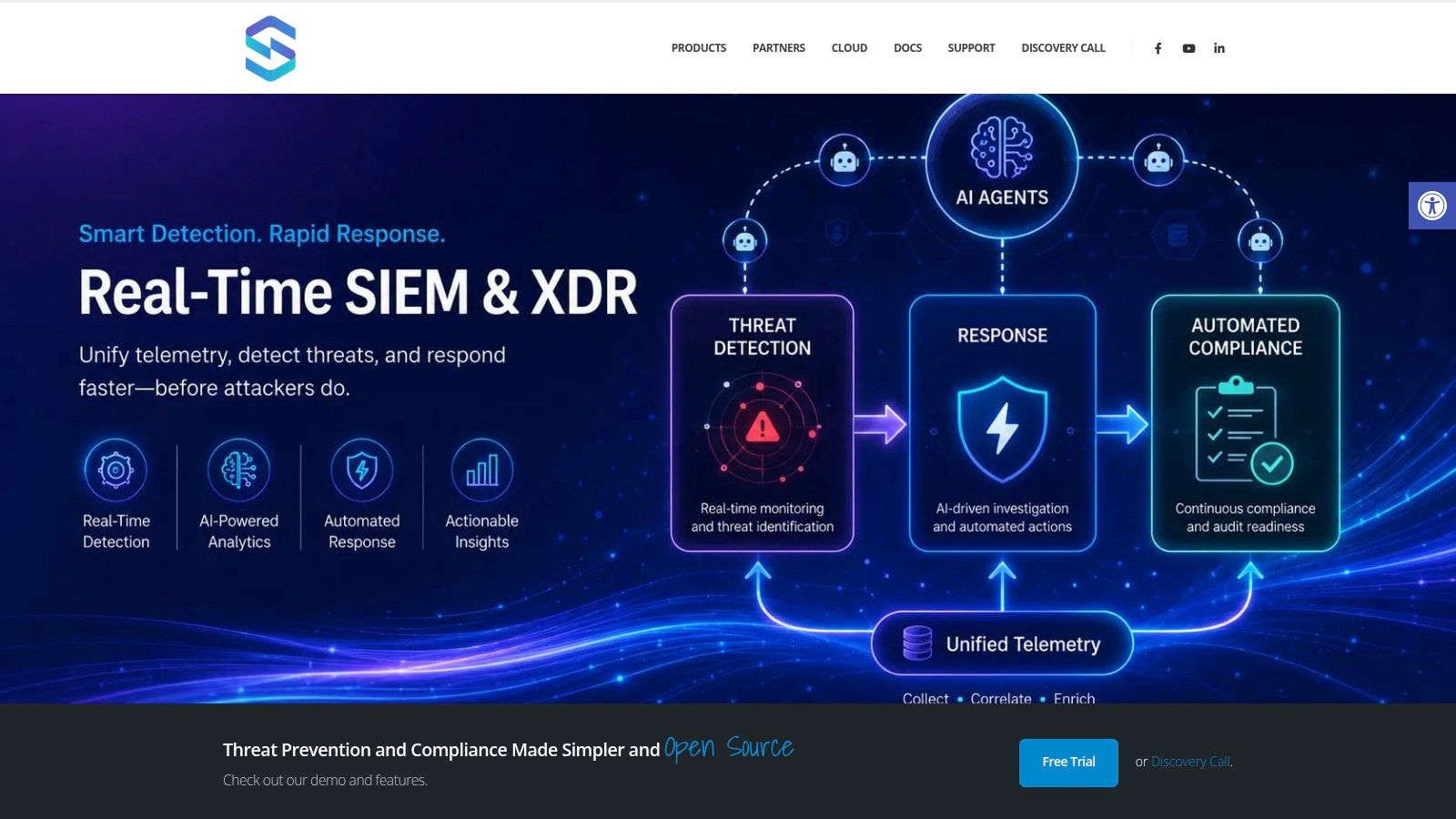
From control text to operational telemetry
Within Unified Security Stack, this mapping begins by onboarding the correct feeds. That includes endpoint agents where process and security telemetry are important, Syslog from perimeter controls, API ingestion from cloud services, and parser validation so events arrive with usable fields.
If you're evaluating a cloud-first deployment model, Unified Security Stack's overview of a cloud SIEM architecture provides helpful context for determining where collection, normalization, and correlation should occur.
The primary tension is scope against fidelity. Many teams hurry to link every source at hand. The stronger route is to bring on sources tied to named controls first, then broaden. A firewall feed with parsed deny actions and admin changes offers more value than a noisy source no one reviews.
Practical mapping examples
This is how the mapping appears when it is performed correctly.
AU-2 Event Logging
| Element | Practical mapping |
|---|---|
| Required data | Authentication events, admin actions, policy changes, security events from critical assets |
| Unified Security Stack configuration | Agents on key servers and endpoints, Syslog from firewalls and VPNs, parser tuning for event classification |
| Detection signal | Alert when a critical asset stops sending logs, or when expected event types disappear from a source |
| Audit evidence | Source health dashboards, onboarding records, retained event samples, alert history for log ingestion failures |
This illustrates a control that many teams misread. AU-2 is not merely the existence of logs. If a domain controller, cloud audit feed, or security gateway stops reporting, the control is diminished. A correlation rule for absent telemetry is often just as important as one for malicious activity.
AC-2 Account Management
| Element | Practical mapping |
|---|---|
| Required data | Account creation, disablement, role changes, group membership changes, privileged role assignment |
| Unified Security Stack configuration | Directory and identity log ingestion, normalization of user and role fields, correlation with ticket or workflow tags where available |
| Detection signal | Alert on privileged account creation outside change windows, dormant admin account reactivation, or direct role assignment bypassing normal workflow |
| Audit evidence | Search results for account lifecycle events, scheduled reports, case records tied to review |
SI-4 Information System Monitoring
| Element | Practical mapping |
|---|---|
| Required data | Endpoint security events, network connection data, identity events, cloud control-plane activity |
| Unified Security Stack configuration | Correlation rules linking suspicious login activity, process behavior, and outbound communication patterns |
| Detection signal | Multi-stage alert when unusual authentication is followed by privilege use or suspicious endpoint execution |
| Audit evidence | Correlation rule definitions, alert timelines, analyst notes, incident cases |
The strongest SIEM control mappings do not center on data sources alone. They center on the security question the control expects you to answer.
Turning detections into investigations
Detection without workflow is often where SOC maturity gets stuck. In Unified Security Stack, the practical step is to link alerts to triage steps, response playbooks, and retained case notes. That makes control monitoring something that can be assessed.
Once the detection logic is established, demonstrate to the team how the workflow should appear in the console.
Consistency is what works here. For each high-value control, analysts should understand:
- which alert types map to the control,
- what enrichment they should check first,
- when to escalate to an incident,
- and what records need to be kept as evidence.
What does not work is depending on analyst memory. If one analyst documents each step while another only closes the alert, your control evidence becomes inconsistent. Standard operating procedures within the SOC matter as much as the correlation rule itself.
Essential Logging Sources for Continuous Control Monitoring
Weak source coverage means weak control coverage. Many teams later find that their SIEM was built for troubleshooting rather than compliance monitoring. Continuous control monitoring relies on dependable telemetry from where access, change, execution, and response occur.
Network and perimeter systems
Begin with devices that enforce boundaries and remote access.
- Firewalls and security gateways support the AC and AU families by displaying allowed and denied traffic, policy changes, administrative logins, and segmentation enforcement.
- VPN concentrators and remote access platforms help monitor remote user activity, authentication results, and unusual access patterns relevant to access control and incident review.
- Switches, wireless controllers, and network access controls supply evidence for connection events, port activity, and administrative changes.
A centralized pipeline is crucial here. Teams frequently raise consistency by using centralized log management so these devices feed a single searchable record rather than separate admin consoles.
Operating systems and endpoint activity
Operating system logs provide some of the strongest evidence for AU, AC, SI, and IR controls since they reveal what users and processes did.
On Windows, concentrate on security logs, PowerShell activity, scheduled task changes, service creation, and local group changes. On Linux, prioritize authentication logs, privilege escalation records, service changes, auditd events, and key file modifications. Endpoint protection and EDR telemetry contribute process execution, malware findings, and response actions.
If you cannot see local privilege changes and process execution on critical hosts, you are operating blind across several control families at once.
Applications and cloud services
Applications frequently create the largest blind spots. Web servers, databases, business apps, and identity-aware platforms all produce events that can demonstrate whether control intent is enforced.
Use this checklist during onboarding:
- Database audit logs. Valuable for reviewing privileged activity, object access, and patterns of unauthorized queries.
- Web server access and error logs. Beneficial for misuse of applications, unusual request activity, and reconstructing incidents.
- Cloud control-plane logs. Essential for monitoring changes, tracking role assignments, and investigating administrative activity.
- Software-as-a-service audit trails. Significant for changes to identities, mailbox activity, file access, and modifications to policy.
A common practical error is to think cloud-native retention suffices. For SOC operations, it seldom does. Ingest those events into your central monitoring workflow so that detections, review, and evidence remain together.
Automating Audit Evidence Collection and Reporting
Auditors seldom begin with your strongest detection rule. They open with a more basic question. Show me the proof. Let me see privileged account creation. Let me see failed administrative logins. Let me see that incidents were handled, not only detected. Let me see that logs were reviewed and not simply stored.
That is why evidence automation is more important than many realize. Labor is not the only issue. Manual evidence collection introduces inconsistency. In one month the report is exported properly. In the next, someone overlooks a filter, skips a system, or records the wrong time period.
What auditors actually want
Assessors usually need a small set of things repeated across many controls:
- A defined scope showing which systems and identities the control covers
- A retained record such as logs, alert history, ticket history, or configuration output
- Proof of review showing someone looked at the data and acted when needed
- A time-bounded sample demonstrating the control operates over time, not only on the audit day
That is why a workflow built on a platform is so valuable. With compliance management workflows, teams can connect event evidence, alert history, and operational records to specific control narratives rather than recreating the same package for every request.

Evidence packages that hold up
A strong evidence package addresses the control with little interpretation. For AC-2, that could be a scheduled report displaying privileged account creation, disablement, and role changes across a set period, along with the associated case or approval trail. For AU-6, it could be analyst review records, alert queues, and monthly summaries of high-value event review.
For teams refining their review process, broader MD TECH TEAM's website audit insights can serve as a useful reminder that audit readiness rests on repeatable inspection habits, not collection at the last minute.
Use evidence bundles that combine more than one artifact:
| Control example | Better evidence bundle |
|---|---|
| AC-2 | Identity events, approval record, review report |
| AU-6 | Alert history, analyst notes, recurring review output |
| SI-4 | Correlation rule, triggered alerts, incident case timeline |
| IR-4 | Incident ticket, containment action record, closure summary |
Reporting habits that reduce audit pain
The most effective teams do not create evidence only upon request. They produce it during normal operations.
A few habits work especially well:
- Schedule recurring reports for privileged changes, authentication anomalies, and the health of critical sources.
- Create read-only auditor views so assessors can review dashboards without interacting with production workflows.
- Preserve case notes and dispositions because the rationale for an action is often as significant as the event itself.
- Tag evidence by control ID when feasible so retrieval does not depend on undocumented know-how.
Audit reality: A control is simpler to defend when evidence was generated as part of routine security operations, rather than put together during a deadline week.
NIST 800-53 Crosswalks to Other Compliance Frameworks
Most organizations that implement NIST 800-53 controls are not doing this in isolation. They are also handling ISO 27001, PCI DSS, CMMC, customer security questionnaires, or internal governance standards. That overlap is beneficial if you manage it intentionally.
Where overlap saves effort
The error is attempting to keep separate evidence programs for every framework. A better approach is to identify the operational control once, then map it outward. Access reviews, audit logging, incident handling, and configuration control typically support several frameworks at once.
Here is a straightforward crosswalk you can use during planning.
| NIST 800-53 Family | ISO 27001:2022 Annex A | PCI DSS v4.0 | CMMC 2.0 |
|---|---|---|---|
| AC Access Control | Access control and identity-related controls | Requirement areas focused on access restriction and least privilege | AC domain |
| AU Audit and Accountability | Logging, monitoring, and evidence-related controls | Requirement areas focused on logging and monitoring | AU domain |
| SI System and Information Integrity | Threat detection, vulnerability handling, and integrity monitoring controls | Requirement areas focused on malware protection, monitoring, and secure systems | SI domain |
| IR Incident Response | Incident management and response planning controls | Requirement areas focused on security incident response | IR domain |
| CM Configuration Management | Secure configuration and change management controls | Requirement areas focused on system hardening and change control | CM domain |
A crosswalk provides more than just speed. It also gives security leaders a way to show that one logging standard or identity review process supports several compliance goals. That is often how budget and operational backing are secured. You are not creating redundant programs. You are creating a single defensible control system viewed through multiple reporting angles.
Building Your Real-Time NIST Compliance Dashboard
A real-time compliance dashboard should not attempt to display the whole framework at once. It should address the operational questions with the greatest importance. Are required logs being received? Are privileged actions under monitoring? Are integrity alerts being investigated? Are incidents progressing through response in a controlled manner?
The widgets that matter
A useful dashboard in a platform like Unified Security Stack includes a small set of high-signal panels:
- Log source health panel for AU coverage. This indicates whether essential systems continue to send required telemetry.
- Privileged access activity chart for AC monitoring. This reveals successful and unsuccessful administrative login attempts, role modifications, and unusual account activity.
- Integrity monitoring feed for use cases modeled on SI-7. This exposes unauthorized modifications to protected files, services, or sensitive configurations.
- Incident workflow panel for IR operations. This presents open incidents, duration by severity, and response progress.
- Control evidence queue for audit readiness. This tracks which recurring reports and reviews were produced and kept.
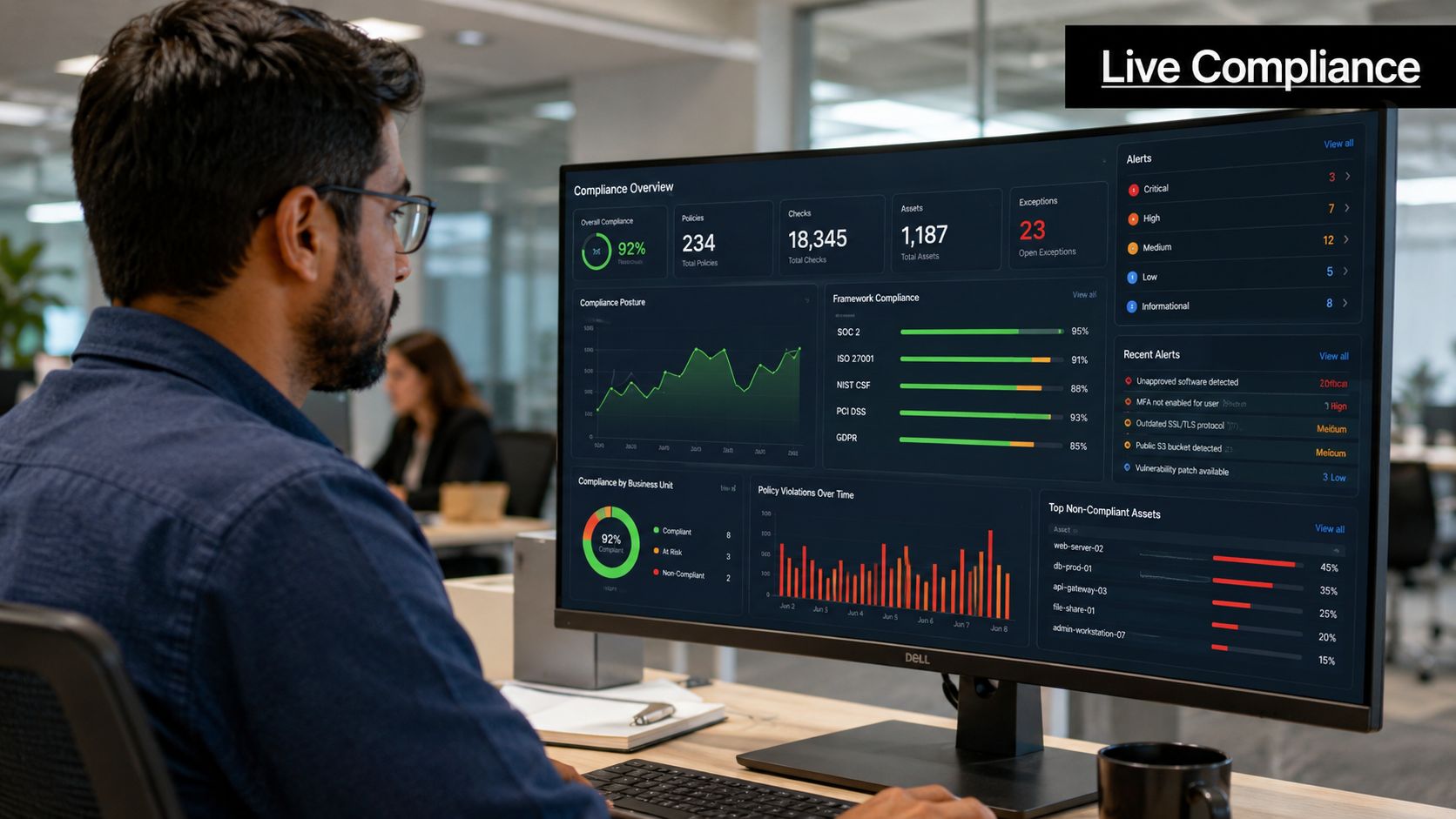
The strongest dashboards also reveal what is missing. A domain controller that has gone silent, an absent cloud audit feed, or an alert queue without analyst disposition can indicate control failure just as clearly as a confirmed attack. For that reason, the dashboard should offer health, workflow, and evidence views, not just threat views.
When you design the dashboard around control questions rather than generic security metrics, your SOC and compliance team at last view the same picture.
Unified Security Stack offers security teams a practical path to convert NIST 800-53 from a collection of documents into a living operating model. If you require open-source SIEM, XDR, automated response, and compliance evidence in a single location, explore Unified Security Stack and shape your monitoring around signals, workflows, and evidence rather than spreadsheets.