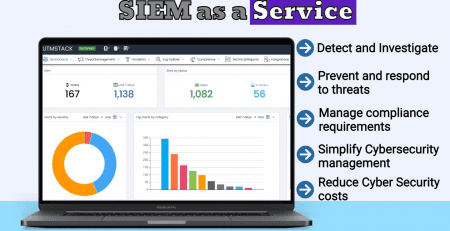
DNS Log File Your Guide to Uncovering Hidden Threats
Nothing appears wrong according to your firewall. Your EDR shows a handful of alerts with low confidence. No outages are being reported by users. Yet something still seems off.
That's the exact situation where a DNS log file ceases to be merely another log and becomes one of the most valuable artifacts in the environment. Attackers rely on DNS because every network needs it, it is frequently dismissed as background noise, and suspicious queries can mix with legitimate traffic for a long time.
If you are accountable for detection, incident response, or compliance, DNS telemetry provides visibility that other controls frequently lack. It reveals who made the request, what they requested, when they requested it, and how the resolver answered. That is sufficient to identify beaconing, malformed queries, policy violations, and covert channels when you put the data to work rather than let it accumulate.
Table of Contents
- Why DNS Logs Are a Security Goldmine
- The Anatomy of a DNS Log File
- Common DNS Log Sources and Formats
- Uncovering Threats with DNS Log Analysis
- Parsing Normalization and Retention Best Practices
- Ingesting and Analyzing DNS Logs with Unified Security Stack
- Sample Detections and Incident Response Playbooks
Why DNS Logs Are a Security Goldmine
A long-term threat seldom reveals itself with a sudden surge in traffic. More frequently, it endures by issuing small, repeated DNS queries that appear normal on their own. One lookup reveals little. A pattern spanning days or weeks reveals much.
This is why DNS offers such a powerful detection surface. Any compromised host must still resolve something. Malware families that swap infrastructure, phishing kits that check in, and tunneling tools that conceal activity within name resolution all leave DNS traces before setting off louder signals elsewhere.
A foundational study on preprocessing DNS data found that log files from a single DNS server can contain over 400 gigabytes of raw DNS request data, which highlights both the forensic value and the operational burden of DNS telemetry (research on preprocessing DNS log data for attack detection). That volume is precisely why teams overlook DNS until an incident drives them back to it.
Practical rule: Unless your security stack treats DNS as a primary telemetry source, you have left a gap in visibility into everyday attacker behavior.
Its worth lies not only in volume but in consistency. DNS is present across branch locations, data centers, remote users, cloud workloads, and third-party services. Unlike many application logs, it provides a shared thread across hybrid environments. That makes it valuable for hunting as well as scoping.
Teams focused on wider observability and audit trails often encounter the same lesson from a different direction. If you are also considering how telemetry enables data protection and accountability, this article on enhancing data security with AI logs is worth reading because it underscores why raw event streams gain value only once they are made searchable and actionable.
The Anatomy of a DNS Log File
A skilled analyst does not view a DNS log entry as plain text. They view it as a brief exchange between a client and a resolver.
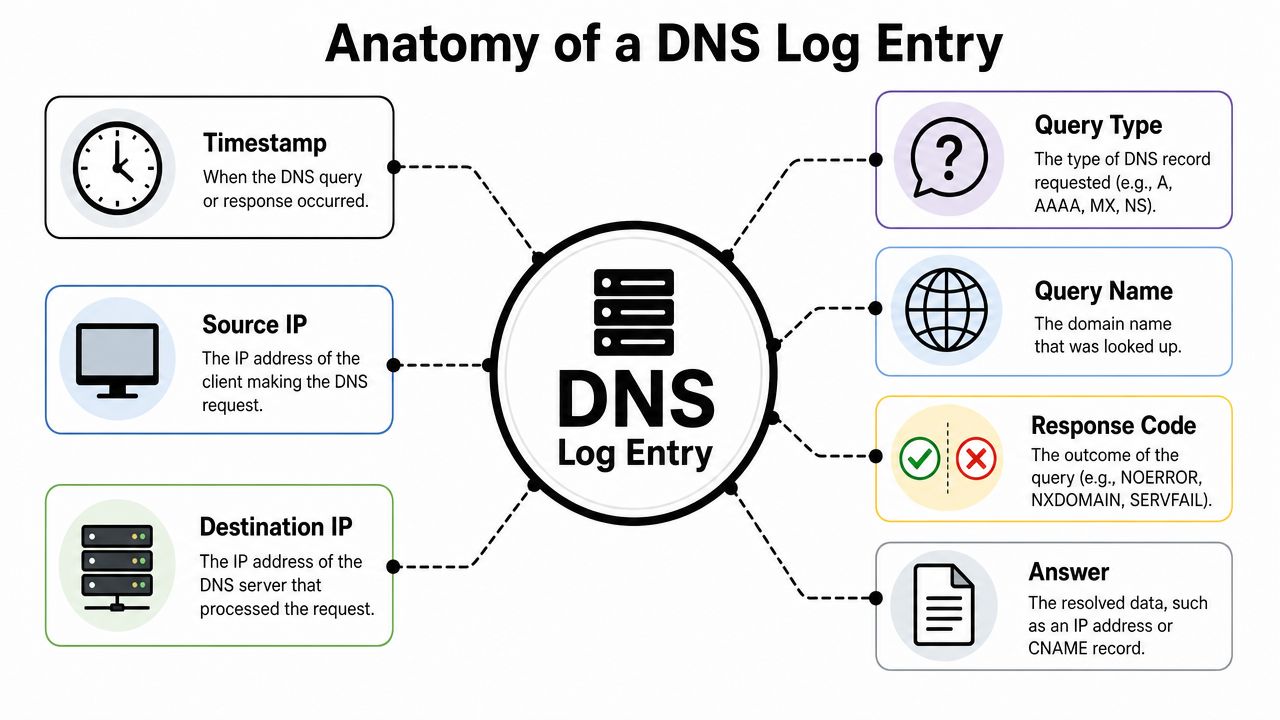
A log entry is a case note
Consider every entry a case file for a detective.
The timestamp is the point when the event entered your timeline. In incident response, that field allows you to align DNS activity with endpoint events, authentication attempts, proxy traffic, and process creation. Without time alignment, DNS evidence remains interesting but not conclusive.
The source IP shows you the internal system that began the request. The destination IP identifies the resolver or upstream DNS service engaged in the exchange. Together, those two fields show where the request originated and where it went for resolution.
The query name is the focus of the investigation. It might be an ordinary SaaS lookup, a typo-squatted phishing domain, or a random-looking hostname produced by malware. The query type provides context for the lookup. Was the host requesting a standard address record, a mail-related record, or something less common that warrants attention?
What matters most during an investigation
Windows DNS debug logging is especially useful because each record contains 16 specific fields, including Date, Time, Thread ID, UDP or TCP indicator, send or receive direction, Remote IP, transaction ID, query or response flag, opcode, flags, response code, question type, and question name (field-level breakdown of Windows DNS debug logs). That degree of structure enables precise parsing and improved correlation.
Here's how those fields become practical:
- Timestamp and direction: Indicate whether you are examining the request side, the response side, or both.
- Remote IP: Assists in linking suspicious lookups back to a workstation, server, or appliance.
- Opcode and flags: Reveal unusual activity such as update-related behavior or recursion-related problems.
- Response code: Shows whether the resolver responded successfully or failed.
- Question name and type: Show what was requested and the kind of request.
Once you can quickly answer four questions, a DNS log file is far easier to trust: who made the request, what was requested, which resolver handled it, and what response came back.
Analysts frequently fixate on the domain string while overlooking the metadata around it. That is an error. A normal-seeming name requested by the wrong host, at the wrong interval, with the wrong record type can raise more suspicion than a clearly odd domain.
Common DNS Log Sources and Formats
DNS logging turns chaotic quickly since the data arrives from multiple places and formats. Enterprise teams typically collect it from Microsoft DNS, BIND-based resolvers, lightweight forwarders like dnsmasq, and cloud-managed DNS services. Every source offers a different trade-off among visibility, effort, and operational cost.
Microsoft DNS
In environments with heavy Active Directory use, Microsoft DNS is common, and modern Windows Server deployments provide two separate logging choices for it. Debug Logs are text-oriented and readable by people. Analytical Logs are stored in .etl Event Trace format and capture hex-encoded packet data, including source IP, query string, and full response payload, but they require enabling the Analytical view and can't be accessed in real time without disabling the log first (Windows DNS logging modes and operational limits).
That distinction has operational consequences. Debug logs are simpler to review and send into a SIEM pipeline. Analytical logs provide richer packet-level context, yet they create a clumsier collection process, particularly for teams requiring scheduled export and archiving.
The largest pitfall is enabling verbose debug logging and never turning it off. Ongoing Windows DNS debug logging can reduce DNS server throughput by 15–25% under high query loads (Windows DNS debug logging performance impact). On a production resolver, that is not a minor detail. It is a design choice.
BIND and dnsmasq
On Linux and Unix systems, BIND and dnsmasq are widely used, yet by default their logs tend to serve operations more than forensics. BIND commonly records query-related events via syslog or file-based logging. dnsmasq is generally lighter and simpler to turn on, but its raw output often requires additional cleanup before it can support hunting.
The real problem is not whether they log. It is whether they capture sufficient detail, with enough consistency, for analytics. When one resolver records the queried name and client, while another handles timing and result codes in a different way, you cannot compare behavior reliably across them until the data is normalized.
Many teams find this out only once they attempt cross-source detections. The same hostname lookup may show up as tidy structured data in one source and as unstructured text in another.
Cloud DNS services
Cloud DNS alters how collection works. Rather than scraping flat files from servers you control, you frequently retrieve events through service-native logging, APIs, or cloud audit integrations. This can be tidier, but it also means the DNS event might come wrapped in cloud metadata that requires additional parsing.
Cloud visibility improves when resolver activity is correlated with network telemetry. For instance, a suspicious lookup becomes far more actionable if you can compare it with flow records from the same workload. That is where pairing DNS with VPC flow logs analysis yields a fuller view of egress behavior.
| DNS Server | Log Format | Enabling Method | Key Benefit | Key Consideration |
|---|---|---|---|---|
| Microsoft DNS | Text debug logs and .etl analytical logs | Server logging settings and Event Viewer configuration | Rich native telemetry in Windows environments | Verbose logging can impact resolver performance |
| BIND | Commonly text-based logging via syslog or files | Configuration changes in the DNS service | Broad deployment in enterprise and ISP-style environments | Output format often needs custom parsing |
| dnsmasq | Lightweight text logs | Service configuration | Simple to enable on smaller systems and appliances | Less context than heavier DNS platforms |
| Cloud DNS services | Provider-generated event streams and APIs | Cloud-native logging and connectors | Good fit for elastic and distributed infrastructure | Schema differs by provider and may include extra wrapper fields |
Selection advice: Pick the log source that first provides stable, collectible data. More detailed telemetry matters only when your team can ingest and use it consistently.
Uncovering Threats with DNS Log Analysis
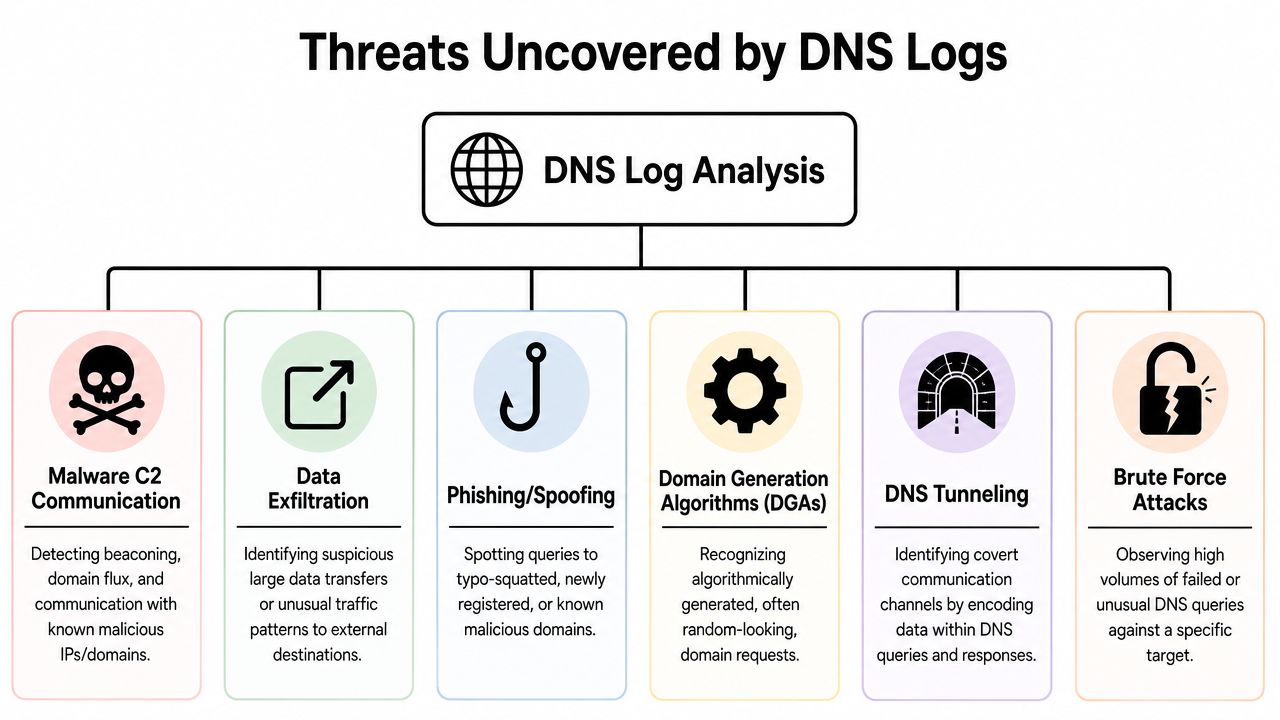
A DNS log file has value because attackers continue to reuse the same fundamental behaviors even as they swap infrastructure. They still require name resolution for command and control, exfiltration, phishing delivery, or evasive staging. The domains shift. The traffic patterns often do not.
DGA activity and failed lookups
Domain Generation Algorithms generate many possible domains, allowing malware to cycle through them until one resolves. In logs, this commonly appears as repeated failed lookups and odd hostname patterns. The domains may seem random, mechanically constructed, or out of step with the host's normal browsing and application profile.
The signal is seldom a single event. It is repetition from one asset, particularly when the user or service on that system should not produce that kind of traffic. If a server that normally communicates with a limited set of internal and approved external services begins requesting odd hostnames in bursts, that warrants investigation.
A comparable pattern shows up in typo-based phishing or poisoned resolution paths. If you are mapping that risk area, this overview of understanding DNS poisoning provides helpful context on how name resolution can be manipulated before the user notices anything suspicious.
DNS tunneling and covert channels
DNS tunneling is conspicuous when a host treats DNS as a transport channel rather than simple name resolution. The request names may be exceptionally long, the subdomains may look encoded, and the record types may be unusual for the application in question. TXT queries often merit extra scrutiny because attackers and red teams use them to move data or instructions over DNS in ways that initially appear harmless.
Look for combinations rather than isolated fields:
- Long query strings: Particularly if numerous requests use one parent domain.
- Encoded-looking labels: Values that do not look like typical hostnames.
- Unexpected query types: Requests that do not align with what the asset is known to do.
- Resolver-only traffic with weak application context: DNS activity volume that lacks a corresponding business justification elsewhere in telemetry.
DNS analysis gets much stronger when you compare it with network traffic analysis in the same investigation workflowOn its own, a suspicious TXT query is just a lead. When combined with abnormal egress activity, that same TXT query becomes a high-confidence incident.
Beaconing and suspicious domain relationships
Command-and-control traffic frequently appears unremarkable. That is exactly why it succeeds.
Beaconing typically shows up as one host repeatedly querying the same domain, or a related group of domains, at a fixed cadence. Those requests may be small, sporadic, and technically valid. Their regularity, together with how poorly they align with user or system activity, is what makes them suspicious.
A successful query does not prove legitimacy. Some of the most significant DNS alerts originate from requests that resolve cleanly.
DNS turns into a powerful tool for scoping. Once you identify a single suspicious domain, you can pivot across source hosts, related query names, time windows, and peer assets. This helps answer the operational questions security leaders ask: Is this one host, one subnet, one business unit, or a broader set?
Parsing Normalization and Retention Best Practices
Most DNS initiatives do not fail because teams lack data. They fail because that data arrives in mismatched formats and sits unused without a common schema.
Translate everything into one language
Parsing pulls useful fields from raw text, event traces, or API payloads. Normalization places those fields into one shared structure, ensuring query name, client, response code, and resolver mean the same thing regardless of where the event originated.
Without that translation layer, detections turn fragile. One rule applies to Windows DNS debug logs. Another applies to a Linux syslog stream. A third applies to cloud DNS events. That does not constitute a security program. It is just a disconnected set of exceptions.
Use a consistent workflow:
- Identify required fields first: Do not parse everything. Extract the fields you will use for correlation, triage, and reporting.
- Map similar values together: Various products represent the same event differently. Standardize names and categories so a single query can search across all of them.
- Preserve the raw event: During an investigation, analysts often need the original message for validation.
- Test with real edge cases: Truncated responses, malformed names, and unusual query types are precisely the events you do not want your parser to discard.
A centralized pipeline is more important here than any individual DNS product. Teams working to build broader security operations maturity often gain from revisiting the fundamentals of understanding logs for business security because the same principle carries over to DNS. Data becomes useful only after collection, storage, search, and review are disciplined.
Retention is a security and audit decision
Retention should not be arbitrary. It must support both investigation timelines and audit expectations.
Industry benchmarks and operational observations show that enterprises typically retain traffic logs, including DNS lookups, for six months to two years, and that 6–24 month window supports many incident response and compliance audit needs under frameworks such as SOC 2 and HIPAA (discussion of enterprise DNS log retention ranges). No single universal standard exists, so security architects must make deliberate trade-offs.
Those trade-offs are practical:
- Short retention lowers cost: Yet it can debilitate long-dwell investigations.
- Long retention improves forensics: However, storage and retrieval design begin to matter much more.
- Hot versus cold storage choices matter: Keep what analysts need available for search. Archive what auditors might request later.
If you're consolidating telemetry beyond DNS alone, centralized log management serves as the control point that makes retention policies enforceable rather than aspirational.
Ingesting and Analyzing DNS Logs with Unified Security Stack
DNS is not a weak-signal problem for security teams. Their difficulty comes from inconsistent collection paths, varying source formats, and correlation that demands too much manual work.
Getting the data in cleanly
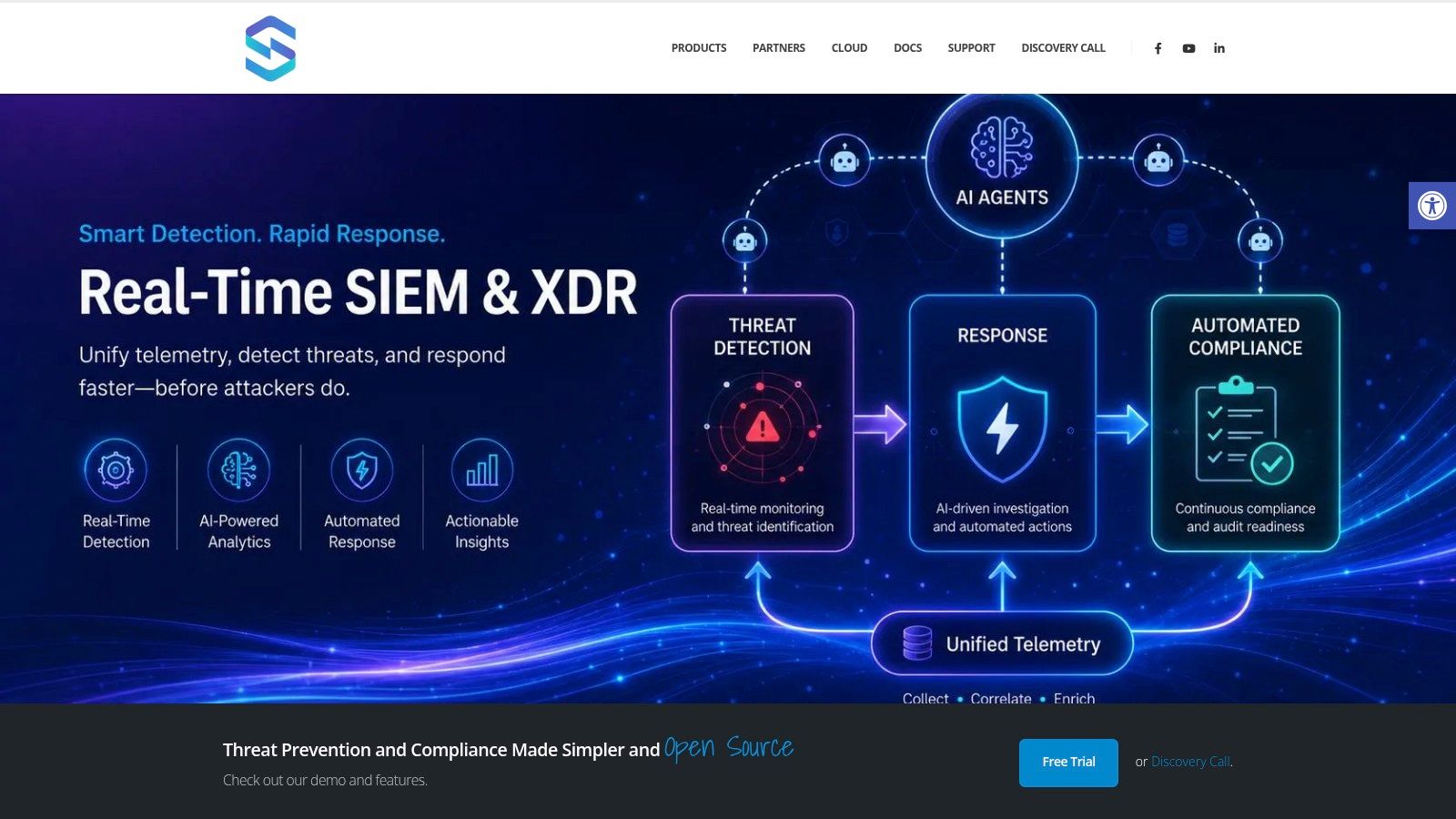
Unified Security Stack fits this use case because it's built to ingest logs from hybrid environments through the methods security teams already use: Syslog, agents, APIs, along with network telemetry sources. This is important for DNS because a production environment seldom depends on a single resolver platform.
A practical rollout typically begins by sending every DNS source into one collection fabric. Windows DNS can be gathered via native event and file collection processes. Linux-based resolvers can send data through Syslog. Cloud-managed DNS services can supply data through service integrations and APIs. The objective is not only collection. It is dependable ingestion without producing separate analysis silos.
The quickest route to distrust in DNS detections is collecting from only one portion of the environment and assuming it stands for everything.
Turning raw DNS into detections
Once ingested, Unified Security Stack's value is in parsing, normalization, correlation, and response orchestration. DNS events no longer remain as scattered raw records. They turn into searchable fields that can be matched against endpoint alerts, firewall events, cloud logs, and threat intelligence.
That changes day-to-day operations in a few useful ways:
- Correlation reduces guesswork: A suspicious query can be linked in the same timeline to an endpoint event or a network event.
- Rule tuning gets easier: Instead of rewriting parsers, analysts can tune detections using actual source fields.
- Compliance evidence becomes reusable: DNS events that support threat hunting can also back audit trails and investigation records.
- Response can be standardized: DNS-driven incidents that recur can set off the same containment actions each time.
Open-source SIEM/XDR moves from theory into practical use. Teams do not need DNS logs trapped in a niche tool that a single engineer understands. They need those logs in the same operational platform where alerts are triaged, cases are handled, and actions are initiated.
Sample Detections and Incident Response Playbooks
DNS detection logic does not have to be complex to deliver value. It must be consistent, explainable, and simple to adjust as the environment changes.
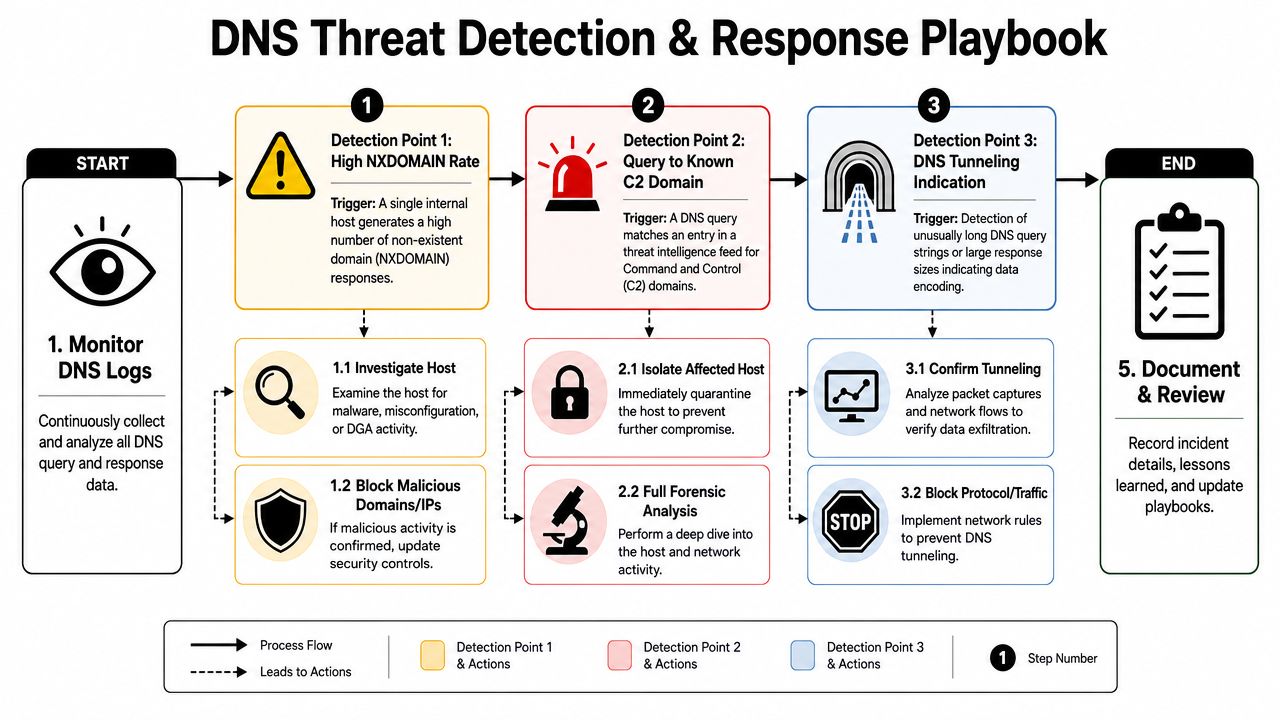
Detection ideas you can adapt quickly
These examples rely on pseudo-query logic, allowing you to tailor them to your SIEM or rule engine.
Potential DGA activity
COUNT dns_events
WHERE response_code = "NXDOMAIN"
GROUP BY source_ip, time_window
ALERT WHEN one source shows sustained failed lookups with many distinct query_name values
Potential DNS tunneling
COUNT dns_events
WHERE query_type IN ("TXT", "NULL")
AND query_name_length is unusually high
GROUP BY source_ip, parent_domain
ALERT WHEN repeated long queries target the same external parent domain
Possible beaconing
FIND dns_events
GROUP BY source_ip, query_name
ALERT WHEN the same source queries the same domain at regular intervals over time
In practice, what works is adding context on top of these rules. Include asset criticality, known-approved services, endpoint alerts, and user context before escalating with force. That reduces noise while preserving signal.
Playbook for potential DNS tunneling
If an alert points to tunneling, follow a set sequence.
- Validate the pattern: Examine the query names, record types, frequency, and parent domain consistency. Determine whether the traffic matches a known application.
- Correlate with surrounding telemetry: Retrieve endpoint, proxy, firewall, and network events for the same host and timeframe.
- Determine whether data movement is plausible: Search for encoded subdomains, repeated structures, or matching outbound activity in other locations.
- Contain if confidence is high: Block the suspicious domain or route, and isolate the affected host if the asset is under active compromise.
- Inspect the endpoint: Inspect process execution, persistence mechanisms, and recent user activity.
- Eradicate and recover: Delete the malware or unauthorized tool, reset access when necessary, and restore the system only after validation.
- Document and tune: Preserve the evidence, refine the rule, and determine whether similar domains or hosts need retrospective review.
Investigation shortcut: When a DNS alert cannot be linked quickly to a host, user, and neighboring events, the problem typically lies in normalization rather than detection logic.
A solid playbook completes the loop between detection and action. That is where DNS analysis proves its worth. It ceases to be a heap of resolver chatter and turns into a repeatable incident handling workflow.
Unified Security Stack provides security teams with one location to collect DNS logs, correlate them with endpoint, network, and cloud telemetry, automate response, and retain evidence required for audits and investigations. If you seek a practical way to operationalize DNS visibility inside an open-source SIEM, SOAR, and XDR stack, explore Unified Security Stack.