PowerShell Execute .Exe: Safe Guide for 2026
You're staring at a deployment script, the vendor wants a clean setup.exe launch, and half the fleet requires the same binary with identical arguments. At the same time, your SIEM is already filled with PowerShell activity that appears harmless until it is not, because the exact same process-launch primitive is among the most common ways attackers move from code execution to real impact. That is why PowerShell execute .exe is not merely a scripting question; it is an operational and detection question.
Table of Contents
- Why Admins and SOCs Both Care About PowerShell EXE Execution
- Three Core Methods to Launch an EXE from PowerShell
- Passing Arguments Without Breaking the EXE
- Execution Policy, Elevation, and Application Control Gotchas
- How Attackers Abuse PowerShell to Launch EXEs
- SIEM and EDR Detection Rules for Suspicious EXE Launches
- Operational Checklist and Compliance Tie-In
Why Admins and SOCs Both Care About PowerShell EXE Execution
A deployment engineer sends a vendor installer to 3,000 endpoints, and the script must retain paths, arguments, and elevation behavior exactly. A SOC analyst sees the same pattern and must determine whether it is an approved rollout or a living-off-the-land execution chain that uses PowerShell to spawn a child process. Both people are examining the same primitive, simply from opposite sides of the console.
PowerShell regards executable launching as a native administrative action. Microsoft documents Start-Process as the cmdlet that starts one or more processes on the local computer, and its syntax accepts both -FilePath and -ArgumentList for executable launch and parameters, making it a core process-control building block rather than a wrapper around a separate toolset. It is also available across platforms in the PowerShell 7.6 documentation, with aliases such as saps and start, so the behavior is no longer a Windows-only edge case; it is part of the modern PowerShell contract. See Microsoft's Start-Process documentation covering the built-in process model and environment inheritance behavior. Microsoft Start-Process documentation
For defenders, this is important because the same primitive is used after initial access to enumerate hosts, launch child binaries, and chain remote activity. Microsoft's guidance on execution policy also states that Restricted blocks scripts by default and AllSigned Script signing is required, yet policies do not constitute a complete security boundary. Consequently, a failed launch must not be treated as harmless, and a successful launch cannot be assumed to be safe. In regulated environments, PowerShell execution demands auditability, not merely functionality. Microsoft guidance on execution policy behavior?redirectedfrom=MSDN)
Practical rule: treat every EXE launched by PowerShell as both an administrative action and a security event. If you cannot explain the command line to a change auditor, a responder, or yourself at 2 a.m., it is not ready for production.
The remainder of this guide is designed to support both roles. If you are an operator, concentrate on launch methods, argument fidelity, and policy checks. If you work on the SOC side, treat the same patterns as detection material, since the syntax that makes a deployment function is often the syntax an attacker reuses for post-exploitation. For a SOC-oriented view of operational visibility, this SOC overview assists in tying process execution to monitoring practice.
Three Core Methods to Launch an EXE from PowerShell
The appropriate method depends on the level of control you need. If the binary is simple and the arguments are clean, the call operator is the fastest path. If you require structured parameter passing, environment inheritance, or a clearer separation between file path and arguments, Start-Process that is the better default. When you need full .NET control over working directory, window style, or credentials, System.Diagnostics.ProcessStartInfo it provides the greatest precision.
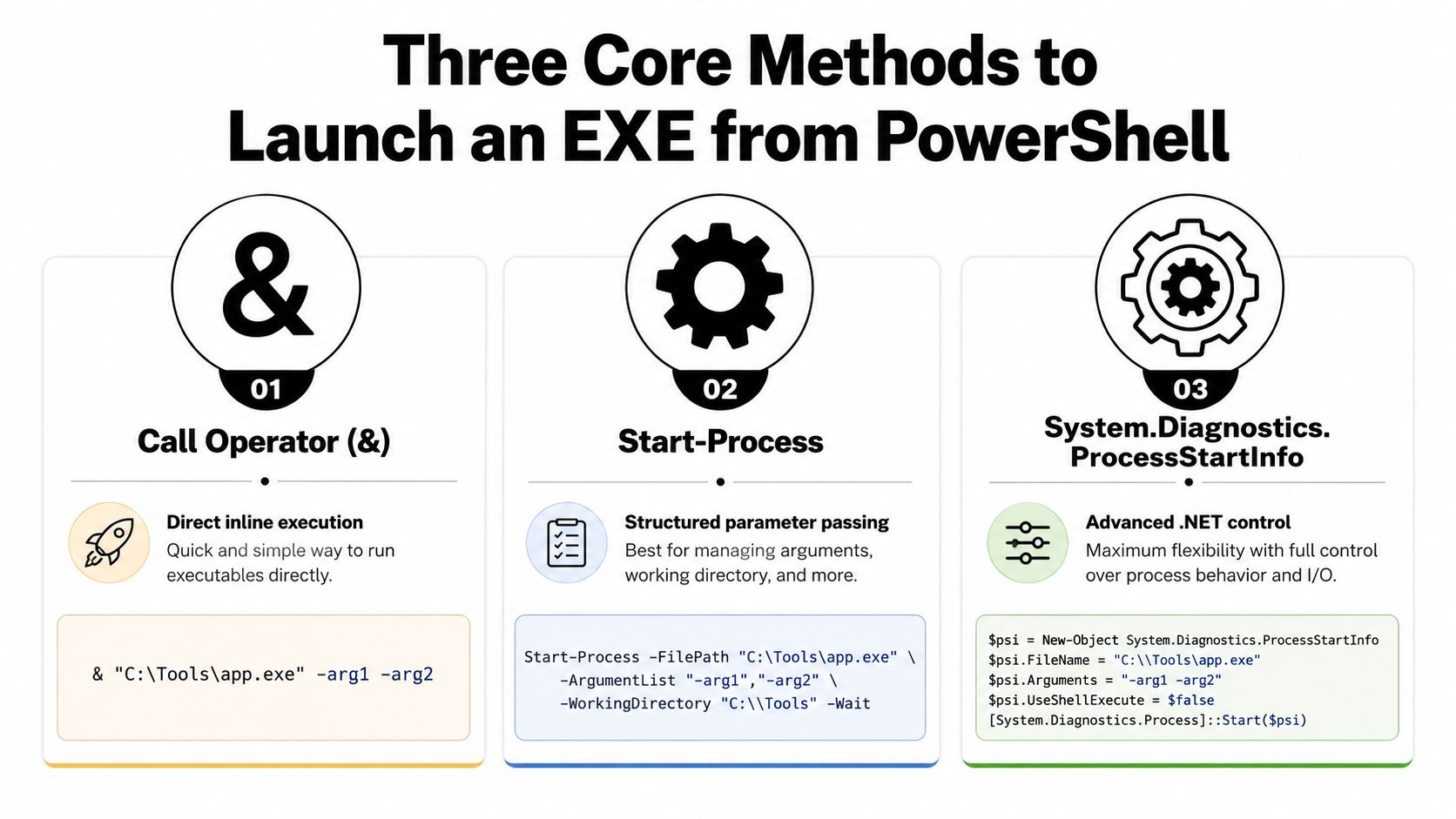
The call operator is the closest thing to running this file immediately. It works well when the executable path is already correct and the argument list is uncomplicated.
Call Operator
& "C:Toolssetup.exe" /quiet /norestart
Use this when you want direct inline execution and do not need additional process options. The caveat is that the call operator is simple to misuse when arguments contain spaces or nested quotes, because you are relying on PowerShell's parsing rules and not an explicit process API. That is fine for a quick admin task, but it is not the best choice when you need predictable boundaries in a complex deployment.
Start-Process is the more disciplined route. Microsoft's syntax keeps the executable clearly separate from its parameters, which makes it the safer default for automation that others will read, maintain, or audit later. By default, it also inherits current environment variables, which matters when the child process relies on enterprise tooling, proxy settings, or machine context.
Start-Process
Start-Process -FilePath "C:Toolssetup.exe" -ArgumentList "/quiet", "/norestart"
Use this when you want structured parameter passing and a sharper process boundary. The trade-off is that you must consider carefully how -ArgumentList is assembled, because a bad argument array is still a bad launch, only with nicer syntax.
For cases where you need absolute control, .NET's process API is the best fit. It is common in automation that must set the working directory, choose a window style, or pass credentials in a controlled way.
ProcessStartInfo
$psi = [System.Diagnostics.ProcessStartInfo]::new()
$psi.FileName = "C:Toolssetup.exe"
$psi.Arguments = "/quiet /norestart"
$psi.WorkingDirectory = "C:Tools"
$psi.UseShellExecute = $false
[System.Diagnostics.Process]::Start($psi)
Use this when you need advanced .NET control. The caveat is that you have now moved into lower-level process plumbing, so the script becomes more verbose and the maintenance burden goes up. That is the price of precision.
Start-Processis the best default for most admin work,ProcessStartInfoserves as the fallback for edge cases, while the call operator is the fastest option when the boundary is already trusted.
The cross-platform documentation for PowerShell 7.6 is relevant here because executable launching is treated as a core capability on Windows, Linux, and macOS, rather than a Windows-only wrapper. This does not mean every EXE acts the same on every platform; it means the launch model belongs to the language's native process control design. The real challenge begins after the method is chosen, since arguments must still survive the boundary.
Passing Arguments Without Breaking the EXE
Many failed PowerShell EXE launches do not produce obvious errors. They go wrong by altering meaning, through one misplaced quote or lost space at a time. An installer meant to receive a path containing spaces is split into separate tokens, a remote invocation changes the string again, and the child process receives something other than what the script author expected.
The most secure approach is to keep every argument as a separate array element rather than constructing one manually assembled string. This is the step people overlook when they copy a fast example from a forum post, and it is usually where problems begin. Community troubleshooting guidance often recommends a helper such as ShowArgs.exe, since the sole concern is what the child process actually received, not how the parent script appeared on screen. Community discussion on argument fidelity and helper-based verification
Treat the child process as the source of truth
$args = @(
  "/quiet"
  "/log", "C:Tempinstall log.txt"
  "/target", "C:Program FilesVendorApp"
)

Start-Process -FilePath "C:Toolssetup.exe" -ArgumentList $args
That pattern maintains argument boundaries much more effectively than one concatenated string. It matters most when paths include spaces, mixed quotes, or characters that PowerShell and the target EXE read differently.
Remote execution introduces another reshaping stage. When a command travels through WinRM or SSH remoting, the string may be interpreted multiple times before the child process ever starts. That is why diagnosis must occur at the boundary, not in the abstract.
Troubleshooting rule: remove unnecessary quotes, log the exact final command line, and compare it against a known-good baseline from a helper binary or a lab host.
A useful process follows this pattern. Start by reducing the command to the smallest workable argument set. Next, add the path values individually. Last, test the identical launch locally and through remoting, because one that works on the console can still fail once it crosses a transport boundary.
When the EXE continues to misbehave, suspect the parser before concluding the executable is broken. In enterprise automation, malformed arguments do more than fail; they create inconsistent outcomes across endpoints, and that inconsistency is what makes troubleshooting painful.
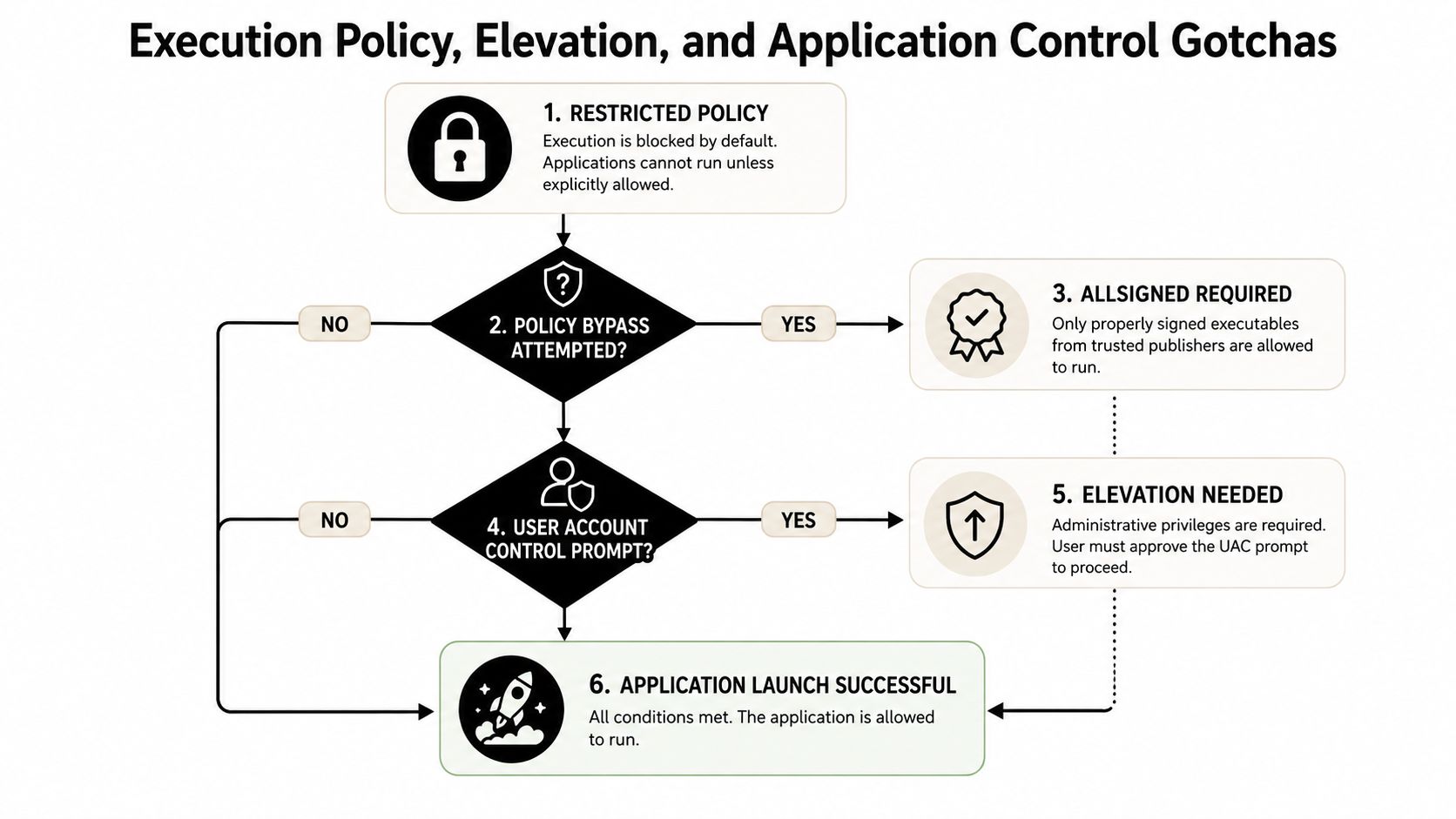
Execution Policy, Elevation, and Application Control Gotchas
Even a correct command line can fail if a security control blocks or alters the launch. PowerShell's execution policy is one layer, elevation is another, and application control may sit underneath both. If you skip diagnostics, you will spend time blaming syntax for a policy problem.
Microsoft's documented defaults are relevant here. Restricted prevents scripts from running and allows only interactive use, while AllSigned requires every script, including profile scripts, to carry a digital signature before PowerShell executes it at startup. Microsoft also states that execution policies do not create a full security boundary and therefore cannot act as a standalone enforcement mechanism. Microsoft execution policy reference?redirectedfrom=MSDN)
Check the active policy before you chase the wrong bug
Get-ExecutionPolicy -List
That single command shows policy values across scopes, which is far more useful than guessing why a launch or script bootstrap is being altered. If policy is not the blocker, examine the parent process context and the elevation path next.
Start-Process -Verb RunAs is the standard PowerShell method for raising a UAC elevation prompt. For operations, what matters is not only whether the prompt appears, but whether the launch completed and the elevated child process started. If the prompt is canceled or the context changes, your deployment can fail without warning unless you monitor the child state.
Use the child process as the proof
Start-Process -FilePath "C:Toolssetup.exe" -Verb RunAs
That launch is straightforward, but verification still matters. Confirm the child is running, confirm the exit path, and ensure the script records whether elevation succeeded rather than assuming the prompt was accepted.
The final gate is application control. Control layers and platform hardening, for example Protected Process Light, WDAC, AppLocker, and SmartScreen detects unsigned or suspicious binaries even if the syntax is correct. Microsoft's 2025 servicing note on PowerShell 5.1 Invoke-WebRequest is another reminder that command behavior keeps becoming more explicit and more guarded, so execution troubleshooting now has to be policy-aware, not just syntax-aware. Microsoft servicing note on evolving PowerShell command behavior
A sound diagnostic practice is to ask three questions in sequence. Can the script run, can the user raise its permissions, and can the binary execute? That sequence saves time because it separates parser issues from policy issues before you start digging through event logs.
How Attackers Abuse PowerShell to Launch EXEs
Attackers need not develop a new primitive when PowerShell already provides one. MITRE ATT&CK maps PowerShell technique T1059.001 to command execution and notes that adversaries can use Start-Process to run an executable, Invoke-Command to run commands locally or remotely, and PowerShell to download and run executables from the Internet either from disk or in memory without touching disk. It additionally states that PowerShell code may run without directly calling powershell.exe by using the underlying System.Management.Automation assembly, so detections based solely on the process name overlook actual misuse. MITRE ATT&CK T1059.001
This distinction matters because PowerShell is frequently exploited after initial code execution. Australian cyber regulations identify PowerShell as a post-exploitation tool used by attackers to enumerate and control systems and inject code into other processes without writing files to disk, thereby limiting evidence for incident responders. This transforms a basic execution primitive into a complex detection challenge involving process creation, script content, and parent-child relationships. Australian Cyber Security Centre PowerShell guidance.pdf)
What the attacker chain usually looks like
- Start-Process or a direct invocation: From a PowerShell session, the attacker starts a child binary or script host, shifting from code execution into a new process.
- Invoke-Command and remoting: The attacker executes commands either locally or remotely, frequently through trusted administrative channels.
- Download then execute: The attacker downloads a payload and executes it either in memory or from disk, complicating recovery and the search for artifacts. See how ransomware operators leverage PowerShell execution for how this pattern appears in real intrusions.
Red Canary provides a valuable detection point. According to their guidance, adversaries use PowerShell to run commands, avoid detection, obscure activity, create new processes, remotely download and execute arbitrary code and binaries, collect information, and alter system configurations. They further observe that PowerShell accepts any abbreviation from -e onward for the encoded command flag, so detections that only key on -EncodedCommand will miss shortened variants such as -e. Red Canary PowerShell detection guidance
A process tree beginning with PowerShell and ending in an unsigned child binary warrants prompt investigation, particularly if the command line is encoded or the parent is a user-facing application.
This is also why ATT&CK coverage cannot stop at the powershell.exe image name. If the code arrives through System.Management.Automation, a rule based only on process name might never trigger. A more effective defender approach is to hunt for suspicious launch behavior rather than a familiar parent executable alone.
SIEM and EDR Detection Rules for Suspicious EXE Launches
The important logs are those that retain both the parent and the command line. Sysmon Event ID 1 gives process creation with the full command line, PowerShell Script Block Logging Event ID 4104 shows script content after deobfuscation, and Windows Security Event ID 4688 provides an additional source of process lineage. Combined, they enable detections for typical PowerShell-to-EXE abuse paths without relying on one product capability. Unified Security Stack detection engineering context
Core Detection Signals for PowerShell-to-EXE Execution
| Log Source | Event ID | What It Reveals |
|---|---|---|
| Sysmon | 1 | Parent process, child process, and full command line |
| PowerShell | 4104 | Script block content and obfuscated logic after deobfuscation |
| Windows Security | 4688 | Process creation and command line auditing |
One useful initial signal is encoded PowerShell that launches a child EXE from a user-writable location. This pattern occurs frequently enough to be practical, and it remains specific enough to tune when the child binary falls outside normal software inventory. Another signal is PowerShell started by Office or browser parent processes, which often indicates a document or web lure chaining into a process-launch primitive. A third is Start-Process used to launch a binary located outside an approved software catalog, since legitimate administration usually remains consistent about binary origins and what those binaries may start.
An effective detection stack searches for combinations rather than individual tokens. PowerShell command lines containing encoded flags, suspicious parent processes, and unsigned or unusual child executables should all feed the same analytic. When the child binary is new, unexpected, or located in a writable path, the signal becomes considerably stronger.
Example correlation logic
- Encoded flag plus unusual child: Generate an alert when PowerShell employs an encoded command variant and the resulting child is an unsigned EXE in a user-writable path.
- Office or browser parent plus PowerShell child: Alert when
winword.exe,excel.exe,outlook.exe, or a browser process starts PowerShell and that PowerShell subsequently launches another executable. - Start-Process plus inventory mismatch: Alert when PowerShell launches an EXE through
Start-Process, yet the target binary is missing from your known software list or signed by an unexpected publisher.
That logic transfers readily to modern SIEMs because it focuses on behavior rather than names alone. It also aligns with the abuse model outlined earlier, in which the launch chain, not the shell by itself, is the event of interest. Analysts seeking to build and tune such rules at scale can use detection engineering workflows as the operational framework, then translate the same logic into SIEM queries and EDR correlations.
Operational Checklist and Compliance Tie-In
The same checklist can serve both operators and defenders, though for different reasons. The admin wants a repeatable and supportable launch. The SOC wants a launch that can be explained, searched, and audited after the fact.
Admin side
- Verify command quoting: Before release, validate the final command line against paths containing spaces and special characters.
- Confirm execution policy: Run
Get-ExecutionPolicy -Listso you know which scope is altering behavior. - Document elevation requirement: Record whether the binary requires UAC,
RunAs, or a different privileged context. - Log the final command: Store the precise launch string in deployment logs to allow comparison with the child process output.
SOC and compliance side
- Review launch logs: Turn on and preserve process creation records, particularly Sysmon Event ID 1 and Security Event ID 4688.
- Validate against policy: Confirm that script blocks and executed binaries align with approved software and approved parent processes.
- Correlate with threat intelligence: Before the alert auto-closes, link suspicious launches to encoded flags, suspicious parents, or unsigned child processes.
Comprehensive logging is critical in regulated environments, as auditing executable launches often supplies evidentiary proof rather than simple telemetry. HIPAA, PCI DSS, CMMC, GLBA, SOC 2, and ISO 27001 all rely on centralized visibility and retention when you must explain who launched what, when, and from where. When PowerShell serves as the administrative control plane, your logs prove that the plane remained on course.
Operational takeaway: the cleanest PowerShell launch is the one your SOC can confirm afterward without guesswork.
Microsoft continues to tighten command behavior and surface security prompts more clearly, meaning the operator workflow and defender workflow are moving closer together, not farther apart. As your environment depends more on PowerShell to start executables, you need a single place to view the launch, the policy, the parent, and the outcome.
If you want one platform that can ingest PowerShell logs, correlate suspicious EXE launches, and turn those detections into response workflows, take a look at Unified Security Stack. It suits this use case well, since it unites SIEM, SOAR, and XDR around the same process-launch telemetry you are already gathering. Visit the site, compare it with your current log stack, and see how it manages PowerShell execution visibility in practice.