File Integrity Monitoring: A Guide for Modern Security
You likely already collect endpoint alerts, firewall logs, cloud audit records, vulnerability scan results, and a backlog of tickets for planned changes. Even so, one of the most frequent gaps remains ordinary file drift on critical systems. A web server configuration is edited outside the maintenance window. A startup script is modified so malware can persist through a restart. A registry key changes on a server no one considered important enough to monitor. Each change looks minor by itself, which is precisely what makes it significant.
That's where file integrity monitoring proves its worth. Not as a separate console that alerts on every DLL touched by a patch, but as a governed source of truth about what changed, where it changed, and whether that change is legitimate. In current operations, the value of FIM does not come from the alert alone. It comes from what your SIEM or XDR platform can accomplish with that alert once it is correlated with identity activity, process telemetry, network connections, and change-control context.
Table of Contents
- Why You Need to Watch Your Files
- What Is File Integrity Monitoring
- FIM Detection Techniques and Architectures
- Deploying and Tuning FIM for Success
- Integrating FIM with SIEM and XDR
- Mapping FIM to Key Compliance Frameworks
- Building FIM Alerting and Response Playbooks
Why You Need to Watch Your Files
Few compromises begin with a dramatic explosion. They take hold quietly. An attacker reaches a system, checks what access is available, and modifies one file to gain persistence or degrade a control. The edit can be minor. A configuration file references another script. A service binary is swapped out. A registry value is changed so a tool launches at startup. Conventional detection may overlook that pattern if nothing clearly malicious triggers when the modification occurs.
This is why file monitoring remains essential. Security teams invest heavily in ingress, identity, and network telemetry, yet the workload itself reveals what happened. When a protected file changes without a legitimate reason, a person or process took action on that system. You need visibility into that.
The commercial side mirrors that demand. The file integrity monitoring market was valued at USD 931.2 million in 2024 and is projected to reach USD 3.2 billion by 2034, with a projected compound annual growth rate of 13.6% from 2025 to 2034 according to Global Market Insights research on the file integrity monitoring market.
Practical rule: When a file can affect security posture, persistence, or audit evidence, it belongs in integrity monitoring, not in the category of ordinary system noise.
Another factor makes this more pressing. Ransomware groups and hands-on-keyboard intruders frequently depend on file and configuration changes before any visible damage appears. Teams focused on preventing ransomware attacks typically prioritize backups, segmentation, email defense, and endpoint controls. They should. But they also require visibility into unauthorized changes on systems attackers access during staging.
FIM was once dismissed as a compliance formality because too many deployments produced more noise than benefit. That criticism was valid. A poorly scoped FIM implementation overwhelms analysts with ordinary drift. A well-tuned one detects persistence, policy tampering, unapproved administrative activity, and suspicious changes on critical assets. The concept is not the problem. The difference lies in how you deploy it and where you route the data.
What Is File Integrity Monitoring
At 2:00 a.m., a server passes its health checks. By 2:07, a scheduled task references a new script, a service binary has been swapped, and a web app configuration file now permits outbound traffic to an unknown host. Antivirus may or may not trigger. File integrity monitoring will.
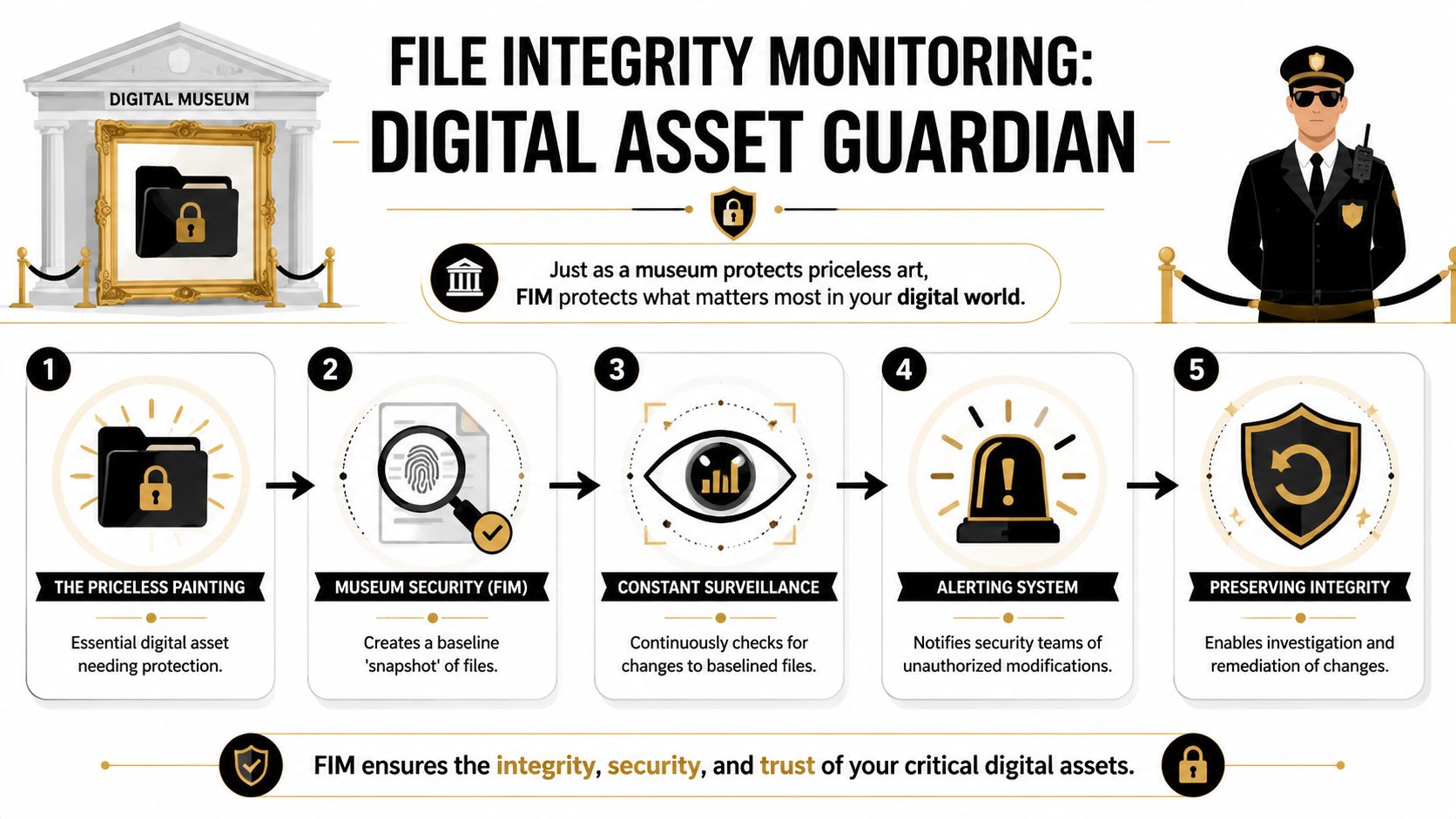
File integrity monitoring is the practice of capturing the approved state of chosen files, directories, registry keys, and system objects, then identifying when that state changes. At its core, FIM answers one straightforward question: what changed on this system that should not have changed?
Baseline first, detection second
Every FIM initiative relies on a trusted baseline. Tools record the known-good state of monitored objects, then compare subsequent observations against that reference through techniques including cryptographic hashing, metadata checks, and permission tracking. The NIST Guide to Integrating Forensic Techniques into Incident Response examines the importance of file hashes for detecting unauthorized changes and maintaining evidence quality during investigations.
An effective baseline goes beyond file contents. In practice, mature FIM policies monitor:
- Content integrity through hashes or direct content comparison
- Metadata changes such as size, ownership, and modification time
- Permission drift including ACL or mode changes
- Object lifecycle events such as create, delete, rename, and replace actions
- Configuration stores including Windows Registry paths and Linux service definitions
Baseline quality matters more than which tool you choose. If the baseline is captured after an attacker has already altered a startup script or installed a web shell, the system will regard that malicious state as approved. Teams that gain value from FIM typically baseline after patching, hardening, and validation, rather than during a hurried rollout.
What security teams actually monitor
The monitored scope should be based on attacker behavior and compliance requirements, not a vendor's default template. The PCI DSS guidance on file integrity monitoring highlights the need to detect unauthorized modification of critical files, configuration files, and content files. That remains a sound starting point for production systems.
High-value integrity objects usually include:
| Monitored object | Why it matters |
|---|---|
| OS binaries and libraries | Attackers replace or patch them for persistence and defense evasion |
| Startup items and scheduled tasks | Small changes here often survive reboots and blend into admin activity |
| Registry keys | Windows persistence, policy tampering, and service changes often appear here |
| Application directories | Web shells, rogue plugins, and unauthorized config edits commonly land here |
| Authentication and privilege files | Changes can weaken access control or hide account abuse |
FIM alone does not determine intent. It generates evidence that a protected state changed, who made the change when telemetry allows attribution, and when the change occurred.
That distinction is important. Legacy FIM deployments frequently ended with alerts that a file had changed, producing noise and forcing analysts to manually triage each item. Today’s implementations deliver normalized change events into SIEM and XDR pipelines, where they can be associated with process execution, identity activity, EDR telemetry, and threat intelligence. Within a platform such as Unified Security Stack, a modification to /etc/sudoers, an unusual admin login, and a suspicious process tree can become one investigation rather than three separate alerts.
That is the modern purpose of FIM. It is not a separate console that security teams review once a week. It is a valuable telemetry source that helps incident responders detect tampering sooner, automate containment, and generate cleaner evidence for audits.
FIM Detection Techniques and Architectures
File integrity monitoring systems do not all operate the same way. The method you select affects visibility, deployment effort, host overhead, and how fast you can respond. In many cases, teams make a poor decision early. They buy based on feature lists rather than matching the detection model to the environment.
Agent-based and agentless trade-offs
An agent-based A FIM model places software on the endpoint or server being monitored. This typically yields deeper telemetry because the tool can directly watch local activity, gather context from the host, and transmit events quickly. It is often the correct option for critical servers, regulated workloads, and systems that require timely detection with local detail.
An agentless This approach relies on remote access or scheduled collection. That reduces deployment effort and can suit environments where installing software is challenging, yet it typically offers less context and delayed visibility. It may still support broad coverage in environments with few changes.
A practical comparison looks like this:
| Approach | Works well for | Main limitation |
|---|---|---|
| Agent-based | High-risk servers, detailed investigations, faster alerting | Requires deployment and lifecycle management |
| Agentless | Easier rollout, selective audits, simple environments | Less context and weaker real-time visibility |
When you protect crown-jewel assets, the convenience of agentless monitoring typically does not outweigh the visibility gap.
Real-time hooks versus periodic checks
The second design choice involves how the system detects change. Certain tools rely on scheduled comparison. periodic scansThese tools compare current state against the last trusted state at set intervals. That may be enough for audit-oriented use cases, but it has an evident weakness. If a file changes and is restored before the next check, you may never detect it.
Other tools use event-driven monitoring Other tools rely on real-time monitoring or hooks connected to operating system activity. Such methods can identify changes as they occur, which is much more valuable for active detection and response. Complexity is the trade-off. Real-time approaches require stricter filtering and tuning since they generate more raw events.
From an architecture standpoint, I'd split the decision this way:
- Periodic checks Scheduled comparison fits slower-moving systems where compliance evidence and drift reporting are the priority.
- Event-driven monitoring Real-time monitoring fits active defense, particularly on systems where attackers may make short-lived changes.
- Hybrid models Hybrid approaches often work best in enterprises. Apply event-driven monitoring to high-value assets and scheduled verification elsewhere.
When persistence, privilege abuse, or rapid tampering are part of your threat model, scheduled comparison by itself is insufficient.
Centralized and distributed operating models
Another question is where analysis takes place. A centralized This model forwards FIM data to a shared platform for search, correlation, and reporting. That is typically what larger teams require because isolated file alerts lack enough meaning on their own. A central platform also simplifies compliance reporting considerably.
A distributed This operating model keeps more logic near the asset. That can lower transport volume and enable fast local decisions, but it fragments visibility unless you aggregate results somewhere meaningful.
What works in practice is a layered design:
- Collect locally so you maintain host context.
- Filter near the source so ordinary events do not overwhelm analysts.
- Correlate centrally As a result, file changes can be assessed alongside identity, endpoint, and network activity.
That final point is where modern FIM either succeeds or fails. If the tool can only report that a file changed, it remains operationally weak. If it can identify what changed and feed that event into a wider detection pipeline, it becomes useful.
Deploying and Tuning FIM for Success
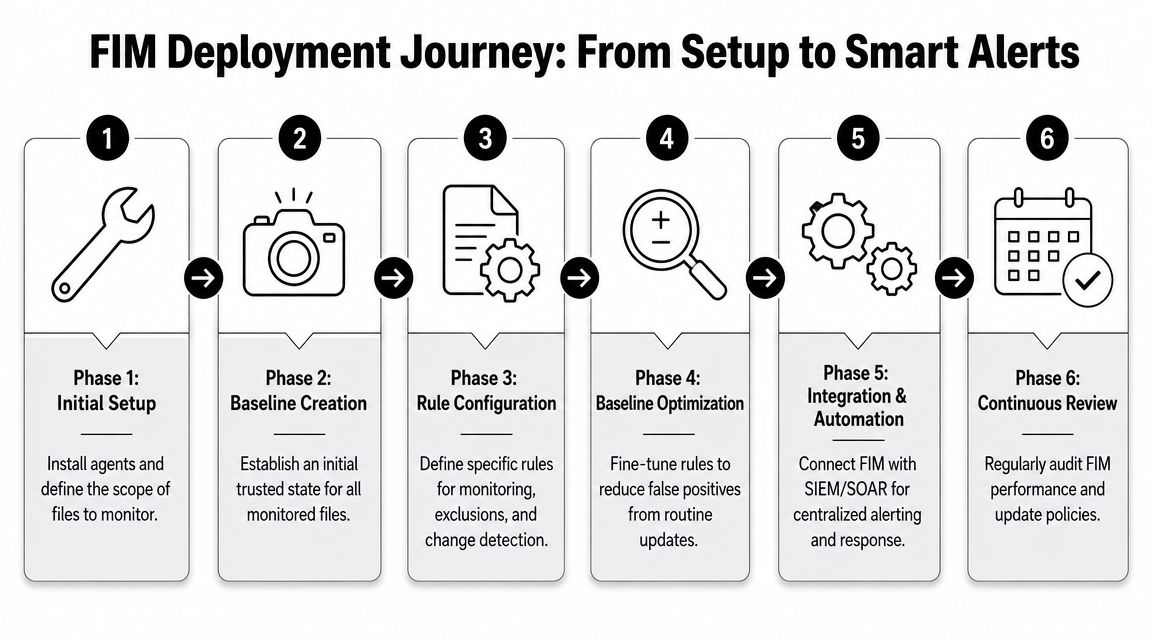
A FIM rollout typically fails in a recognizable manner. The team turns on broad monitoring, patching and deployment activity overwhelm the queue, analysts begin ignoring alerts, and the first audit request reveals that no one can clearly demonstrate which changes were approved and which were not. A sound deployment prevents both issues. It provides the SOC with a limited set of high-value integrity events, and it gives compliance teams evidence they can use effectively.
Start with a trusted baseline
Baselines determine whether FIM proves useful or misleading. Establish them after the system is validated, during a controlled change window, and only for assets you can sustain over time. In its overview of file integrity monitoring best practices, guidance from Tripwire stresses beginning with known-good states and monitoring a defined set of critical files, directories, and configuration elements instead of attempting to watch everything at once.
This aligns with what succeeds in production. Before you enable alerting, answer three questions:
- Which systems warrant close monitoring first? Begin with domain controllers, identity infrastructure, regulated databases, internet-facing servers, and systems that support business-critical workflows.
- Which items influence risk? Concentrate on system binaries, startup paths, security tooling, application configs, web roots, scheduled tasks, registry locations where applicable, and files that are relevant to audit.
- How will approved change be identified? If your CMDB, ticketing system, deployment pipeline, or maintenance calendar can identify planned changes, integrate that data early.
A clean baseline alone will not suffice. It must also remain up to date. When teams rebuild hosts every week or deploy application changes every day, outdated baselines quickly generate false positives.
Tune for operations, not for theoretical coverage
Monitoring every directory at the same severity is the quickest way to make FIM useless. Noisy paths like temp locations, package caches, logs, browser artifacts, and software update directories produce volume without much investigative value. Exclusions are not a workaround. They belong in the design.
Useful tuning usually includes these controls:
- Define scope based on risk and function. Production authentication systems and payment infrastructure warrant stricter rules than utility servers.
- Separate change classes. Creation, deletion, permission changes, ownership changes, hash changes, and content modifications are not equally significant.
- Apply maintenance windows aggressively. Drift that is expected during patching or releases should be suppressed, grouped, or given lower priority.
- Label service accounts and deployment tools. Changes linked to approved automation require different handling than edits made through an interactive shell.
- Review rule hit rates. If a rule keeps producing low-value alerts for a month, adjust the rule rather than expecting analysts to put up with it.
Platform design also matters here. Teams comparing SIEM and XDR roles in a unified detection stack FIM should be treated as a high-context telemetry source, not as a separate console that operators visit only during audits. Unified Security Stack fits that model well because file change events can sit alongside endpoint, identity, and network evidence, making tuning decisions easier to validate against real incidents.
Build around change control and response
FIM is most effective when it reflects how systems are actually administered. A disciplined release process allows a disciplined monitoring policy. Inconsistent change control will be exposed by FIM quickly.
The practical objective is straightforward. Within minutes, an analyst should determine whether a change corresponds to approved activity, suspicious behavior, or a process gap.
That demands more than hashes. Record file path, user or process context, time of change, host role, and whether the asset falls within regulated scope such as PCI DSS, HIPAA, or SOX. These details make an alert actionable in an investigation and defensible in an audit.
For teams creating internal development and automation workflows, the same principle holds. A project that moves quickly still requires controlled file and configuration changes. If your engineers are bringing AI-assisted code workflows into production environments, a review of secure Claude Code deployment can help clarify how change control and code execution safety align with the broader integrity story.
This walkthrough is worth watching before you start tuning at scale:
Handle cloud-native drift with different rules
Cloud-native environments invalidate older assumptions. A short-lived container, autoscaled node, or rebuilt image may change frequently without signaling compromise. Using server-era FIM rules for those workloads often leads to alert fatigue or blind spots.
A better approach is to align integrity checks with the deployment model:
| Environment | Better tuning focus |
|---|---|
| Traditional server | Protected files, startup locations, configuration drift, permissions, and unauthorized binary replacement |
| Containerized workload | Deviation from approved image contents, unexpected runtime writes, new executables, and changes outside expected writable paths |
| Ephemeral compute | Integrity events that occur before termination, changes tied to unexpected processes, and activity that conflicts with image or workload policy |
The trade-off is clear. As environments become more dynamic, broad static baselining loses value, while tying file activity to workload identity, image provenance, and runtime behavior gains value. This is why many modern teams feed FIM data into a shared detection platform rather than managing it as a standalone control.
Integrating FIM with SIEM and XDR
At 2:13 a.m., a web server configuration file is altered outside the maintenance window. By itself, that event is ambiguous. In a unified detection platform, the same file event can be connected to a new admin login from an unusual source, a suspicious process chain, and outbound traffic that was absent an hour earlier. That is the difference between a ticket reviewed tomorrow and an alert that triggers containment now.
Standalone FIM tools typically stop at drift detection. Security teams require more than drift. They require context, priority, and a response path. Feeding file events into SIEM and XDR pipelines gives analysts the surrounding evidence to determine whether they face approved change, operator error, or attacker persistence.
Correlation is what transforms file change data into a detection source worth retaining. A modified startup script becomes more meaningful if EDR also observed PowerShell spawning from an unexpected parent. A new binary in a system path is more significant if identity logs reveal failed logons followed by a successful privileged session. A permissions change carries more weight if it appears on a domain controller or payment system without an approved change record.
How correlation changes the response
A practical workflow looks like this:
| Signal | Alone | Correlated |
|---|---|---|
| Web server config changed | Could be routine admin work | High concern if it follows unusual login activity and new outbound traffic |
| New executable appears in system path | Could be software installation | Serious if the parent process is unexpected or unsigned |
| ACL changed on sensitive directory | Might be troubleshooting | Critical if paired with privilege escalation or account misuse |
That context also raises triage quality. Analysts can suppress approved changes tied to patch windows or deployment jobs and focus on events that violate policy or diverge from expected behavior. The outcome is fewer dead-end investigations and faster response to the events that matter.
The SIEM versus XDR distinction matters here, because FIM supports both use cases. SIEM preserves the historical record, correlation rules, retention, and audit trail. XDR contributes endpoint and response depth, so a suspicious file event can lead directly to host isolation, process termination, or case enrichment. This comparison of SIEM vs XDR is useful when you are deciding where FIM data should land first and how far automation should extend.
Where Unified Security Stack fits
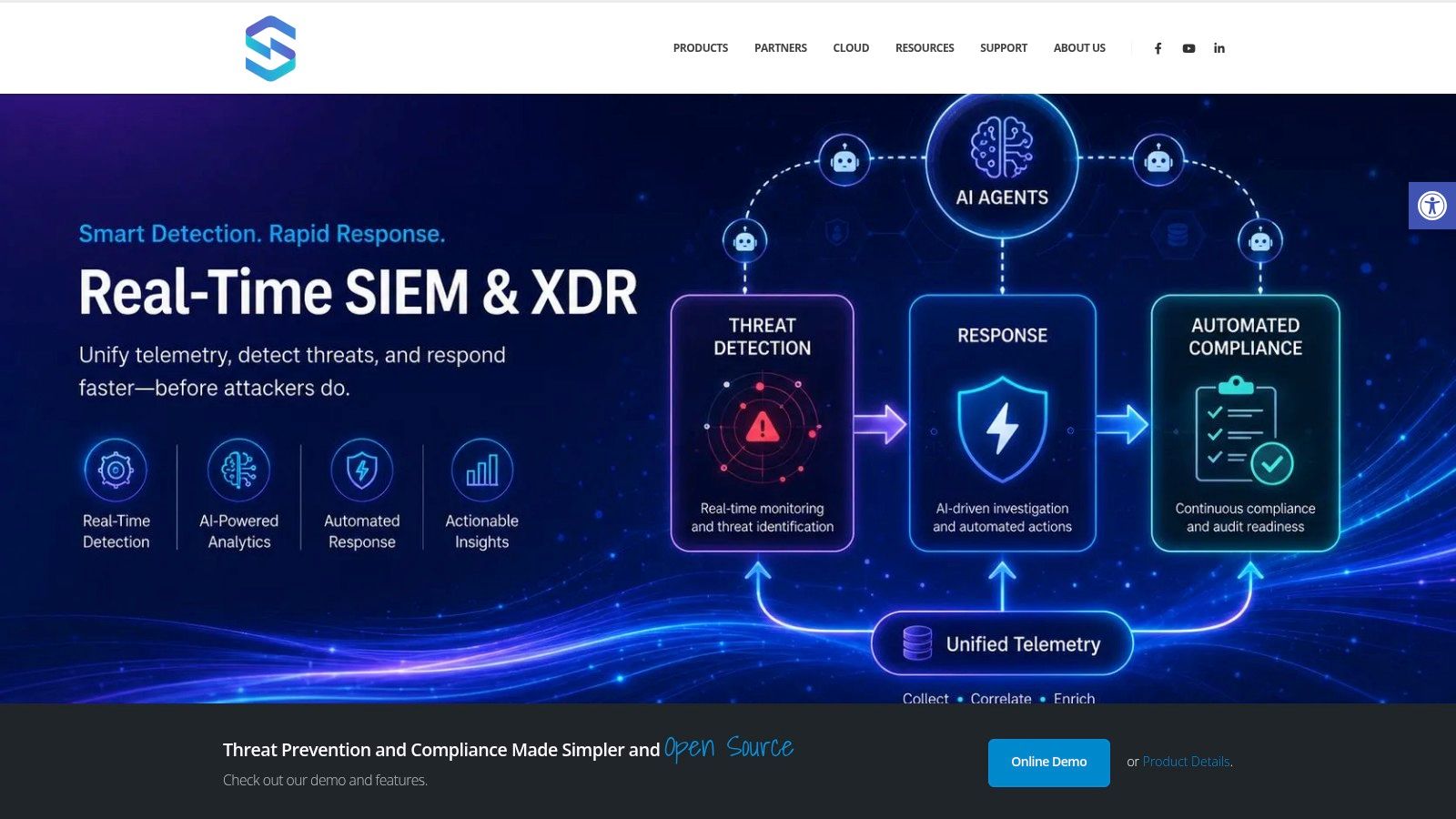
Within Unified Security Stack, FIM serves as one telemetry source in a broader SIEM, SOAR, and XDR workflow. File events are gathered alongside endpoint, network, identity, and cloud telemetry, then assessed through shared correlation and response logic. That design reflects how mature security operations truly operate. Analysts do not want an individual console for every control. They want one place to view the file change, the user session behind it, the process that caused it, and the next action taken.
This integrated model also eases compliance work. When FIM events, investigation notes, and response actions reside in the same platform, teams can show auditors what changed, who reviewed it, and whether it was contained or approved. That operational view matches how many practitioners study detection engineering and control mapping in CISSP exam preparation materials.
The trade-off is clear. More telemetry means more initial tuning effort. But once FIM is viewed as an input to SIEM and XDR instead of a standalone alert feed, it becomes much more valuable for incident response and audit evidence alike.
Mapping FIM to Key Compliance Frameworks
A compliance review frequently opens with one basic question. Demonstrate which critical files can change, who changed them, and how the team reacted. File integrity monitoring answers that effectively when it is connected to operations rather than operating as an isolated control.
In practice, auditors seek proof of disciplined change control. They want to see that the organization has established a trusted state, monitors for unauthorized drift on in-scope systems, and keeps records that outlast staff turnover and audit cycles. That is why storing FIM data in a system designed for centralized log management matters. It transforms scattered host alerts into retained, searchable evidence that security and compliance teams can use without reconstructing the story manually.
What auditors usually expect
From an implementation standpoint, useful FIM evidence usually comes down to a few repeatable records:
- Monitoring scope for systems, directories, registries, and application paths that matter to the framework
- Baseline history showing when trusted file states were recorded and how that baseline is approved
- Change records with timestamps, file paths, actors or related context, and analyst disposition
- Exception handling for approved changes, maintenance windows, and known noisy paths
- Response records that show whether a change was validated, escalated, reversed, or left in place with approval
A practical compliance mapping
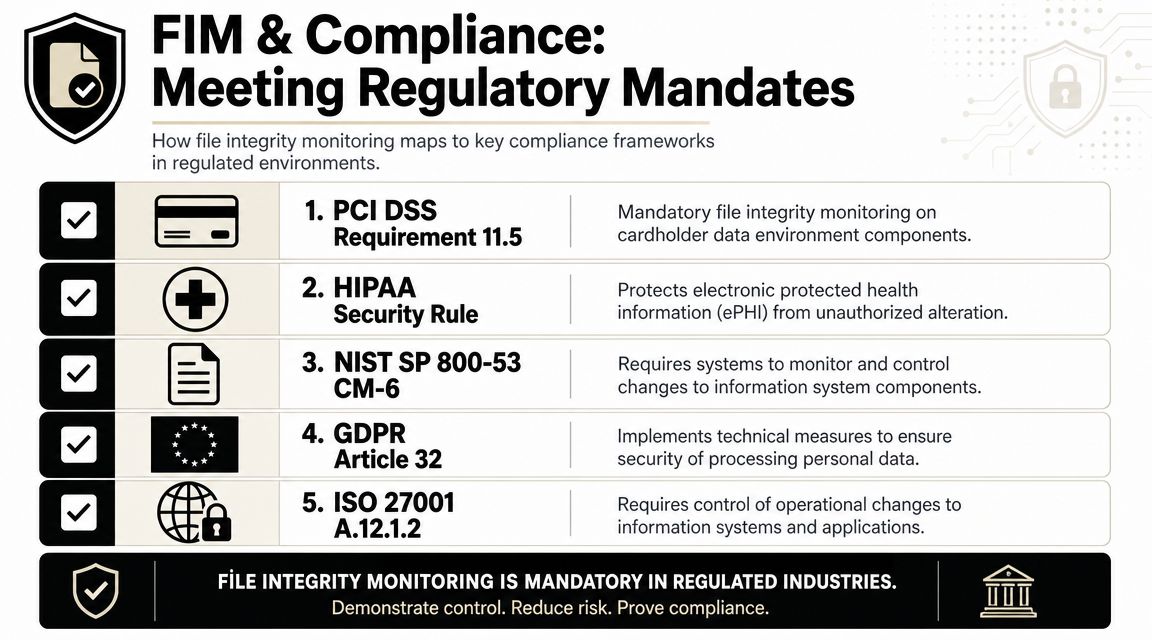
Various frameworks express the requirement in different terms, yet the control theme remains consistent. Watch sensitive systems for unauthorized change. Maintain integrity. Retain evidence that review and response occurred.
A valuable change in modern programs is that one FIM event stream can fulfill two purposes simultaneously. It provides control validation for auditors and supplies SIEM or XDR correlation for security operations. In Unified Security Stack, this means a file change on a payment server, domain controller, or EHR application does not remain in a compliance report awaiting quarterly review. It turns into actionable telemetry that analysts can correlate with identity activity, process execution, and network behavior.
A practical mapping looks like this:
| Framework | Where FIM helps | Evidence to keep |
|---|---|---|
| PCI DSS | Detecting unauthorized changes to payment system files, security configurations, and other in-scope components | File change logs, approval records, alert investigations, remediation history |
| HIPAA | Supporting safeguards around the integrity of systems that store or process electronic protected health information | Monitored asset lists, change reviews, access context, incident records |
| ISO 27001 | Supporting change control, logging, and protection of system integrity within the ISMS | Baseline procedures, review workflows, exceptions, audit trails |
| GDPR | Supporting technical and organizational measures that protect systems involved in personal data processing | Monitoring scope for high-risk systems, unauthorized change reviews, corrective action records |
| NIST-oriented programs | Supporting configuration monitoring and integrity oversight across information systems | Policy mappings, change evidence, analyst notes, incident documentation |
The trade-off is simple. Wider scope improves coverage, but it also raises tuning effort and evidence volume. Teams that watch every temporary file path often generate audit noise they must explain later. Teams that concentrate on regulated data stores, authentication paths, security tooling, and core configuration repositories typically gain better signal and cleaner control evidence.
That also explains why compliance FIM and operational FIM ought to use one pipeline. If the change data already reaches SIEM or XDR, analysts can investigate more quickly, and auditors can examine the precise record of what changed, how it was classified, and what action came next. Older FIM deployments seldom managed this well because they were built as separate agents with their own console and limited context.
If you're formalizing control mappings for governance work, CISSP exam preparation materials can assist in linking FIM to integrity, operations security, change management, and audit evidence in an organized manner.
Building FIM Alerting and Response Playbooks
A mature FIM program does not end with detection. It sets out what the team will do next, who owns the decision, and which actions can be safely automated. Without this, a 2 a.m. alert turns into an exercise in improvisation.
Modern deployments must also address environments in which files, containers, and permissions change without pause. Sysdig's present framing is helpful here. Modern deployments require runtime detection and automated response to keep pace with container drift and short-lived assets, as described in Sysdig's blog on modern file integrity monitoring.
Playbook for unauthorized config changes
This is the standard FIM event. A web server, authentication service, or application configuration file changes without warning.
Use a playbook like this:
- Validate expected change first. Review the maintenance calendar, release pipeline, and ticket queue.
- Identify actor and timing. What account, process, or host activity lined up with the change?
- Review adjacent telemetry. Check for suspicious sign-ins, process launches, or odd outbound connections around the same time.
- Contain if needed. If the change lacks approval and alters exposure or access, isolate the host or shut down the affected service path.
- Restore trusted state. Restore the file from a validated baseline or approved configuration source.
- Document disposition. Classify it as an authorized change, administrative error, or suspected intrusion.
This internal guide to creating an incident response plan is a valuable companion because FIM playbooks are most effective when they are part of a wider incident process rather than a standalone runbook.
Playbook for unknown executable creation
A new executable in a protected directory warrants a quicker response path, as it could indicate persistence, staging, or tool transfer.
Focus the playbook on triage speed:
- Check whether the path should ever receive new binaries. For many critical systems, the answer is no.
- Inspect parent context. What user, process, or deployment action produced the file?
- Hunt nearby activity. Did that same host display registry changes, startup modifications, or script creation?
- Quarantine decisively if the file is not linked to an approved deployment.
- Preserve evidence before removal if the event may turn into an incident case.
A frequent mistake in this situation is waiting for malware verdicts before responding. In protected directories, unauthorized placement is often sufficient to justify containment.
Playbook for ACL and permission changes
Permission changes are often underestimated because they do not always disrupt functionality right away. However, they can quietly broaden access or enable an attacker to keep control.
A good ACL-focused playbook should answer:
| Question | Why it matters |
|---|---|
| Did the permission change receive approval? | Many are routine. Some are evasive |
| Who gained access? | New write or execute rights change risk quickly |
| Which item was impacted? | Access on a utility folder is different from access on app configs or logs |
| What occurred after the change? | Permission drift often precedes further tampering |
For these alerts, the appropriate response is often phased. Confirm the business justification, compare against baseline permissions, revert if unauthorized, and then check whether related changes happened nearby.
The strongest response playbooks are brief enough to use under pressure and specific enough to automate safely.
When teams do this correctly, FIM no longer serves only as the function that reports file changes. It becomes a trigger for controlled investigation and rapid containment across servers, endpoints, and cloud workloads.
Unified Security Stack enables security teams to manage file integrity monitoring within one consolidated workflow instead of using a standalone tool. If your objective is to correlate FIM events with endpoint, cloud, and network telemetry and then feed them into automated response and compliance reporting, Unified Security Stack is worth considering as part of a broader SIEM, SOAR, and XDR strategy.